
What To Do When Your Developer Disappears
It happens more often than you would think. The developer who built your system retires, moves on, stops answering emails, or their agency folds. You are left with software your business depends on every day, and nobody who understands how it works. Taking over existing software is the structured process of recovering from exactly that.
If you are reading this page, there is a good chance you are in that position right now. The system is running. Mostly. But something needs fixing, or updating, or extending, and you have no idea where to start. You might not even know what technology it is built with, let alone who has the passwords.
Take a breath. This is recoverable. Systems get inherited in this state all the time, and the takeover follows a predictable path: recover access, run a source code audit, stabilise, then decide whether to maintain or rebuild. This page walks you through every step.
What You Are Probably Dealing With
The situation is usually a combination of the five problems below. You do not need to have all of them for the takeover process to apply, but most businesses in this position are dealing with at least three or four.
Those first two are about visibility: you cannot see how the system works or prove what you own. The next two are about the machinery underneath.
The last problem is the one that quietly causes the most trouble later.
This is the key-person dependency problem in its purest form. A bus factor of one means a single departure can bring development to a standstill. The good news is straightforward: code can be read, infrastructure can be traced, and business logic can be reverse-engineered. It takes patience, but it is not a mystery: it is a source code audit with a method.
What to Do Right Now
Before you hire anyone or make any decisions about the future of the system, there are five things you can do today. Each one protects your position and makes the next steps easier.
Do not touch the live system
Resist the urge to log into the server and start poking around. If the system is running, let it keep running. Changes made without understanding the codebase are how working systems get broken. The first rule of a takeover is: stabilise before you improve.
Gather every credential you can find
Search your email, password managers, old contracts, and invoices for anything related to the system. Domain registrar logins, hosting account details, old emails from the developer with access information. Even partial information helps. Put it all in one document.
Document what the system does from the outside
Walk through the system as a user and write down every screen, every workflow, every report it generates. Screenshot everything. This user-level map of the system is genuinely valuable to any developer who picks it up next, and you do not need any technical knowledge to create it.
Check your contracts
Review whatever agreement you had with the previous developer. Look for clauses about code ownership, intellectual property, and handover obligations. In many cases, the code belongs to whoever paid for it, even if the developer registered the hosting in their own name. Knowing your legal position helps if you need to recover assets.
Try to reach the previous developer
Even if the relationship ended badly, a single handover conversation can save weeks of reverse-engineering. Keep the request specific and professional: you need credentials, a walkthrough of the deployment process, and any documentation they hold. Most developers will cooperate, especially if the request is reasonable and time-boxed.
What Taking Over Existing Software Looks Like
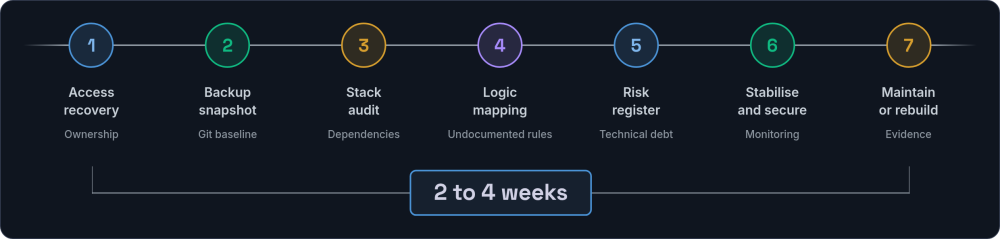
Whether you handle this with an in-house developer, a freelancer, or an agency, the process should follow the same deliberate sequence. Any competent team will work through these seven phases. If someone skips straight to "let us rebuild it" before reading a line of your code, that is a warning sign, not confidence.
Access and ownership recovery
The first priority is establishing who owns the domain registration, hosting account, SSL certificates, and DNS records. Every credential the business needs should be recovered or reset: server logins, database passwords, email service accounts, payment gateway keys, third-party API credentials. If the previous developer registered assets in their own name, the new team should help you contact registrars and hosting providers with proof of business ownership.
Full backup and code snapshot
Before anyone touches anything, a complete backup should be taken: the codebase, the database, uploaded files, and all configuration. This backup goes somewhere the business controls directly. If the code is not already in version control, getting it into a Git repository is one of the first actions. This creates a known-good baseline to fall back to if anything goes wrong later.
Stack identification and source code audit
The team identifies the language, framework, database, and third-party services. They assess code quality, test coverage, dependency health, and security posture. Framework and language versions get checked against current support windows. Abandoned packages and known vulnerabilities get flagged. The code audit is where you find out what you are actually working with, and how much technical debt has accumulated while the system ran without oversight.
Business logic mapping
The most time-consuming and most valuable part of the process. The team walks through the system with the people who use it daily, cross-referencing what users describe with what the code actually does. This is where the undocumented rules, the workarounds, and the features nobody uses but everyone is afraid to remove all come to light. Good teams do this collaboratively, not in isolation.
Risk register
A clear account of the technical debt: how many dependencies need updating, how far behind the framework version is, where the security risks sit, and which parts of the code are fragile enough to break under change. This register directly informs the next decision.
Stabilisation and security
Critical security patches get applied, immediate vulnerabilities get fixed, and monitoring gets set up so you know when something breaks. A working deployment pipeline gets established so that changes can be applied safely and rolled back if needed. The goal is to reach a state where the system is secure and observable before anyone starts improving it.
Maintain, modernise, or rebuild recommendation
With the audit complete, the team presents an honest, evidence-based recommendation on whether to keep the existing system, pursue legacy system modernisation incrementally, or rebuild. A trustworthy team gives you the numbers and the reasoning. They are not incentivised to sell rewrites. If maintaining what you have is the right answer, they should say so plainly.
The most important principle behind all of this: stabilise before you improve. The urge to start rewriting immediately is strong, but it is the wrong instinct. Nobody can improve what they do not understand, and nobody can understand a system they are simultaneously changing.
A reasonable timeline for this process is two to four weeks for a moderately complex application, though it varies with the system's size and the state of the code. Larger systems with no documentation can take longer. Smaller, well-structured applications can sometimes be assessed in days.
What to Gather from the Previous Developer
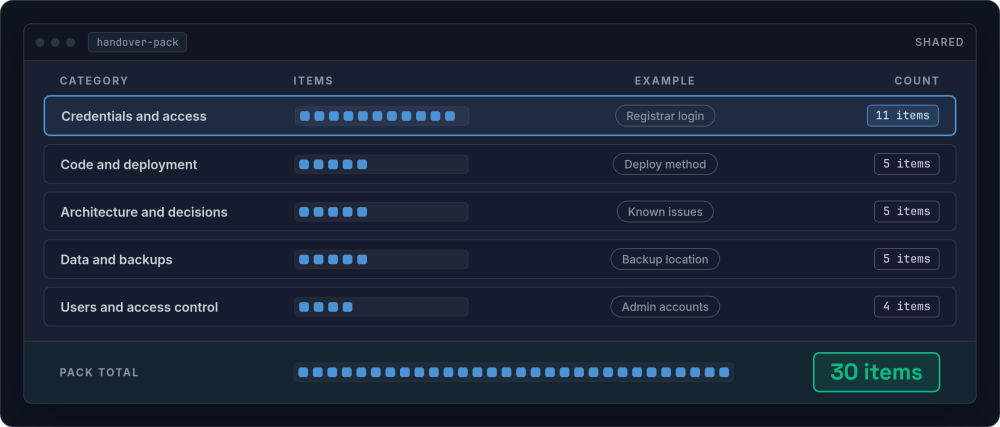
If your previous developer is still reachable (even if the relationship has ended), a specific set of information makes the takeover dramatically easier. Even a single hour of their time can save weeks of reverse-engineering effort. Here is the most complete list of what to ask for.
Credentials and access
- Domain registrar login (GoDaddy, Namecheap, 123-reg, etc.)
- Hosting account credentials (cPanel, Plesk, or cloud console access for AWS, DigitalOcean, etc.)
- DNS provider access (often the same as the registrar, but not always)
- SSL certificate provider and renewal details
- Database credentials (host, username, password, database name)
- SSH or SFTP access to the server
- Email service credentials (Mailgun, SendGrid, Amazon SES, or similar)
- Payment gateway keys (Stripe, PayPal, GoCardless, etc.)
- Third-party API keys and secrets (Google Maps, shipping providers, accounting integrations, CRM connections)
- Any environment files (.env) or configuration files not stored in version control
- Two-factor authentication recovery codes for any accounts
Code and deployment
- The version control repository (GitHub, GitLab, Bitbucket) and access to the full commit history
- How code gets from development to the live server: is there a CI/CD pipeline, a deployment script, or was it done manually over FTP?
- Whether there are separate staging or testing environments, and where they live
- Any build steps required (npm install, composer install, asset compilation)
- The server's operating system and any specific software versions it depends on
Architecture and decisions
- Why certain things were built the way they were. "We did it this way because..." is some of the most valuable context you can recover
- Known issues and technical debt: what they knew was fragile, what they planned to fix but never did
- Any third-party services the system depends on (and the accounts associated with them)
- Integrations with other systems: what data flows where, how often, and in which direction
- Anything that runs on a schedule: cron jobs, queue workers, automated reports, data syncs, cleanup scripts
Data and backups
- Whether automated backups are running, and where they are stored
- The database schema and any migration history
- Where uploaded files are stored (local disk, Amazon S3, or another service)
- Any data retention or deletion rules built into the system
- GDPR or data protection considerations they were aware of
Users and access control
- Admin account credentials and how to create new admin users
- How user roles and permissions work within the system
- Whether there are any "super user" accounts with special privileges baked into the code
- Any single sign-on or external authentication integrations
If the developer is not reachable at all, every one of these items can be discovered through the audit process. It takes longer, but it is entirely possible. Systems have been taken over where the only starting point was "we think it is on this server somewhere." A thorough source code audit takes longer without cooperation, but it will still surface the answers you need.
Tip: Create a shared document (not email) for this handover information. It becomes the seed of your system documentation and gives the next developer a head start.
The Maintain vs Rebuild Decision
This is the decision every business in this situation eventually faces: keep what you have, or start again from scratch. In engineering terms it is the software rewrite vs refactor question, and the honest answer depends on what the source code audit reveals. Here is a framework for thinking about it clearly, because this decision is often made emotionally (usually in the direction of "burn it all down") when the evidence might support a different conclusion.
| Factor | Leans toward maintaining | Leans toward rebuilding |
|---|---|---|
| Code quality | Reasonably structured, follows conventions, consistent patterns | Chaotic, no patterns, copy-paste throughout, no separation of concerns |
| Framework version | Within two major versions of current, upgrade path exists | End-of-life, no security patches available, upgrade path spans five or more major releases |
| Business fit | Still matches how the business operates today | The business has outgrown the system's assumptions entirely |
| Database structure | Normalised, uses migrations, foreign keys in place | No migrations, inconsistent naming, orphaned records, data integrity issues |
| Dependencies | Maintained packages, managed via a package manager, few or no known vulnerabilities | Multiple abandoned packages with known vulnerabilities, no package management |
| Data portability | Clean schema, standard formats, data can be exported | Proprietary structures, serialised blobs, no clear way to extract data |
| Test coverage | Some automated tests exist, core business logic is covered | No tests at all, changes break things unpredictably |
| Change velocity | Small changes can be made safely in hours or days | Every change requires extensive manual testing and still breaks things |
In practice, the answer is rarely a clean binary. Many takeovers land somewhere in the middle, where the core is solid enough to keep but certain parts need rebuilding. The build vs buy decision framework applies here too, just at a component level rather than a whole-system level.
The strangler fig approach
When the answer is "somewhere in between," the most reliable migration pattern is the strangler fig: wrap the existing system, build new functionality alongside it, and gradually migrate features from old to new. Each piece gets replaced individually, and the old system keeps running until every part has been moved across.
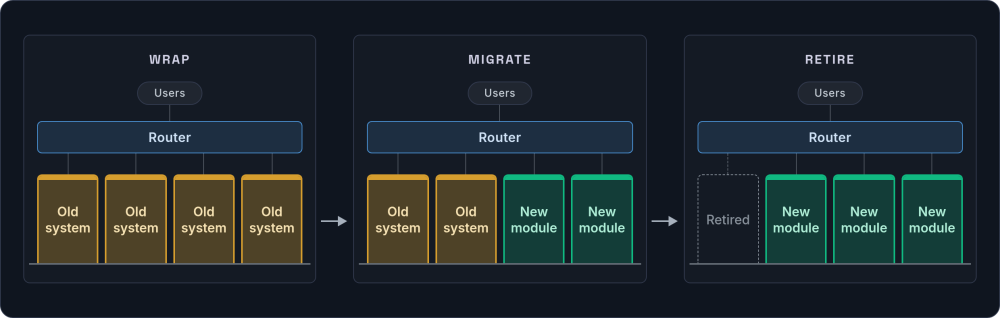
This avoids the "big bang" rewrite risk, where months get spent building a replacement only for the team to discover at launch that it missed half the business logic the old system handled quietly in the background. The old system is the specification. It encodes years of decisions, edge cases, and workarounds that nobody documented. Replacing it all at once means losing that institutional knowledge. This staged approach is the basis of our legacy modernisation service: modernising without the big-bang rewrite.
Questions to pressure-test a rebuild recommendation
If someone recommends a full rebuild, these questions help you evaluate whether that recommendation is sound or whether it is driven by a preference for working with new code.
- Can you show me specifically which parts of the codebase are beyond repair, and why?
- What is the realistic timeline and cost for the rebuild, including data migration?
- How will the business operate during the transition period?
- What happens to the features and business logic encoded in the old system? How do you ensure nothing gets lost?
- Have you considered a partial rebuild (strangler fig) instead of a full replacement?
- What is the cost of maintaining the current system for another 12 months while we plan properly, compared to the cost of the rebuild?
A word of caution: rebuilding from scratch almost always takes longer and costs more than anyone estimates. If the existing codebase is functional and the framework is still supported, maintaining and incrementally improving is usually the lower-risk path.
Warning Signs That a Codebase Is Beyond Saving
While the general lean should be toward maintaining over rebuilding, there are situations where the evidence genuinely supports starting again. Here are the signals a thorough audit should look for.
Those two are about the foundations. The remaining three are about whether the system can be worked on safely at all.
The last sign is the most practical test of all, because it governs whether anyone can make a change without working on the live system.
Even when several of these signals are present, the data in the existing system still has value. A rebuild does not mean throwing away the database. It means building a better structure around the information the business has already accumulated, often by following a legacy migration path rather than a clean-sheet rewrite.
How to Choose the Right Team for a Takeover
Taking over someone else's code is a specific skill. Not every developer or agency is good at it, and some will actively resist it because inheriting a codebase is harder and less glamorous than building from scratch. Here is what to look for.
Those two signals tell you the team will diagnose before it prescribes. The next three tell you whether you can trust what comes back.
The last signal protects your budget, and it is the one inexperienced teams most often skip.
This is, in essence, what a software takeover engagement should feel like from the outside: diagnosis first, plain-language findings, and a fixed-scope audit before anyone commits to the larger work.
What It Should Cost
The takeover audit itself (access recovery, backup, codebase assessment, business logic mapping, stabilisation) is a fixed-scope piece of work. A competent team will scope it after an initial conversation about your situation and quote a fixed price for the audit phase.
What comes after the audit depends on the findings. If the system is healthy enough to maintain, ongoing maintenance and support is typically a monthly retainer covering security patches, dependency updates, monitoring, and a set number of hours for changes. If a partial or full rebuild is recommended, that gets scoped as a separate project with its own timeline and budget.
Be wary of any team that quotes a rebuild before completing the audit. And be wary of any team that recommends ongoing work without clearly explaining what the audit found and why the work is necessary.
The one cost worth stating plainly: doing nothing is almost always more expensive in the long run. Technical debt compounds, and an unpatched system on an unsupported framework is a business risk that grows with every month of inaction. In our experience the audit phase for a moderately complex application takes two to four weeks and is a fixed, knowable number. The cost of inaction is the opposite: open-ended, climbing the longer the framework sits unsupported and the technical debt accumulates. If you are not in an emergency and simply want to know where an inherited system stands, a stack health check gives you that read for a fixed price.
Making Sure This Does Not Happen Again
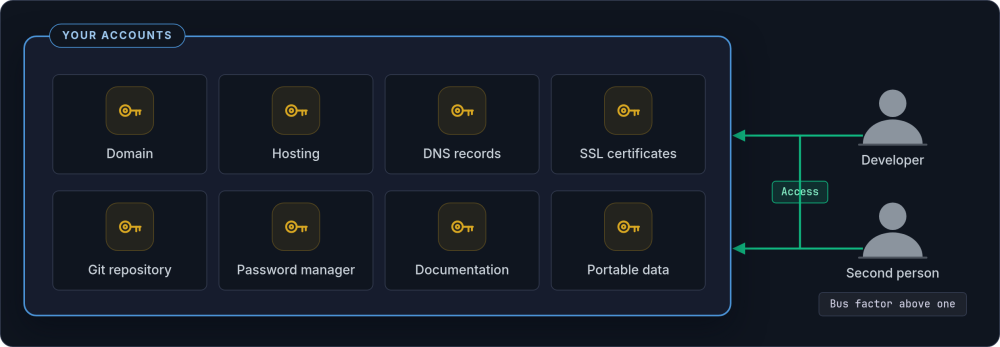
Once you have been through a software takeover, you understand viscerally why key-person dependency is a risk worth managing. Here is what should be in place so that your business is never in this position again, regardless of who maintains the system.
-
You own everything Domain registrations, hosting accounts, DNS records, and SSL certificates are in your name. Your developer has access, but you hold the keys. If the relationship ends tomorrow, nothing is locked away.
-
Code lives in your repository The version control repository belongs to your organisation. The developer commits to it, but the account is yours. If they leave, the code and its full history stay with you.
-
Documentation exists Not a novel, but enough for a competent developer to pick up the system: architecture overview, deployment process, environment setup, key business rules. Updated at least annually.
-
Data is portable Your data is stored in standard formats with clean schemas. If you need to move providers, your information comes with you without a complex extraction project.
-
The maintenance relationship is structured Regular updates, security patching, dependency monitoring, and periodic health checks. Not "call us when it breaks."
-
The bus factor is above one At least two people understand the system well enough to make changes. This could be two developers, or one developer and a well-documented codebase that any competent professional could pick up.
-
Credentials are centrally managed All passwords, API keys, and access details live in a password manager the business controls. No credentials exist only in one person's head or one person's email.
These are not expensive measures. They are habits. The cost of putting them in place is negligible compared to the cost of taking over existing software in an emergency a second time.
Need help with a system takeover?
If your developer has moved on and you need someone to assess what you have, we are happy to talk through your situation. No obligation, no pressure.
Get in touch →