
Own the Stack (So You Can Own Your Business)
Most businesses run on a patchwork of disconnected software. A CRM here, a project management tool there, a separate invoicing platform, a spreadsheet bridging the gaps. Each tool was added to solve a specific problem. None of them were chosen to work together.
Vertical integration is the strategy of bringing those fragmented systems under one roof. Rather than stitching together a dozen SaaS subscriptions with manual data entry and export workarounds, you build or adopt a single system that handles your core operations in one place. The result is custom business software shaped around your operations, with a single source of truth for your business data. Fewer moving parts, and far less time spent keeping everything in sync.
This page explains what vertical integration means in the context of business software, why reducing tool sprawl matters more than most businesses realise, and how to approach consolidation without taking unnecessary risks. It is closely related to the broader question of owning vs renting your critical business logic and the principle of digital sovereignty.
What Vertical Integration Means for Software
The phrase carries baggage from a different field, so it helps to define it plainly before applying it to your tools. In business software, vertical integration is less about supply chains and more about where your operational data lives and who controls it. The definition below is the one this page works from throughout.
Vertical integration in business software is the practice of consolidating multiple operational functions into a unified system, so that data flows through one platform rather than being fragmented across separate tools.
The term comes from manufacturing, where companies like Ford famously owned everything from rubber plantations to assembly lines. In a software context, the meaning is different. It is not about supply chains. It is about owning the full technology stack that runs your operations rather than renting pieces of it from a dozen different vendors.
The traditional model is horizontal: buy the best CRM, the best project management tool, the best invoicing platform, and connect them together. This is the "best-of-breed" approach, and it sounds logical. In practice, it creates a web of integrations, each of which can fail silently. When they do, data drifts out of sync, and your team spends hours reconciling information that shouldn't have needed reconciling at all.
Vertical integration software takes the opposite approach. Instead of best-of-breed tools connected by fragile integrations, you build or adopt an integrated business system where customer data, project tracking, financial operations, and communication all live in the same database. One login, one data model, one place to look.
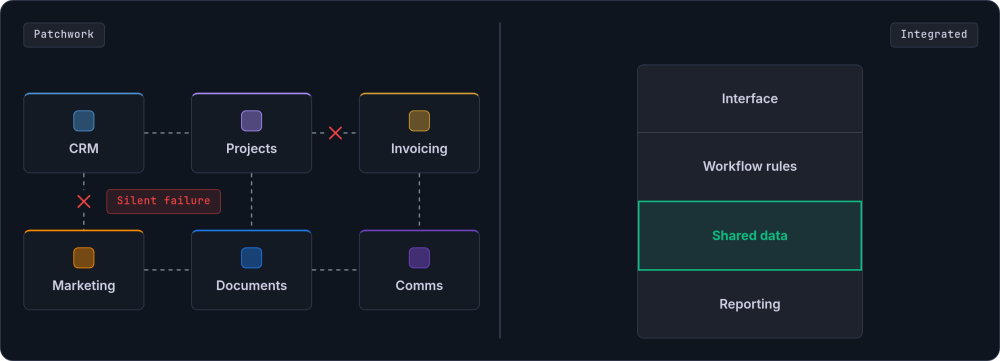
The debate between best-of-breed vs integrated software is not new, but the economics have shifted. SaaS subscription costs rise with per-seat pricing, and integration complexity grows with every new tool. More businesses are finding that the supposed flexibility of separate tools is costing them more than the coherence of a unified business platform would.
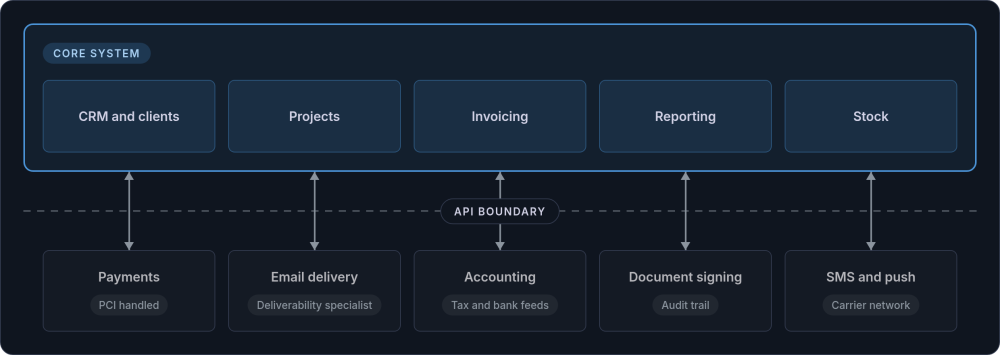
This is not about building everything from scratch. Commodity functions (email hosting, payment processing, tax compliance) should still be handled by specialist providers. The principle is to own the core systems that define how your business operates and to connect commodity services through well-designed API integrations rather than manual workarounds.
This approach has strong backing in the software engineering world. Martin Fowler advocates a monolith-first architecture, and DHH at 37signals makes the same case with the majestic monolith. Start with one well-structured system. Only split it apart when you have clear evidence that separation would help.
The Cost of Tool Sprawl
Tool sprawl is what happens when every department solves its own problem independently. Marketing picks one platform. Sales picks another. Operations uses a third. Nobody chose these tools to work together; they were chosen because each one looked good in isolation. The result is a set of data silos, each holding a partial version of the truth.
The visible costs are the subscription fees. For a 25-person business, a typical SaaS estate looks something like this:
| Tool category | Typical annual cost |
|---|---|
| CRM | £12,000 - £45,000 |
| Project management | £3,000 - £7,500 |
| Marketing automation | £5,000 - £9,600 |
| Invoicing and accounting | £2,400 - £6,000 |
| Document management | £1,800 - £4,800 |
| Internal communications | £2,400 - £4,800 |
| Total subscriptions | £26,600 - £77,700 |
But subscription fees are only the visible portion. The hidden costs are where fragmented systems really hurt:
Manual data entry between systems
When a new client signs up in the CRM, someone re-enters the same information in the project management tool, the invoicing system, and the document management platform. That is the same data typed four times, with four opportunities for error.
Reconciliation overhead
When systems disagree (and they will), someone has to work out which version is correct. The labour cost of managing integrations between SaaS tools frequently rivals or exceeds the subscription fees themselves, because reconciliation is skilled work that eats into senior staff time.
Silent integration failures
A webhook that stops firing. An API that changes its response format. A sync job that fails at 2am and nobody notices until a client calls to ask why their invoice is wrong. These failures are invisible until they cause visible damage.
Lost visibility
When data is scattered across seven platforms, nobody can answer simple questions without logging into multiple systems. Working out revenue by client for the quarter becomes a spreadsheet exercise instead of a dashboard glance.
Vendor lock-in and lost control
Each SaaS tool you depend on is a vendor whose pricing, features, and API you do not control. When a vendor raises prices, deprecates an API, or forces a migration to a new version, you have no choice but to comply or face a costly switch. This is the opposite of digital sovereignty: your business processes are shaped by someone else's product roadmap.
Estimating the true cost of fragmentation
To get a realistic picture of what tool sprawl is costing your business, you need to account for more than licence fees. The following framework helps estimate the full burden.
Illustrative example: A 25-person UK professional services firm running Salesforce, Asana, Xero, HubSpot, and Zapier. Visible annual SaaS spend: approximately £38,000. Hidden workaround and reconciliation labour (estimated using the method below): approximately £52,000. Total annual cost of fragmentation: around £90,000. An integrated system built to replace that sprawl would typically cost £50,000 to £80,000 to develop, with annual running costs of roughly £8,000, suggesting a payback period under 12 months.
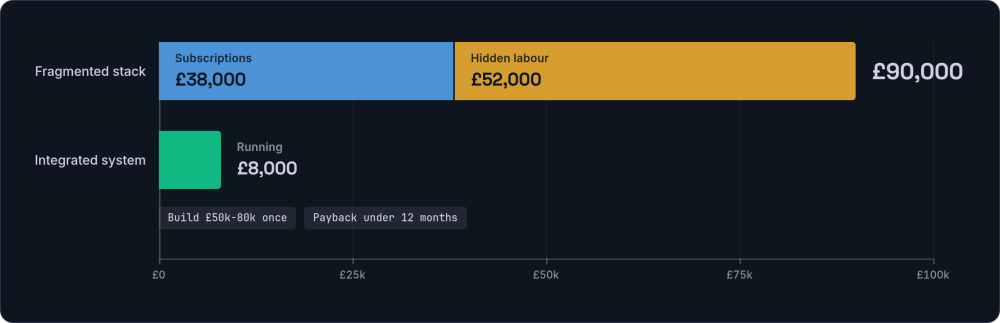
To run a similar estimate for your own business, count three things:
- Subscription costs. Total your annual SaaS fees across all tools, including per-seat charges, add-on modules, and integration middleware like Zapier or Make.
- Workaround labour. For each tool boundary (where data moves from one system to another), estimate the weekly time spent on manual entry, CSV exports, copy-pasting, and error correction. Multiply by your average fully loaded hourly cost. Even conservative estimates tend to be surprising.
- Failure cost. Think about the last time an integration broke, a record was duplicated, or an invoice went out with wrong data. Estimate the time spent diagnosing and fixing the issue. These incidents may be infrequent, but each one absorbs hours of senior staff time.
Across a team of 20 to 30 people, workaround labour alone commonly runs between 15 and 40 hours per week. At average UK salary levels, that is £27,000 to £72,000 per year in labour cost on top of the subscription fees. Reducing tool sprawl is not a technology project. It is a financial one.
Per-seat pricing and the cost curve
There is another cost dynamic that catches growing businesses off guard. Most SaaS tools charge per seat, per month. When you have 10 employees, the costs are manageable. At 25, they are significant. At 50, they are eye-watering.
The shape of the curve is the real problem. SaaS costs scale linearly with headcount, and sometimes worse, as vendors push you into higher pricing tiers. Infrastructure costs for a system you own scale sub-linearly. So there is a tipping point, usually somewhere between 15 and 30 employees. Past it, the economics start to favour an integrated system over a growing pile of subscriptions.
Core vs Peripheral: A Decision Framework
Vertical integration does not mean rebuilding everything from scratch. The practical question is which functions belong in your core integrated system and which should remain as external services connected through APIs. Getting this boundary right is the most consequential decision in any integration project.
The principle: Build core, buy commodity, integrate peripherals. If a function holds your customer state, contains proprietary workflow, or stores operational truth, it belongs in the core. If it is a commodity function with specialist compliance requirements or strong network effects, keep it external and connect via API.
The following five questions help classify any function in your business. Score each one. If three or more come back "yes", the function is a strong candidate for your core system.
| Question | If yes | If no |
|---|---|---|
| Does it hold customer state? (Contact records, account history, relationship data) | Core | Peripheral |
| Does it contain proprietary workflow? (Business rules, approval chains, handoff logic specific to your organisation) | Core | Peripheral |
| Does it feed or depend on data from three or more other functions? | Core | Peripheral |
| Would losing access to it (vendor shutdown, price hike, API change) disrupt daily operations? | Core | Peripheral |
| Does it require specialist compliance, certification, or infrastructure you would not want to maintain? (PCI-DSS, bank feeds, deliverability reputation) | Peripheral | Core |
Applying these questions to common business functions produces a practical classification:
| Function | Classification | Rationale |
|---|---|---|
| CRM and client records | Core | Holds customer state, feeds every other process |
| Project and workflow management | Core | Contains proprietary operational logic, cross-function data |
| Invoicing and billing workflow | Core | Tightly coupled to project and client data |
| Reporting and dashboards | Core | Requires access to operational data across functions |
| Stock and inventory tracking | Core | Feeds ordering, fulfilment, and financial reporting |
| Payment processing (Stripe, GoCardless) | Peripheral | Commodity function, PCI compliance handled by specialist |
| Email delivery (Postmark, SendGrid) | Peripheral | Commodity infrastructure, deliverability is a specialist domain |
| Accounting (Xero, QuickBooks) | Peripheral | Tax compliance, bank feeds, and accountant access are commoditised |
| Document signing (DocuSign, Adobe Sign) | Peripheral | Legal compliance and audit trail handled by specialist |
| SMS and push notifications (Twilio, Firebase) | Peripheral | Carrier relationships and delivery infrastructure are specialist |
The core system handles the functions that define how your business operates: the workflows, the handoffs, the rules. Peripheral services handle commodity infrastructure where specialist providers do a better job than anyone would building it from scratch. The two connect through well-designed API integrations, giving you the coherence of a unified platform without rebuilding payment processing or tax compliance.
Grey areas and how to handle them
Some functions sit on the boundary. HR management, for instance, holds employee state (core signal) but also involves payroll tax compliance (peripheral signal). Marketing automation contains proprietary campaign logic (core signal) but relies on deliverability infrastructure (peripheral signal). For these grey-area functions, a good default is to keep the data and workflow logic in your core system while using specialist providers for the infrastructure layer. Your system decides what emails to send and to whom; Postmark handles the actual delivery.
This is where vertical integration differs from the old enterprise monolith. You are not trying to build everything. You are trying to own the parts that matter most, and to make sure those parts talk to each other without human intervention.
The Accountability Gap
Beyond the cost of sprawl, there is a subtler problem: nobody owns the gaps. When something goes wrong across multiple vendors, each one points the finger at the others. The CRM vendor says the webhook fired. The integration platform says it received the data. The invoicing tool says it never arrived. With an integrated system, there is one team responsible for the entire flow, and problems get traced and fixed instead of bounced between support desks.
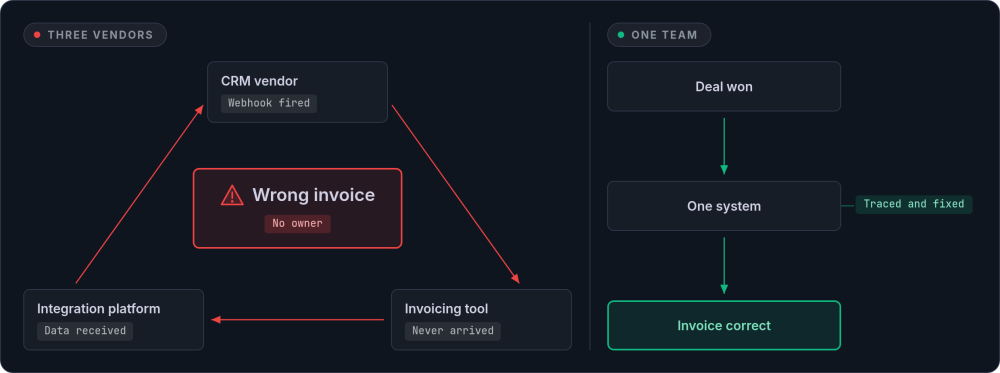
The pattern plays out the same way regardless of industry:
Professional services
A consulting firm tracks opportunities in a CRM, manages projects in a separate tool, logs time in a third, and invoices through a fourth. When a project scope changes, someone updates the CRM deal record, the project plan, and the billing schedule separately. Invariably, one of those updates gets missed. The client receives an invoice that does not match the agreed scope, and a senior partner spends an afternoon sorting it out. In an integrated system, changing the project scope updates the billing schedule automatically, because they share the same data.
Manufacturing and distribution
A manufacturer passes orders through five platforms before the product ships: web store, order management, production scheduling, stock control, shipping. Each handoff is a potential failure point. A stock level that is correct in the warehouse system but not yet synced to the web store leads to overselling. A production schedule that does not reflect rush orders leads to missed deadlines. Vertical integration means the order triggers the production schedule and updates stock levels in one transaction, not five.
Membership organisations
A professional body juggles separate databases for members, events, payments, CPD tracking, and communications. When a member renews, the payment system records the transaction but the membership database still shows them as lapsed until someone manually updates the status. Event bookings do not reflect membership tier pricing because the event system cannot read the membership database. An integrated system means one member record holds everything from payment history to CPD credits to event attendance, and pricing rules apply automatically.
Property and lettings
A letting agency manages properties in one system, tenancies in another, maintenance requests through email, and accounting in a fourth. When a tenant reports a boiler fault, the maintenance team looks up the property to find the landlord's preferred contractor. Then they create a job in yet another tool, then update the tenant by email. An integrated system links the property, the tenancy, the contractor directory, and the maintenance log. Raising a job from a tenant's request takes seconds rather than a chain of manual lookups.
In every case, humans are the integration layer, and humans make mistakes. In a vertically integrated system, winning an opportunity automatically creates the project. A confirmed order triggers production scheduling and updates stock levels. A member record holds everything from payment history to renewal dates. One record, one view, no reconciliation. The build vs buy decision usually starts with a specific pain point, but the underlying pattern is almost always the same: the business has outgrown its collection of disconnected tools.
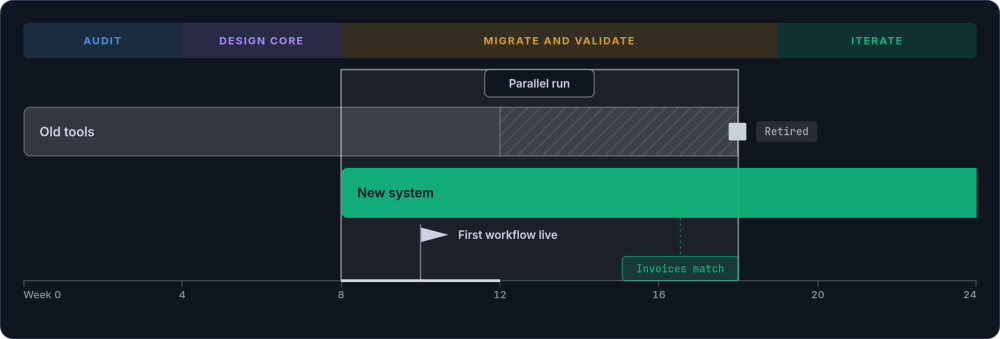
How Vertical Integration Works in Practice
Moving from fragmented tools to vertical integration software doesn't mean ripping everything out on a Monday morning. It's a phased process that starts with understanding what you have and ends with a system that actually fits how your business operates.
Audit and prioritise
Map every tool your business uses, what data it holds, who uses it, and how it connects to other systems. Categorise each tool as core (consolidate), commodity (keep and connect via API), or redundant (eliminate). Most businesses are surprised by the total count: twenty to thirty active SaaS subscriptions is common for a 25-person company. Use the five-question framework above to classify each function.
Design the core system
Before writing a line of code, document the workflows, handoffs, decision points, and data flows that the new system needs to support. The custom business software that replaces your fragmented core tools needs to reflect how your business actually works, not how a vendor thinks businesses should work. A custom web application built this way encodes your workflows, your terminology, and your decision logic directly. The business process automation that was previously handled by Zapier or manual effort becomes native to the system. Commodity services (Stripe, SendGrid, Xero) connect through APIs rather than being rebuilt.
Migrate and validate
Data needs to move from existing systems to the new platform without loss, duplication, or corruption. The safest approach is parallel running: keep old systems operational while the new system takes over, validating data consistency at each step. Set clear criteria for when the old system can be retired (e.g. "all invoices for the past 90 days match between old and new systems").
Iterate and extend
A vertically integrated system is not a one-time project. It evolves as the business evolves. New workflows, new reporting needs, new integrations with external partners. Because you own the system, these changes happen on your timeline, not on a vendor's roadmap.
When Vertical Integration Is Not the Right Answer
Vertical integration is not always the right strategy, and any honest discussion of vertical integration disadvantages should say so plainly. Recognising when it is the wrong move saves money and avoids unnecessary complexity.
The remaining signals are about cost and constraint rather than fit. Each one is a legitimate reason to wait, or to choose a lighter approach than a full integration project.
One more signal sits outside the cost question entirely, and it overrides the rest when it applies.
The goal of vertical integration is to reduce complexity where it doesn't add value. If consolidation would add complexity, it's the wrong move.
Measuring Integration Effectiveness
Once you have moved to vertical integration software, the improvements should be measurable. Here are the metrics that matter, along with how to track them:
-
Time spent on data entry and reconciliation This should drop dramatically. If staff were spending 20 hours per week on manual data movement, that number should approach zero. Measure it before the migration starts (even a rough estimate) so you have a baseline.
-
Error rates Order errors, invoice errors, duplicate records, and missed handoffs should all decline. One system means one version of the truth. Track the number of correction entries or credit notes issued per month as a proxy.
-
Time to answer business questions Revenue by client for the quarter should be a dashboard query, not a three-hour spreadsheet exercise. Before integration, note which figures require multi-system lookups. After, check whether they are available in a single view.
-
Onboarding time for new staff One system to learn instead of seven. Training time drops and new hires become productive faster. Track the number of days from start date to independent work.
-
SaaS subscription costs Fewer tools means lower subscription fees, though the real saving is in labour costs rather than licence fees. Keep a simple register of active subscriptions and review it quarterly.
For most businesses pursuing vertical integration, labour cost savings alone cover the development investment within 12 to 18 months. The subscription savings are a bonus. The harder-to-measure gains (better decisions from better visibility, fewer client-facing errors, faster response times) often prove more valuable still.
Frequently Asked Questions
What is vertical integration in business software?
It means consolidating multiple operational tools (CRM, project management, invoicing, reporting) into a single unified system. Rather than running separate SaaS subscriptions connected by manual data entry, vertical integration software handles core operations in one platform with one database. One login, one place to look, a single source of truth instead of scattered data silos.
How much does an integrated business system cost to build?
It depends on scope and complexity. Small, focused systems (replacing two or three tools with tightly connected workflows) typically start around £15,000 to £30,000. Full business systems covering multiple departments range from £50,000 to £150,000. The cost depends on the number of workflows, the volume of data to migrate, and the complexity of integrations with peripheral services. Running costs for a system you own are typically £5,000 to £12,000 per year (hosting, maintenance, minor updates), compared to the per-seat SaaS fees that grow with every new hire.
Can I keep some existing tools while integrating others?
Yes, and in most cases you should. The core-vs-peripheral framework above is designed for exactly this. Commodity functions (payment processing, email delivery, accounting, document signing) are best handled by specialist providers and connected via API integrations. Vertical integration focuses on consolidating your core operational systems where data needs to flow freely, not on replacing every tool in the building.
How long does a typical integration project take?
Timelines vary with scope. As a rough guide:
- Four to eight weeks for a small focused application replacing two or three tools.
- Three to six months for a full business system covering multiple departments.
- Six to twelve months for complex multi-phase projects with large data migrations.
The first high-value workflow is usually live within eight to twelve weeks, even on larger projects. Migration from existing tools adds time depending on data volume and complexity. Parallel running (keeping old systems live while the new one is validated) adds a few weeks, but it cuts the risk sharply.
What belongs in the core system vs peripheral services?
Anything that holds customer state, contains proprietary workflow logic, or stores operational truth belongs in the core. If it defines how your business runs, own it. Commodity functions like payment processing (Stripe), email delivery (Postmark), accounting (Xero), and document signing should remain as peripheral services connected through APIs. The five-question test in the "Core vs Peripheral" section above provides a systematic way to classify any function. A useful gut check: if a vendor disappearing tomorrow would break your daily operations, that function is a strong core candidate.
What about vendor lock-in with a custom system?
Vendor lock-in is one of the strongest arguments for vertical integration. With a custom integrated system built on open technologies, you own the code and the data. No per-seat pricing that escalates as you grow. No forced migrations when a vendor changes their product. No API deprecations that break your workflows.
If you part ways with the team that built it, the code is yours and the database is yours, and any competent development team can pick it up. That is digital sovereignty in practice. The key is to insist on standard, well-documented technologies (e.g. Laravel, Django, Rails, PostgreSQL) rather than proprietary frameworks that create a different kind of lock-in.
Start with the Audit
The first step in any vertical integration project is understanding what you have. Map your tools, estimate your workaround labour, and apply the core-vs-peripheral framework. If the numbers point toward consolidation, our custom build service is how we turn that fragmented tool stack into a unified system built around how your business actually operates. If you want to start smaller, the Build Roadmap turns the highest-pain workflow into a working prototype with a firm price for the full build.
Get in touch →