
Custom Software Maintenance and Support
The build is the beginning. Maintenance is what makes it last.
Software maintenance is the work that keeps a custom system healthy, secure, and aligned with your business as both evolve over time. A software maintenance agreement is how that work gets organised: a defined set of activities on a predictable schedule, rather than reactive firefighting. It is not an afterthought or an optional extra. Maintenance is widely cited as the majority of a system's lifetime cost (industry estimates typically place it at 60-80% of the total), and that is not a warning sign. It is simply how software works.
Think of it the way you would think about a house. The purchase price gets you through the front door. The decades of upkeep, adaptation, and occasional renovation are what make it a comfortable, functional place to live for the long term. The price you paid on completion day is the beginning of the investment, not the whole story.
This page is a buyer's guide. It covers what maintenance actually involves and what it should cost. It also shows how to tell whether your system is genuinely maintained or just running on borrowed time, and how to judge whether a provider is doing the job properly. When you understand the initial cost of building custom software, maintenance is the context that makes those numbers meaningful. The build cost tells you what it takes to start. The maintenance commitment tells you what it takes to last.
What Custom Software Maintenance Actually Covers
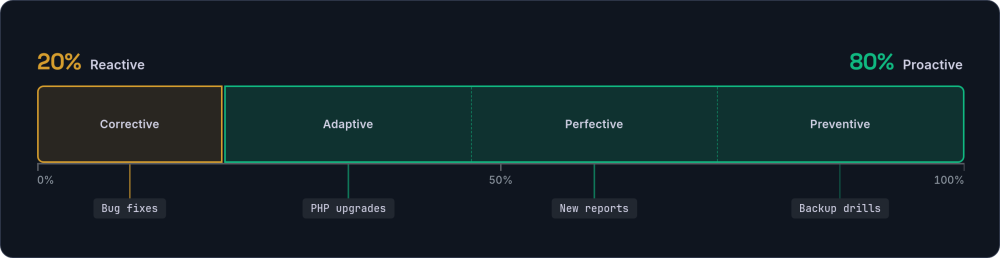
The word "maintenance" covers a surprisingly wide range of work. Not all of it is fixing things that broke. In fact, most of it should not be. The industry recognises four distinct types of custom software maintenance. Understanding them helps you see what your money actually buys each month.
For a business running a custom Laravel application with a PostgreSQL database, here is what each type looks like in practice.
Corrective: fixing what broke
A user reports that an invoice calculation is rounding incorrectly, or a report that ran fine last month now times out. Corrective maintenance is the reactive work: diagnosing bugs, tracing unexpected behaviour, and deploying fixes. It is necessary, but in a well-maintained system it should be the smallest slice of the work.
Adaptive: keeping current
PHP releases a new version. Your hosting provider drops support for the old one. Laravel ships a major update with security patching and dependency management improvements. Adaptive maintenance is the work of keeping your application compatible with its environment as that environment changes around it.
Perfective: making it better
Your team has been using the system for six months and now they know exactly where the friction is. They need a new report view, a shortcut for a common workflow, or a dashboard that surfaces the numbers the business now cares about. Perfective maintenance is new feature work. It evolves the system to match how the business actually operates, not how you imagined it would when the specification was written.
Preventive (planned): avoiding future problems
Refactoring a tangled module, adding automated tests where regressions keep appearing, and running database index optimisation before slowness reaches users. It also means scheduling dependency update sprints, running backup-restore drills, and refreshing documentation as the codebase evolves. Modern planned maintenance leans on monitoring tools (Sentry, New Relic, or equivalent) to catch rising error rates early, turning what would have been a reactive fix into a scheduled one. It is the unglamorous work that stops small problems from compounding into expensive ones.
The balance between these four types tells you a lot about the health of your system and your maintenance relationship. A healthy ratio sits at roughly 20% reactive (corrective) and 80% proactive (adaptive, perfective, planned/preventive). When that ratio flips, when most of the work is firefighting rather than forward movement, something structural needs attention.
Is Your System Working, or Actually Maintained?
One of the most common misunderstandings is the belief that a system which appears to be working is the same as a system that is properly maintained. The two are very different. A system can run for years with no visible problems while quietly accumulating risk beneath the surface. This diagnostic helps you tell the difference.
Score your own system honestly. For each row, decide whether you sit in the left column or the right. If you do not know the answer, that itself is informative. If you would rather have someone run the assessment for you, a stack health check gives you an honest, fixed-price read on exactly these questions.
| Area | Appears to work | Genuinely maintained |
|---|---|---|
| PHP version | Running, but may be past end-of-life with known vulnerabilities | Current LTS release, patched monthly |
| Framework version | The version it was built on, never upgraded | Within one major version of the latest release |
| Dependencies | Installed years ago, never reviewed | Reviewed quarterly, updated proactively |
| Backups | Configured once, never restore-tested | Automated with regular restore drills |
| Error monitoring | None, or logs no one reads | Active alerting (Sentry or equivalent) with triage process |
| Deployment | Manual FTP or undocumented process | Automated pipeline with staging environment |
| Test coverage | None or minimal | Growing test suite covering high-risk modules |
| Documentation | Written during the build, never updated | Living documentation, refreshed alongside code changes |
| Upgrade planning | No plan, react when forced | Scheduled against PHP and framework lifecycle dates |
| Maintenance reports | No regular communication about what was done | Monthly summary of work completed, issues found, and next steps |
How to read your score: If most of your answers sit in the left column, your system is not yet at risk of failing. But it is accumulating the kind of invisible debt that makes future work slower, riskier, and more expensive. Four or more items in the left column typically indicates that what you have is hosting, not maintenance. Moving to the right column is what genuine software maintenance delivers, month by month.
Why Continuity Matters in Maintenance
Whoever maintains your software needs context that goes beyond what any codebase or documentation can capture. They need to understand why the system works the way it does, not just how. This is true regardless of whether the maintainer is the original builder, an in-house team, or a new provider.
When a maintenance team has deep context on a system, whether accumulated through building it or through a long-term support relationship, the practical differences are significant.
| Dimension | Deep context | Starting from scratch |
|---|---|---|
| Diagnosis speed | Minutes to hours. They know where to look and why the code behaves that way. | Hours to days. Reading unfamiliar code, tracing logic, forming theories. |
| Change cost | Low. They understand the ripple effects before writing a line of code. | High. Every change requires mapping dependencies they have never seen before. |
| Regression risk | Low. They know the edge cases because they have encountered them. | High. Edge cases are invisible until something breaks in production. |
| Business context | Deep. They understand why the system works this way, not just how. | Shallow. They see the code but not the business reasoning behind it. |
| Onboarding cost | Minimal. The relationship is already established. | Significant. Weeks or months before they are productive. |
This is not an argument for vendor lock-in. It is an argument for valuing continuity when you find a good maintenance relationship. If you do switch providers, invest properly in the handover. Budget time for the incoming team to shadow the outgoing one, walk through architectural decisions, and understand the business rules that are encoded in the code rather than written down anywhere. A rushed handover is one of the most common causes of expensive early mistakes.
Protecting yourself either way: Regardless of who maintains your system, make sure you own the source code, have access to the repository, hold the credentials for hosting and third-party services, and keep documentation reasonably current. Owning your codebase means you always have the option to move. That freedom is what makes continuity a choice rather than a dependency.
The Cost of Neglecting Custom Software Maintenance
Unmaintained software does not stay the same. It degrades. Not because the code changes, but because everything around it does.
PHP releases new versions. Laravel moves forward. Browsers update. Security vulnerabilities are discovered. Operating systems are patched. Your unmaintained application sits still while the ground shifts beneath it.
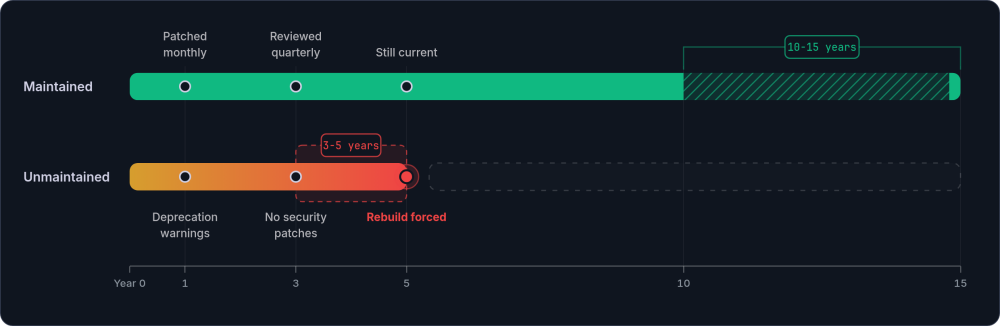
Technical debt is not linear. Each deferred update makes the next update harder. A system one PHP version behind typically takes a day to update. A system three versions behind can take weeks. A system five versions behind may require a rewrite of significant portions of the codebase. Here is what the pattern typically looks like.
By the third year the slope steepens. The work that was trivial in year one now needs planning, testing, and budget. By year five the picture has changed entirely.
Now contrast that with what a maintained system looks like at the same milestones. None of these markers is dramatic on its own; together they are the difference between an asset and a slow-burning liability.
The framework and language stay current as a matter of routine, never as a panic. The same discipline extends to everything they depend on.
The difference is not dramatic in any single month. It is cumulative over years. Maintained software typically lasts 10-15 years. Unmaintained software forces a rebuild at 3-5. That rebuild cost, which could have been avoided entirely, dwarfs what the ongoing maintenance would have totalled. Controlling your own platform risk starts with keeping the platform current.
What a Software Maintenance Agreement Should Include
A software maintenance agreement is not abstract. It is a defined set of activities that happen on a predictable schedule. Understanding what a typical month should include helps you evaluate whether a provider is delivering real value or whether your system is just nominally "supported".
Here is what a representative month of maintenance looks like for a custom web application.
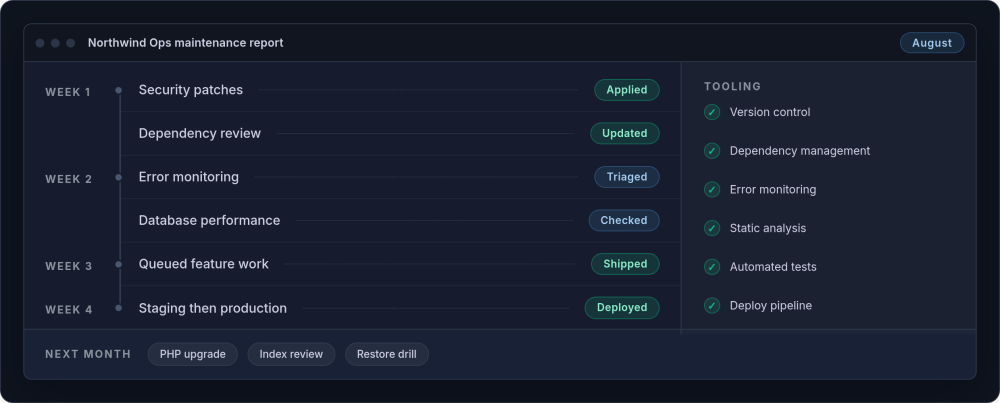
Good maintenance requires specific tooling. Not every provider uses the same products, but the capabilities should be present regardless of brand names. Here is a baseline to check against.
Essential maintenance tooling: Version control (GitHub, GitLab, or Bitbucket), dependency management (Composer for PHP packages), error monitoring (Sentry, Bugsnag, or equivalent), static analysis for code quality (PHPStan, Psalm, or similar), automated testing (Pest or PHPUnit), and deployment automation (Forge, Envoyer, or a CI/CD pipeline). If your maintenance provider cannot describe their process for each of these, that is worth a direct conversation.
Budgeting, Security, and Knowledge Continuity
A widely cited planning figure for annual custom software maintenance cost is 15-20% of the original build cost. It is not a fixed rule, but it holds well across different system sizes and complexities.
The quick maths: For a system that cost £50,000 to build, budget £7,500-10,000 per year (roughly £625-835 per month). For a £100,000 system, £1,250-1,670 per month. These figures cover all four maintenance types: security, updates, improvements, and prevention.
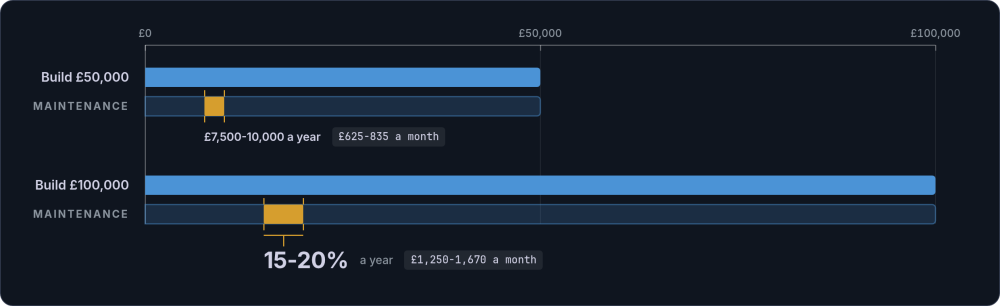
Early years tend to run at the higher end of that range as the gap between what was specified and what is truly useful becomes clear. Mature systems settle into a steadier rhythm where adaptive and preventive work dominates. When you are working through the total cost of ownership calculation, maintenance is the number that makes the five-year and ten-year projections honest. And when understanding the initial build investment, the maintenance budget is what puts that figure in its proper context.
Security is the area that causes the most anxiety, and rightly so. PHP has a defined support lifecycle: two years of active support (bug fixes and security fixes), then two years of security-only fixes, then nothing. Laravel follows a similar pattern: bug fixes for 18 months, security fixes for 2 years. Falling behind on either means running software with known, published vulnerabilities.
Staying current is straightforward when it is part of a routine, not an emergency response. A good software maintenance agreement bakes these dates in, so upgrades are scheduled against the lifecycle rather than triggered by a crisis. The same applies to Composer dependencies: reviewing and updating quarterly prevents the kind of version drift that turns a routine update into a major migration. For a deeper look, see how security and operational maintenance work in practice.
Documentation deserves the same discipline. Think about what a new developer would need if they had to pick up your system tomorrow: where the environment variables live, how the deployment process works, which business rules are encoded in the code rather than written down anywhere. Good documentation answers those questions. It should be maintained alongside the code, not written once during the build and forgotten. When documentation drifts from reality, it becomes worse than no documentation at all, because it misleads anyone who relies on it.
Retainer vs Ad-hoc: Choosing the Right Commercial Structure
The commercial structure of a software maintenance agreement typically takes one of two forms, and each suits different situations.
| Factor | Monthly retainer | Ad-hoc (pay-as-you-go) |
|---|---|---|
| Cost predictability | Fixed monthly amount, easy to budget | Variable, depends on what breaks or what you need |
| Proactive work | Built in. Security updates, dependency reviews, and prevention happen whether you ask or not | Only happens if you specifically request it |
| Response priority | Guaranteed availability. Your time is already allocated | You queue behind retainer clients |
| Provider familiarity | Monthly contact keeps the provider current with your system | Context fades between engagements. Ramp-up time increases |
| Best for | Business-critical systems, actively evolving software, teams that value predictability | Stable systems with genuinely minimal needs, tight budgets during early stages |
Neither model is inherently better. Some systems genuinely need very little ongoing work and ad-hoc makes sense. But for anything business-critical or actively evolving, a retainer is the stronger choice. The rhythm and predictability keep the system moving forward rather than waiting for the next emergency.
A realistic service level agreement from a small, dedicated team looks different from enterprise support contracts. Here is what honest SLA tiers typically look like.
| Severity | Response time | Coverage |
|---|---|---|
| Critical (system down, data at risk) | Acknowledged within 4 hours | Business hours, with best-effort out-of-hours for genuine emergencies |
| High (major feature broken, workaround exists) | Picked up within 1 business day | Business hours |
| Normal (minor issue, improvement request) | Picked up within 2 business days | Business hours |
Be wary of over-promising: Any small agency or freelancer claiming 24/7 on-call, enterprise uptime guarantees, or instant response at 2am is either pricing those commitments into the cost (significantly) or making promises they cannot keep. Honest SLAs from a focused team offer reliability and context. That is worth more than a contractual fiction about round-the-clock coverage.
When to Maintain vs When to Rebuild
Properly maintained software typically lasts 10-15 years. That is a long time in business terms. But it is not forever. Some systems outlive their usefulness not because the code failed but because the business evolved beyond what the original architecture can accommodate. Recognising the difference between a system that needs maintenance and one that needs replacing is an important skill.
The decision to rebuild is not a failure of the software or the people who built it. It is a recognition that the business has changed enough to warrant a new foundation. Use this framework to think it through.
Signs that point towards rebuilding
These are the structural signals, not the cosmetic ones. A clunky screen can be redesigned. A data model that no longer matches the business is a deeper problem. Watch for the patterns below, and treat several of them appearing together as more telling than any single one.
The first two signs are about economics: the system has become more expensive to bend than to replace. The remaining three are about viability, where the surrounding technology has moved beyond what the system can safely follow.
One sign outweighs the rest, because it cannot be deferred or worked around.
Signs that maintenance is still the right path
Most systems that feel tired are not actually finished. They have simply been neglected, and neglect is reversible. If the foundation is sound, continued maintenance (sometimes with a focused remediation sprint to catch up) is almost always the cheaper, less disruptive choice. Look for the following.
Those first two signs are about the foundation holding firm. The next two are about whether the surrounding technology and the people using it are still on your side.
The last sign is the one that settles most close calls: the plain arithmetic of catching up versus starting over.
The grey area: a structured way to decide
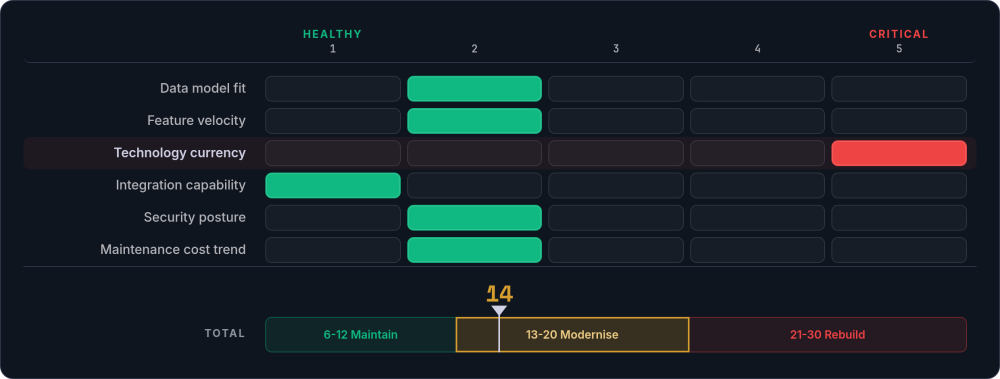
Most systems do not fall neatly into "maintain" or "rebuild". They sit somewhere in between, with some components working well and others causing friction. When you are in that grey area, score each dimension below on a scale of 1 (fine) to 5 (critical problem).
| Dimension | Score 1 (healthy) | Score 5 (critical) |
|---|---|---|
| Data model fit | Core entities match current business processes | Constant workarounds, data stored in wrong places |
| Feature velocity | New features take proportionate effort | Simple changes take weeks due to architectural resistance |
| Technology currency | Framework and language within supported versions | End-of-life stack, shrinking developer pool |
| Integration capability | Can connect to modern APIs and services | Incompatible with current standards |
| Security posture | Patchable, follows current practices | Structural vulnerabilities requiring core rewrites |
| Maintenance cost trend | Stable or declining over time | Rising year-on-year with diminishing returns |
Reading the score: A total of 6-12 generally favours continued maintenance. 13-20 suggests targeted modernisation of the weakest areas. 21-30 points towards a rebuild, potentially phased. No single dimension should be treated as decisive on its own. A system scoring 5 on technology currency but 1-2 everywhere else is a candidate for a framework upgrade, not a full rebuild.
A phased migration, replacing the system piece by piece while the old one keeps running, is often less disruptive than a full rebuild. That staged approach is exactly what our legacy modernisation service delivers: bringing a system up to date without the big-bang rewrite. Either way, the decision should be deliberate, not forced by neglect. For systems that have crossed the line, see how legacy system migration works in practice.
Evaluating a Maintenance Provider
Choosing who maintains your software is a decision you will live with for years. Price matters, but it is the least interesting factor. What matters more is whether the relationship will work over the long term. Here is what to look for, and what to ask.
-
You own the code, unconditionally The source code is yours. You have access to the repository. You hold the credentials for hosting and third-party services. You can take everything elsewhere if the relationship ends. No lock-in, no hostage situations. Why owning your codebase matters.
-
They can describe their maintenance process in detail Ask what a typical month looks like. Ask about their tooling. If they cannot walk you through their security patching process, dependency management approach, and deployment pipeline, that tells you something.
-
Maintenance is proactive, not just reactive They find problems before you notice them. Dependencies are updated before they become urgent. Performance is monitored before users complain. Ask what proactive work they did last month for an existing client (without naming names).
-
They understand your business, not just your technology Maintenance decisions are better when the person making them understands why the system works the way it does, not just how. Look for curiosity about your business during initial conversations, not just technical questions.
-
Communication is clear and regular You receive monthly summaries of what was done and what is coming. No surprises, no invoices for unexplained work. Ask to see a sample maintenance report (redacted).
-
They have long-term client relationships Ask how long their longest maintenance relationship has lasted. A provider with multi-year client retention is demonstrating something that no sales pitch can replicate.
-
Their SLA promises are realistic Honest response times, clear coverage hours, no fictional 24/7 claims from a small team. Realistic SLAs are a sign of integrity, not weakness.
Red flags to watch for
The positive signs above tell you what good looks like. These are the warnings that should give you pause during a sales conversation. None is automatically disqualifying, but each one deserves a straight answer before you sign anything.
Those first two are about control and visibility. The next two are about engineering discipline, and they are the ones a non-technical buyer is most likely to miss.
The best maintenance relationships are quiet. The system works. Updates happen. Security is current. You do not need to think about it, and when you do need something, the response is fast because the context is already there. That quietness is not the absence of work. It is the presence of a well-run, long-term partnership.
Planning for the long term
Perhaps you have custom software that needs looking after, or you are planning a build and want to understand the full lifecycle commitment. Either way, our ongoing support service covers everything from security patches and dependency updates to feature additions and performance monitoring.
Get in touch →