
The Case for Owning Your Critical Business Logic
Every business rents software. Accounting packages, email platforms, project management tools. Monthly subscriptions that keep the lights on. The question is not whether to rent at all. The question is whether you are renting systems that should belong to you.
The own vs rent business software decision is one of those choices that compounds quietly over years. Rent the wrong things and you wake up one morning locked into a vendor's roadmap, paying three times what you started with. Your own data sits in a format you cannot export. Own the wrong things and you burn capital building something that a £50 per month subscription handles better than you ever could.
This guide offers a practical framework for deciding which systems to own and which to rent. Sometimes renting genuinely is the right answer, and this page will say so. The goal is to help you draw the line in a way that serves your business over a ten-year horizon, not just the next quarter.
Own vs rent software refers to the strategic decision of whether to build and maintain your own bespoke software (owning the code, data, and development roadmap) or to subscribe to third-party SaaS products (renting access on the vendor's terms). The core trade-off is control and long-term cost versus speed and convenience.
To be clear upfront: ownership doesn't mean rebuilding Stripe, running your own email servers, or writing accounting software from scratch. Nobody is suggesting that. The practical answer is a hybrid model where you own the systems that encode how your business specifically operates and rent the commodity infrastructure beneath them. The rest of this guide explains where to draw that line.
What Ownership Actually Means
Ownership in software isn't just about having source code on a server. It means having the authority and ability to change, extend, export, or replace a system on your own terms and timeline, without requiring permission from a vendor.
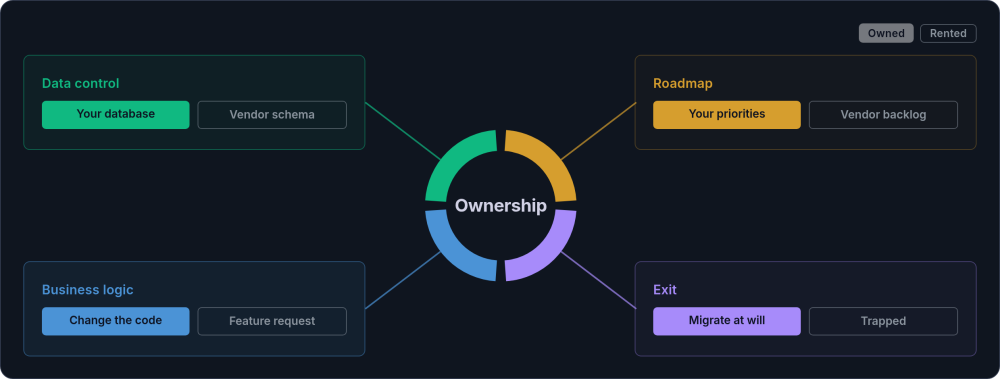
Four dimensions define real ownership:
-
Data control You hold your data in formats you can query, export, and migrate. No proprietary schemas. No vendor-mediated access. Your customer records, order history, and operational data belong to you, not to a platform.
-
Business logic The rules that govern how your business operates live in code you control. Your quoting logic, your approval workflows, your reporting calculations. When these need to change, you change them. You do not submit a feature request and wait.
-
Development roadmap Your priorities determine what gets built next. Not a product team optimising for their largest customer segment. Your business needs drive the roadmap.
-
Exit capability You can move. If your hosting provider doubles their prices, you migrate. If a better database engine emerges, you switch. Ownership means you are never trapped.
When people talk about the own vs rent software decision (sometimes framed as SaaS vs on-premise, though the reality is more nuanced than that binary), these are the four things at stake. If you have all four, you own your system. If you're missing any of them, you're most likely renting in practice, even if your contract suggests otherwise.
Data Sovereignty vs Data Portability
These two terms are often used interchangeably, but they describe different things. Data portability means you can export your data in a usable format. Data sovereignty means you control where that data is hosted, who has access to it, which subprocessors handle it, and whether it crosses borders.
A SaaS vendor might offer reasonable export tools while still controlling hosting location, backup access, and third-party processing. For businesses in regulated industries, or those whose data is a competitive advantage, the distinction matters. Genuine business software ownership requires both.
What Renting Actually Costs Over Time
SaaS pricing looks simple on the surface. A monthly fee per user, a clear feature tier, predictable budgeting. But the real total cost of ownership for rented business software accumulates in ways that are easy to miss, and a fair SaaS comparison has to count all of it.
Start with the subscription itself. A mid-tier SaaS tool might cost £50 per user per month. For a team of 15, that is £9,000 per year. Over ten years, the licence cost alone reaches £90,000, and that assumes no price increases.
It rarely stays flat. SaaS vendors raise prices, and renewal is when they hold the upper hand. According to Gartner's research on SaaS renewals, annual increases of 8 to 15 percent are common, precisely when your switching costs are highest.
Beyond the subscription fee, renting creates costs that rarely appear in any budget line:
Workaround labour
When the tool cannot do what your business needs, your team builds workarounds. Export to spreadsheet, reformat, re-enter into another system. A single workaround that takes 20 minutes per day costs roughly £4,000 per year in staff time (based on a £25/hour loaded cost across 200 working days). Most businesses have several.
Integration tax
SaaS tools that do not talk to each other require middleware, manual data transfer, or paid integration platforms (Zapier, Make). Each connection adds cost and fragility.
Training overhead
Every time the vendor redesigns their interface or deprecates a feature, your team needs to relearn. This happens on the vendor's schedule, not yours.
Data migration risk
When you eventually need to leave, getting your data out is rarely straightforward. Proprietary formats, incomplete exports, and missing historical records are common. The cost of a forced migration can run into tens of thousands.
And when you eventually decide to leave, switching costs go far beyond the migration fee. You face data extraction and cleaning, relationship rebuilding (linked records rarely survive export intact), and automation re-creation. Add integration re-wiring, team retraining, and a productivity dip during transition. These switching costs are what give SaaS vendors their power at renewal, and they typically dwarf the obvious migration line item.
A Realistic Ten-Year Comparison
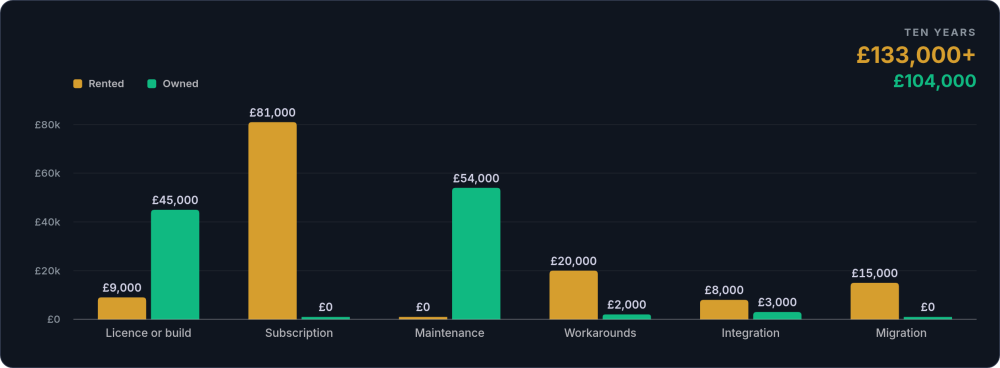
Consider a growing business with 15 staff, comparing a SaaS subscription against an owned system for their core operational platform. The figures below are illustrative and will vary by business. For a more detailed breakdown of custom software pricing in the UK, see our guide to custom software costs.
| Cost factor | SaaS (rented) | Custom (owned) |
|---|---|---|
| Licence / build cost (year 1) | £9,000 | £45,000 |
| Annual subscription (years 2-10) | £81,000 (baseline; likely higher with annual increases) | £0 |
| Annual maintenance and hosting | £0 (included) | £54,000 (£6k/yr) |
| Workaround labour | £20,000 | £2,000 |
| Integration costs | £8,000 | £3,000 (built in) |
| Data migration (end of life) | £15,000 | £0 (you own it) |
| Total over 10 years | £133,000+ | £104,000 |
These numbers are illustrative and will vary depending on your team size, the complexity of your operations, and the specific tools involved. But the pattern is consistent: SaaS looks cheaper in year one, while owned systems cost less over a decade.
How to adapt this comparison for your business
The table above uses a single SaaS tool at £50 per user per month. Your numbers will differ. To run your own version:
- Calculate your actual per-user cost. Include the subscription fee plus any add-on modules, premium support tiers, or overage charges. Many SaaS tools charge extra for API access, additional storage, or advanced reporting.
- Factor in price escalation. Check your renewal history. If you have been on the platform for three or more years, compare your current rate to your original rate, then project that same annual increase across the next decade.
- Estimate workaround labour honestly. Walk through your team's daily routines. Every manual export, every spreadsheet reconciliation, every "we have to do it this way because the system cannot" moment has a time cost. Multiply by the hourly loaded cost of the person doing it.
- Price the exit. Ask your vendor what a full data export looks like. If the answer is vague or the export is incomplete, budget generously for migration. Data cleaning after an incomplete export is typically the most expensive part.
- Get a build estimate. Ask a development partner for a ballpark on replacing the specific functionality you need (not the entire SaaS product, just the parts your business uses). The gap between "what we use" and "what the product does" is often enormous.
The crossover point (where cumulative ownership costs drop below cumulative rental costs) typically falls between year three and year five for most mid-sized business systems. The exact timing depends on user count, price escalation, and workaround intensity.
When Renting Is Genuinely the Right Answer
Some categories of software should almost always be rented. Trying to own them would be a waste of money and engineering effort. The common thread: these are functions that work the same way across most businesses, where vendor expertise genuinely exceeds what any individual company could build.
Payment processing
Stripe, GoCardless, or similar. Payment compliance (PCI DSS) is complex, heavily regulated, and constantly changing. Let specialists handle it.
Email delivery
Postmark, Mailgun, or Amazon SES. Deliverability is a discipline unto itself. Rent it.
Accounting
Xero or FreeAgent for standard bookkeeping. These tools are shaped by regulatory requirements that change annually.
Calendar and email
Google Workspace or Microsoft 365. Building your own would be absurd.
These are not your competitive advantage. They are infrastructure. The own vs rent business software decision is about allocating ownership where it creates the most value. Renting commodity infrastructure frees your budget and attention for the systems that actually define how your business operates.
When Renting Even Core Systems Makes Sense
There are situations where renting core systems is the right call, at least temporarily. During an acquisition or merger, the acquiring company may have different systems entirely. Building something custom at that point would be wasted effort. During a rapid business model pivot, requirements are too volatile for custom development to keep pace.
In some industries, regulatory change is so frequent that a specialist SaaS vendor's R&D genuinely outpaces what a small team could build and maintain. These situations call for renting, but they also tend to be time-limited. When conditions stabilise, the ownership question returns.
When You Should Own Your Software
If renting makes sense for commodity functions, ownership earns its place for the systems that encode your competitive advantage and your customer relationships. These are the core operational systems where relying on off-the-shelf software becomes a genuine business risk.
Customer relationship management
Not a generic CRM where you bend your process to fit Salesforce or HubSpot's data model, but a system that reflects how your business actually manages client relationships. Your fields, your stages, your automation rules. A custom CRM built around your customer records gives you that control.
Order and production management
The system that tracks how work flows from enquiry to delivery. If your fulfilment process is what differentiates you, owning that logic means you can refine it continuously without waiting on a vendor roadmap. This is where custom workflow engines earn their keep.
Client portals and self-service
The interface your customers use to interact with your business. This is your brand experience. Renting it means looking and behaving like every other business on the same platform.
Operational dashboards and reporting
The views that tell you what is happening across the business. When your reporting depends on a SaaS vendor's export capabilities, you see what they let you see, not what you need to see.
What these systems have in common is business logic: the pricing rules, approval workflows, service exception handling, and operational calculations that represent accumulated knowledge. When that logic lives in bespoke software you own, it is intellectual property you can inspect, modify, and build upon. When it lives inside an off-the-shelf platform, it is locked in a black box you cannot examine, export, or take with you.
The pattern is straightforward: if the system encodes how your business specifically operates, and if losing access to it would damage your operations, you should own it. This connects directly to the broader question of digital sovereignty for businesses. The same test now applies to AI: if a model is becoming part of your operations, running it privately on infrastructure you control keeps the ownership line consistent.
The asset argument: Depending on how the spend is structured, custom software can appear on your balance sheet as a business asset (your accountant can advise on capitalisation and software depreciation schedules, typically amortised over three to five years). This can increase your company's valuation during investment, acquisition, or sale. SaaS subscriptions are pure operating expenditure with no residual value. When a prospective buyer evaluates your business, a proprietary system that encodes your operational advantage is worth something. A stack of SaaS logins is not.
The Hybrid Approach: Own Core, Rent Commodity
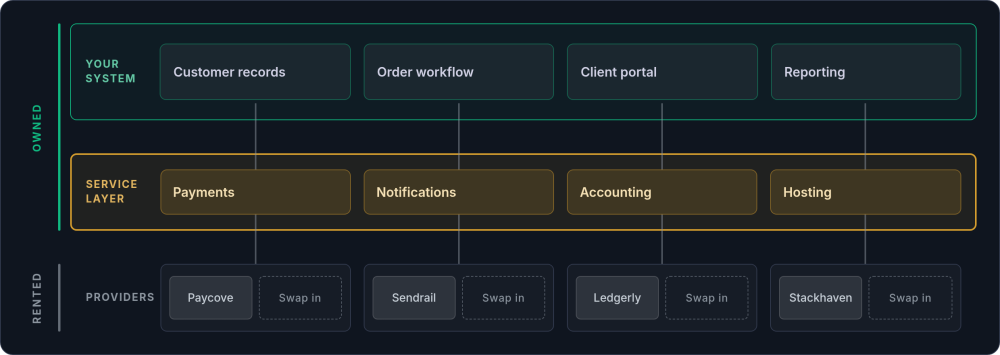
The most practical strategy is not "own everything" or "rent everything." It is a deliberate mix that places ownership where it creates the most value and rents where vendor expertise justifies the dependency.
You own
Your core operational system (CRM, order management, client portal, reporting). Your data, in a database you control. Your business logic, in code you can modify. Your development roadmap.
You rent (as infrastructure beneath your owned system)
Payment processing (Stripe sits beneath your order system). Email delivery (Postmark sends your notifications). Hosting infrastructure. Accounting (Xero, integrated via API).
The key difference from a pure SaaS stack is that your owned system orchestrates everything. If you need to replace Stripe with GoCardless, you change one integration layer. If Postmark doubles their prices, you switch to Mailgun. The rented services are interchangeable components, not the foundation of your operations.
Making the Hybrid Model Work in Practice
The hybrid approach sounds clean in theory. In practice, it requires deliberate architectural decisions to avoid recreating the same dependency problems at a different level.
Wrap every external service in an abstraction layer
Your application code should never call Stripe, Postmark, or Xero directly. Instead, it calls your own payment service, notification service, or accounting service. That internal service handles the vendor-specific API calls. When you need to swap vendors, you rewrite one adapter, not fifty call sites scattered across your codebase.
Store your own canonical records
When a payment goes through Stripe, record the transaction in your own database with your own schema. When an invoice syncs to Xero, keep your own copy. Vendor systems should be treated as downstream consumers of your data, not the source of truth. If the vendor disappears overnight, your records are intact.
Design for vendor failure
Every integration should handle the case where the external service is unavailable. Queue outbound requests. Log failures. Retry with backoff. A Postmark outage should delay your email notifications, not crash your order processing pipeline.
Audit your dependency surface annually
Once a year, review every external service your system depends on. Check pricing changes, terms of service updates, API deprecation notices, and acquisition news. A vendor acquired by a larger competitor will almost certainly change pricing, features, or both within 18 months.
This hybrid software architecture is what genuine ownership looks like in practice. For a deeper look at how owned systems consume rented services through clean boundaries, see our guide to integration patterns.
Signs of SaaS Dependency (and How to Test Your Exposure)
Most businesses do not set out to become dependent on their SaaS stack. It happens gradually. Vendor lock-in is not a theoretical concern; it is a pattern that plays out predictably. Here are the warning signs that suggest you have crossed from sensible renting into problematic dependency:
| Risk mechanism | How it works | Business impact |
|---|---|---|
| Pricing pressure | Once your data and workflows are embedded, switching costs are high and the vendor knows it. Prices ratchet up at renewal. | Cumulative cost increases of 50-100% over five years are common across the SaaS industry |
| Feature deprecation | Products evolve to serve the largest customer segments. Features you depend on get removed or buried in higher tiers. | Broken workflows, forced process changes |
| Acquisition disruption | SaaS companies get acquired. Expect pricing changes, feature consolidation, and forced migration to the acquirer's platform. | Your business is collateral in someone else's growth strategy |
| Data as hostage | Proprietary APIs with rate limits, incomplete export tools, and formats that only work within the vendor's ecosystem. | You have visiting rights to your own data, not ownership |
Data ownership stops being abstract the moment you need a report the vendor's interface does not support, or you have to combine data from several systems into one view. It becomes urgent when a data subject access request under GDPR lands on your desk and the records are scattered across platforms you do not control.
This is why the build vs buy decision should always account for data portability, and why a single source of truth matters. Scattered data across multiple SaaS platforms makes every one of these problems worse.
Regulatory context: UK GDPR Article 20 gives individuals the right to data portability, but your obligations go further. The ICO's guidance on data portability applies to any business handling personal data. For financial services firms, the FCA's operational resilience rules explicitly address third-party dependency. If your sector has specific data handling obligations, SaaS dependency becomes a compliance risk as well as an operational one.
How to Spot Over-Renting in Your Own Business
If the risks above feel distant, check these concrete patterns against your own stack. The first pair shows up when the software starts shaping how your team works:
The next two are about who really controls your data and your roadmap:
And the last one is the tell that lock-in has already taken hold:
If several of these apply, the cost of continued renting may well exceed the cost of building. It is worth running the numbers. This is often the point where businesses start thinking seriously about scaling without chaos.
For a sharper test, pick your most critical SaaS tool and run through four scenarios: a 30% price increase at renewal, the removal of API access you depend on, an acquisition that sunsets your pricing tier, or a 48-hour outage during your busiest period. If the answers are uncomfortable, the platform dependency risk is real.
The Own, Rent, or Depends Decision Matrix
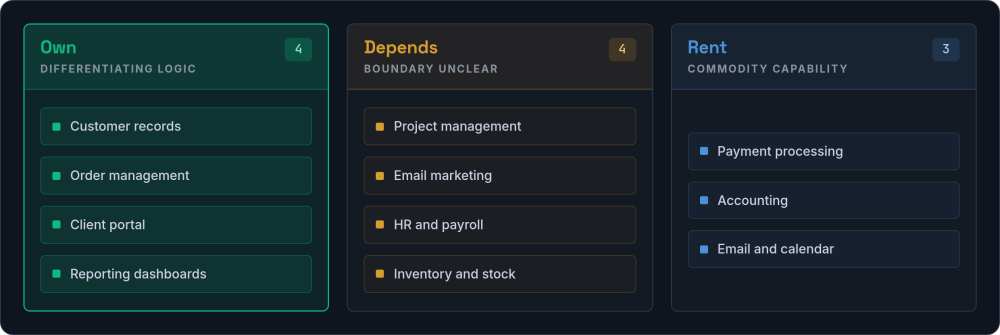
This is the single most useful reference on the page. For each common business system, the classification depends on whether it encodes your competitive advantage, handles sensitive data, or requires processes unique to your business.
| System | Own | Depends | Rent |
|---|---|---|---|
| CRM / customer records | Your sales process is unique and your customer data is your most valuable asset | ||
| Order / production management | Your fulfilment process differentiates you | ||
| Client portal | This is your brand experience; renting it makes you look like everyone else | ||
| Reporting / dashboards | You need views the vendor's interface does not support | ||
| Project management | Own if your delivery process is core IP; rent if standard Kanban or Gantt suffices | ||
| Email marketing | Rent the delivery engine (Postmark, Mailgun); own the logic of what gets sent and when | ||
| HR / people management | Rent for standard payroll and leave tracking; own if your people processes are a differentiator (e.g. custom onboarding, skills matrices) | ||
| Inventory / stock management | Own if your stock logic is complex or tightly coupled to production; rent if you need standard warehouse tracking | ||
| Payment processing | PCI DSS compliance is a specialist discipline. Stripe or GoCardless beneath your owned system. | ||
| Accounting | Xero or FreeAgent. Shaped by annual regulatory changes. Integrate via API. | ||
| Email and calendar | Google Workspace or Microsoft 365. Building your own would be absurd. |
How to Use This Matrix for Your Business
The matrix above provides general guidance, but the right answer for any specific system depends on your context. Three questions will help you place any system accurately:
- Does this system encode logic that is unique to our business? If your quoting rules, approval chains, or fulfilment steps differ meaningfully from the industry default, that logic is intellectual property. Owning it protects and extends that advantage. If you use the same process as everyone else, renting is fine.
- Is the data in this system a competitive asset? Customer relationship history, pricing models, operational performance data: these have value beyond the immediate function. If losing access to this data (or having it held in a proprietary format) would weaken your market position, ownership is the safer path.
- What is the realistic switching cost? Estimate the full cost of moving away from the current system: data extraction, data cleaning, integration rewiring, team retraining, and the productivity dip during transition. If that number is large enough to make you feel trapped, you are already experiencing the downside of renting. Future ownership decisions should factor this in.
Three rules summarise the matrix. Own differentiating logic and sensitive data models. Rent commodity capabilities where vendor expertise genuinely exceeds yours. Use a hybrid approach when the boundary is less clear, with your owned system orchestrating rented services through API boundaries.
How to Start Owning What Matters
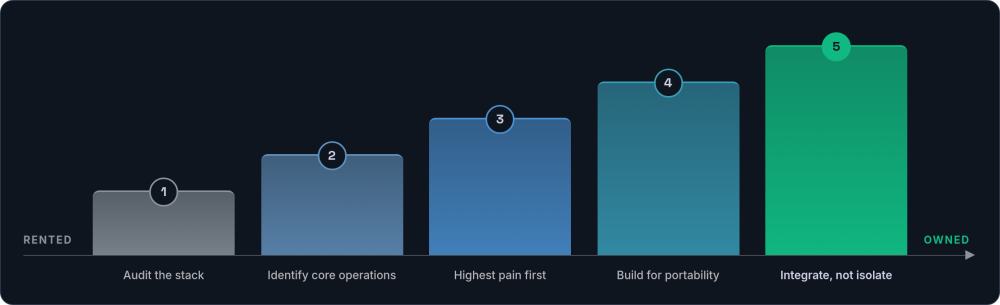
Moving from rented to owned does not happen overnight, and it should not. The transition works best as a phased approach:
Audit your current stack
List every SaaS tool your business uses. For each one, note the annual cost, the data it holds, and how difficult it would be to replace. The tools that score high on cost, high on data criticality, and high on switching difficulty are your ownership candidates.
Identify your core operations
Pick out the systems that encode how your business specifically operates. The ones that, if they disappeared tomorrow, would force you to fundamentally change how you work. Those are the systems that deserve ownership.
Start with the highest-pain system
Do not try to replace everything at once. Pick the system that causes the most friction, the most workarounds, or the most vendor dependency, and build a replacement that you own.
Build with portability in mind
Build on open technologies with standard data formats. Open-source frameworks and databases (Laravel, Django, PostgreSQL, MySQL) carry no vendor lock-in. Your code runs anywhere and your data exports cleanly. For some functions, open-source self-hosted tools like SuiteCRM, ERPNext, or Odoo Community offer a middle ground between SaaS and fully custom builds. They bring their own maintenance overhead, but avoid per-user licensing.
Integrate, do not isolate
Your owned system should talk to your rented services via clean APIs. The rented tools become plumbing beneath your custom platform: easy to inspect, easy to replace.
When This Works, What Changes
When a business owns its core systems and rents only commodity infrastructure, several things shift.
-
Your development priorities answer to your business, not a vendor Features get built when your business needs them, not when a product team in another country decides they are a priority.
-
Your growth stops triggering per-user cost spikes No surprise price increases at renewal. No per-user scaling that punishes growth. The system that serves 15 people serves 50 at roughly the same operating cost.
-
Your data lives in your database, queryable on your terms Reports show what you need to see. Integrations work because you built them to work. GDPR requests are straightforward because your data lives in your database.
-
Your operational knowledge is encoded in software you control The accumulated knowledge of how your business operates, encoded in software that you control, that you can extend, and that no vendor can take away.
Work Through the Decision
If you are weighing up which systems to own and which to rent, a consulting session is a good starting point. We will help you assess your current stack and work out where ownership creates the most value.
Get in touch →