
Platform Risk and Why Your Business Logic Shouldn't Be Rented
Every SaaS subscription is a bet. A bet on the vendor's pricing staying reasonable, their features staying relevant, their company staying alive, and their interests staying aligned with yours. For email and calendars, that bet is fine. For the systems that define how your business operates, it is a bet worth examining carefully.
Digital sovereignty is the principle that a business should own and control the systems, data, and logic critical to its operations. Not as a philosophical stance, but as a practical strategy for reducing risk and keeping the freedom to grow on your own terms. It matters more every year, because each new platform deepens a dependency you do not control. For UK businesses it carries an extra edge: post-Brexit data adequacy arrangements and sector-specific rules add layers of complexity that US-centric advice tends to skip.
Digital sovereignty for businesses means controlling five things: your data, your business logic, your development roadmap, your costs, and your integrations. When any of these are governed by a third party's commercial decisions, you have a dependency. When several of them are, you have a vulnerability.
This guide sets out a practical framework for thinking about digital sovereignty. It is closely related to the question of owning versus renting your business systems and the broader build vs buy decision. If you have felt the friction of platform dependency risk, the ideas here will help you assess your position and plan a path forward.
Red flags that suggest you have a sovereignty problem:
- No full-fidelity data export available
- Business automations trapped inside a platform with no external documentation
- Per-seat pricing rising faster than headcount growth
- Your core product has been acquired in the past three years
- API access restricted or rate-limited
- Data hosted exclusively in US jurisdiction with no alternative
- A renewal cliff approaching with no alternative prepared
The Platform Risks That Accumulate Quietly
Platform dependency rarely announces itself. It builds gradually, one subscription at a time, until the cost of leaving exceeds the cost of staying. The examples are well documented. Salesforce imposes mandatory tier upgrades at renewal. Broadcom's 2023 acquisition of VMware replaced perpetual licences with mandatory subscriptions that doubled or tripled costs. Google has discontinued over 290 products. Twitter (now X) moved from free API access to £42,000 per month. These aren't edge cases. They're the predictable consequence of depending on systems you don't own.
Each vendor makes decisions that serve their business, not yours. That is not malicious. It is rational. But it means your operational stability is subject to someone else's commercial strategy. When multiple critical functions run on a single vendor's ecosystem, a single pricing or policy change affects everything simultaneously. Recognising these risk categories early gives you time to respond before renewal pressure forces your hand.
Pricing escalation: what to watch for
Annual increases above inflation. Tier consolidation that bundles features you do not need with ones you cannot lose. "Enterprise only" labels appearing on features you already use. Per-seat costs that make hiring feel like a licensing decision.
Feature deprecation: what to watch for
Release notes that quietly remove capabilities. "Sunset" announcements with short timelines. Your most-used features sitting outside the vendor's stated product direction. Workarounds multiplying as the platform evolves away from your needs.
Acquisition-driven pivots: what to watch for
Your vendor being acquired or merging. New parent company language about "platform alignment" or "portfolio rationalisation." Licensing model changes within 12 months of acquisition. Key product staff departing after the deal closes.
Data portability barriers: what to watch for
Export options limited to CSV with no relational structure. Calculated fields and custom objects missing from exports. Attachments, audit trails, or workflow history excluded. Export functionality buried, undocumented, or requiring support tickets.
Data Sovereignty and the Regulatory Dimension
Digital sovereignty and data sovereignty overlap, but they are not the same thing. Data sovereignty is the legal and jurisdictional question: which country's laws govern where your data is stored, how it is processed, and who can compel access to it. It is about legal control. Digital sovereignty is broader. It covers control over the systems, logic, and processes that generate and use that data.
The two can come apart. You might hold data sovereignty (hosting in a UK data centre, complying with UK GDPR) and still lack digital sovereignty. That happens whenever the application layer sits with a vendor who can change pricing, deprecate features, or restrict your access at will.
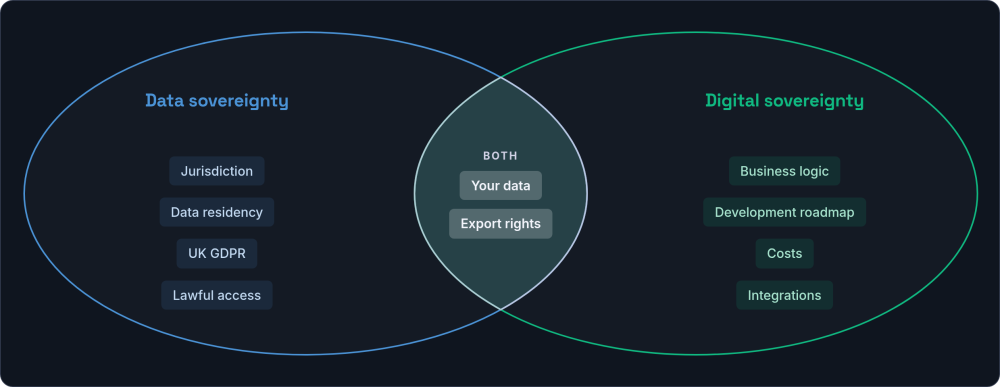
For UK businesses, both matter. The Schrems II decision in 2020 invalidated the EU-US Privacy Shield framework, creating ongoing uncertainty for organisations using US-hosted platforms to process European personal data. The EU Data Act, which came into force in 2024, introduced new rights around data portability and interoperability that affect any business serving European customers.
Sector-specific regulations add further layers. Financial services firms operating under FCA oversight face explicit requirements around data handling and operational resilience. Healthcare organisations working within NHS frameworks must demonstrate data localisation and security standards. Legal practices handling privileged information have professional obligations around data control that generic SaaS platforms may not satisfy.
The practical implication is straightforward. If you store customer data, financial records, or regulated information in a platform you do not control, you are adding regulatory risk on top of commercial risk. Owning your infrastructure does not eliminate compliance obligations, but it gives you direct control over how they are met.
There is a cost dimension here that is easy to overlook. Regulatory compliance with third-party platforms creates recurring operational overhead: audit preparation (often two to four days per vendor per year), procurement delays for approved vendors, data processing impact assessments, and contractual renegotiation when vendors change their terms. For businesses operating under FCA oversight or handling NHS data, sovereignty is not just philosophically appealing. It reduces the ongoing cost of proving compliance.
A Practical Regulatory Checklist
If you handle regulated data, run through these questions for each platform you depend on.
If more than two of these are unclear for any critical platform, that platform represents a regulatory risk worth addressing. The more vendors involved, the more surface area you have for compliance gaps.
How SaaS Vendor Lock-In Works
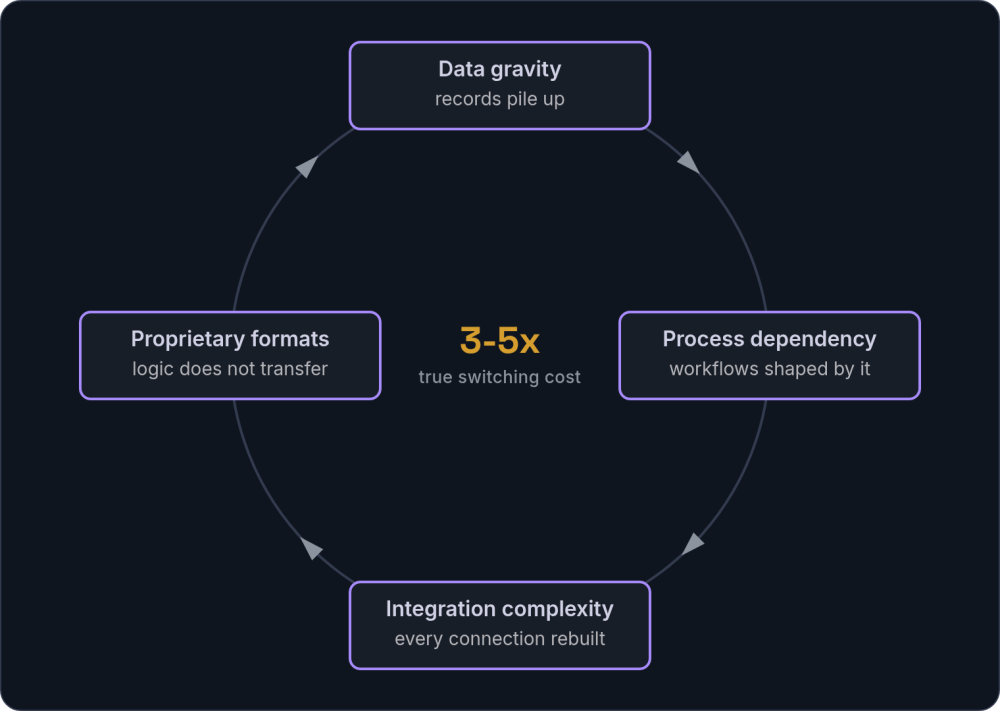
The risk categories above describe what can go wrong. Lock-in describes why it is so hard to respond when it does. Four mechanisms compound over time, reinforcing each other and making switching progressively harder with every passing year.
Data gravity
The longer you use a platform, the more data accumulates. Customer records, transaction histories, project archives, communication logs. Export processes often prove incomplete or error-prone. Proprietary fields, calculated values, and custom objects may not migrate cleanly. The volume of data itself creates inertia.
Process dependency
Teams build workflows around platform-specific features and quirks. Institutional knowledge becomes platform-specific. "We do it this way because that is how Salesforce works" becomes indistinguishable from "We do it this way because it is the right way." Over time, the platform shapes the process rather than serving it.
Integration complexity
Each new connection to the platform increases switching difficulty. When your CRM connects to your accounting software, your email marketing tool, and your project management system, replacing the CRM means reconfiguring or rebuilding every connection. The ecosystem compounds the lock-in.
Proprietary formats
Automation rules, workflow logic, calculated fields, and reporting configurations built inside a platform do not transfer. They must be rebuilt from scratch in any replacement system, and the original logic is often poorly documented because the platform made it easy to create without writing it down.
These mechanisms apply at the application level, but lock-in operates at the infrastructure level too. Building on proprietary cloud services from AWS, Azure, or GCP (managed databases, serverless functions, identity services) creates its own form of dependency. Tie your application tightly to one provider's proprietary APIs, and moving elsewhere means rewriting, not just redeploying. Containerisation and infrastructure-as-code tools like Docker and Terraform soften this. They only help, though, if you adopt them from the start.
Businesses typically underestimate switching costs by a significant margin. When you factor in staff time, productivity loss during transition, data quality issues, and integration rebuilding, the true cost is often three to five times the initial estimate. For a deeper look at the financial picture, see the guide to custom software costs.
What Digital Sovereignty Looks Like in Practice
Digital sovereignty for businesses is not about rejecting external services entirely. It is about making deliberate choices about what to own and what to rent, based on how central each system is to your operations. A practical digital sovereignty strategy starts with distinguishing between core and commodity systems.
| System type | High sovereignty (own these) | Lower sovereignty (rent is fine) |
|---|---|---|
| Examples | Core operational processes, customer data, regulated data, high-volume operations | Email, video conferencing, document editing, version control, credit checks |
| Why | These encode your competitive advantage and hold your strategic data | Commodity functions where specialist providers genuinely offer more value |
| Risk profile | High switching costs, business impact from changes, data sensitivity | Low switching costs, interchangeable providers, standardised data formats |
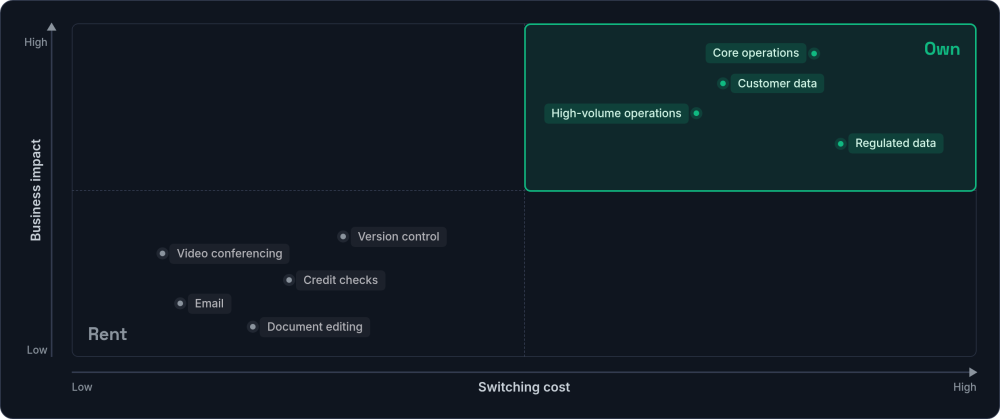
The five characteristics of a sovereign business system are straightforward. Your data lives in databases you own (see the guide to data modelling), backed up independently and exportable in standard formats. Your business logic lives in code you control, not in a vendor's configuration layer. Your development roadmap follows your priorities, not a vendor's product team. Your costs track infrastructure, not per-seat pricing that climbs unpredictably. And your integrations use standard protocols without artificial limits.
When renting is still the right call: Digital sovereignty is not about rejecting SaaS entirely. Email, video conferencing, document editing, calendar, credit checks, and identity providers are commodity functions where specialist providers genuinely offer more value than self-hosting. The goal is technology independence for the systems that encode how your business operates, not total isolation.
This maps directly to the decision framework in the guide to building versus buying software. Commodity functions are fine to rent. Core systems deserve ownership. The principle also connects to vertical integration: the more of your operational stack you control, the more freedom you have to adapt as the business grows.
The Real Cost Comparison
The total cost of vendor dependency is often invisible because it spreads across multiple budget lines. Subscription fees are obvious. Workaround labour, integration maintenance, switching costs, and opportunity costs from feature limitations are not.
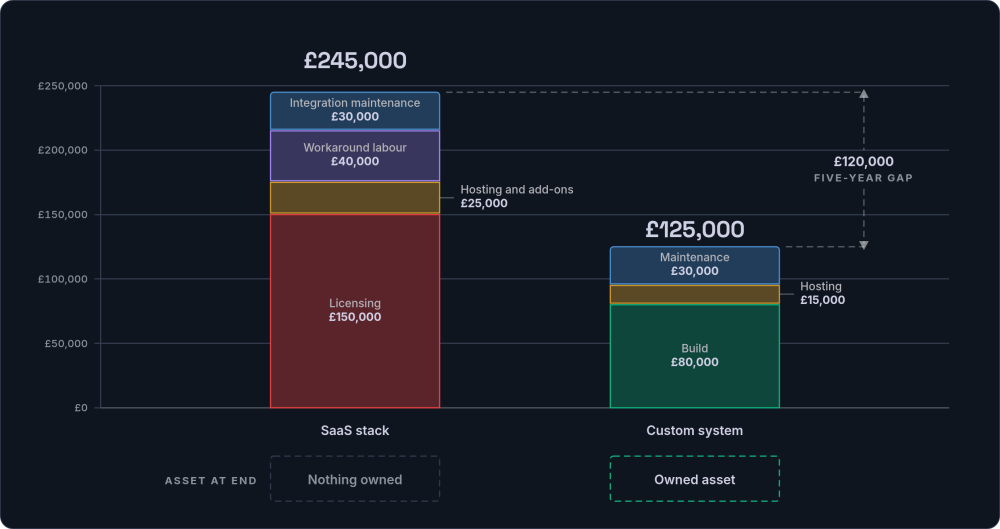
To illustrate the pattern, consider a model scenario: a professional services firm with 25 employees over a five-year period. The figures below are illustrative, based on typical ranges for UK businesses at this scale (using current UK hosting and developer rates), not a universal rule.
| Cost category | SaaS stack (5 years) | Custom system (5 years) |
|---|---|---|
| Licensing / development | £150,000 (£30k/yr with increases) | £80,000 (initial build) |
| Hosting and add-ons | £25,000 | £15,000 |
| Workaround labour | £40,000 | Minimal |
| Integration maintenance | £30,000 | Included in maintenance |
| Ongoing maintenance | Included in subscription | £30,000 |
| Asset at end | £0 (subscription expires) | Owned system, extendable |
| Total | ~£245,000 | ~£125,000 + owned asset |
The inflection point varies by business size and complexity, but the pattern holds. SaaS costs accumulate linearly (or worse, with per-seat increases as you grow). Custom system costs are front-loaded but flatten over time.
The Inflection Point: Around 15 to 20 Employees
At 10 seats, a typical SaaS stack (CRM, project management, invoicing, reporting) costs roughly £800 to £1,200 per month. Custom development is hard to justify at that scale. At 20 seats, the same stack runs £1,600 to £2,400 per month, or £19,200 to £28,800 a year. Workaround labour adds another £5,000 to £8,000 a year on top.
Over five years that pushes the total towards £120,000 to £180,000. At that point a £60,000 to £80,000 custom build, with £6,000 to £8,000 a year in maintenance, starts to look like the better financial decision. You also own the resulting asset rather than renting it. The crossover arrives sooner for businesses scaling quickly, where per-seat costs compound with headcount growth.
Building Toward Digital Sovereignty
A practical path to digital sovereignty does not require replacing everything at once. It starts with understanding your current position and making deliberate decisions about what to change.
Step 1: Score Your Current Position
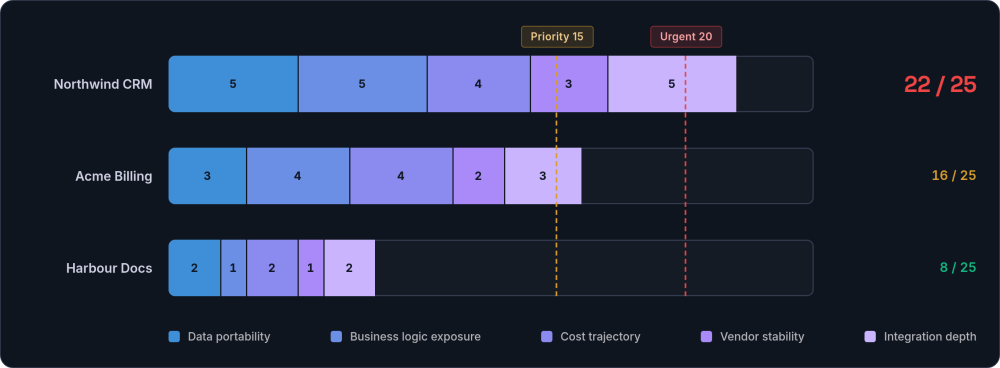
Before making any decisions, get a clear picture of where you stand. For each SaaS platform your business depends on, score it against these five dimensions on a scale of one (low risk) to five (high risk). If you would rather have an outside view, a stack health check gives you a fixed-price, independent read on the systems you already run.
| Dimension | Score 1 (low risk) | Score 5 (high risk) |
|---|---|---|
| Data portability | Full export in standard formats, tested regularly | No export, or export missing key data (relations, files, history) |
| Business logic exposure | Workflows documented externally, reproducible elsewhere | Automations live only inside the platform, undocumented |
| Cost trajectory | Fixed or inflation-linked pricing, predictable | Per-seat with annual increases, tier consolidation, surprise add-ons |
| Vendor stability | Established, profitable, no recent ownership changes | Recent acquisition, VC-funded with no path to profit, key staff leaving |
| Integration depth | Standard APIs, few dependencies, easy to swap | Deep integrations with multiple systems, proprietary connectors |
Any platform scoring above 15 out of 25 is a priority for your sovereignty strategy. Above 20, and you have an urgent dependency that deserves attention before the next renewal cycle.
Step 2: Build Your Sovereignty Roadmap
Once you know which platforms carry the most risk, the work becomes a sequence rather than a leap. You do not have to move everything, and you do not have to move at once. The four steps below take you from a full picture of your dependencies to a deliberate plan, timed around renewal dates rather than crises.
Audit your dependencies
List every SaaS tool your business uses. Run the scoring exercise above. Identify where your most critical data lives and what would happen if that platform changed its terms, pricing, or feature set tomorrow.
Identify the critical few
Most businesses find that three to five systems carry disproportionate dependency risk. These are the tools where switching difficulty is highest and business impact is greatest. Focus your sovereignty strategy on these, and leave the low-risk commodity tools alone.
Plan exit paths before you need them
For each critical platform: test a full data export and verify you can restore it. Document your current workflows and business rules independently of the platform they run on. Map every integration dependency. Note your renewal dates and contract terms. This planning costs nothing and provides insurance against forced migration.
Build or migrate strategically
Address the highest-scoring systems first. Consider migrating legacy systems where existing platforms have become constraints rather than enablers. Maintain sensible external dependencies for commodity functions where the convenience genuinely outweighs the risk. Time your moves to align with renewal dates, not crisis points.
The Technical Foundations
The technical foundations that enable sovereignty are well established and have been stable for decades. Open-source frameworks like Laravel, Django, and PostgreSQL provide production-grade tools that cannot be repriced or withdrawn. Standard data formats (JSON, CSV, relational schemas) ensure portability. API-first architecture makes systems replaceable at the component level. Containerisation with Docker enables movement between hosting providers without rebuilds.
None of this is experimental or bleeding-edge. These are the same foundations that run some of the largest applications on the web. The tooling is mature, the talent pool is deep, and the community support is extensive. The risk profile of building on open-source foundations is, at this point, lower than the risk of depending on a single commercial vendor. The same principle now extends to AI: private and self-hosted AI keeps models and data on infrastructure you control rather than behind a third party's API.
Common Objections, Honest Answers
Digital sovereignty is not the right choice for every business in every situation. These are the most common objections, along with honest responses.
"We cannot afford custom development right now."
That may be true. SaaS makes sense for small teams and early-stage businesses. The inflection point tends to arrive somewhere around 15 to 20 employees, or when workaround costs become significant. Digital sovereignty is a direction, not a destination you must reach immediately.
"We do not have technical staff to maintain custom systems."
This is the most common objection, and the most easily addressed. The model known as "managed ownership" means you own the system and the code, but you contract a development partner to handle hosting, maintenance, and updates. The custom system needs the same attention as any SaaS subscription: someone needs to be responsible for it. The difference is that you choose who that someone is, and you can change your mind without losing the asset.
"SaaS platforms are more secure than custom systems."
It depends. Large SaaS platforms invest heavily in security, and that's a genuine advantage. A well-built custom system can have a smaller attack surface because it does only what your business needs. That edge only holds if the team building it follows sound security practices. For regulated industries, custom systems often make compliance easier to demonstrate, because you control every layer. The honest answer: security depends on implementation quality, not on whether the software is custom or commercial.
"We have already invested heavily in our current platform."
The investment is gone regardless of what you do next. The question is whether future spending goes toward deepening a dependency or building an asset. Sunk costs should not drive forward-looking decisions.
What to Look for in a Development Partner
If you decide to move toward sovereignty for your core systems, the choice of development partner matters as much as the technology. A good development partner should be replaceable. If leaving them means losing access to your own systems, that is a sovereignty problem, not a partnership. Here are the non-negotiable standards to hold any partner to.
The litmus test is simple. You should be able to walk away tomorrow and keep everything running with a different developer. If you cannot, the relationship is a dependency rather than a partnership. Settle that point before signing anything.
Frequently Asked Questions
What is digital sovereignty?
Digital sovereignty means a business retains direct ownership of the systems, data, and operational logic it depends on. Rather than accepting a vendor's terms as a condition of doing business, a sovereign organisation can move, modify, or replace any part of its technology stack without permission or penalty.
What is the difference between data sovereignty and digital sovereignty?
Data sovereignty refers specifically to the legal jurisdiction governing where data is stored and processed. Digital sovereignty is broader: it encompasses control over the systems, business logic, integrations, and development roadmap, in addition to the data itself.
When does digital sovereignty matter most for businesses?
Digital sovereignty matters most when the systems in question encode your competitive advantage, hold sensitive or regulated data, or carry high switching costs. For commodity functions like email and calendar, renting is perfectly sensible. For core operational systems, ownership reduces risk and increases long-term flexibility.
How do I assess my current level of vendor dependency?
Start by listing every SaaS tool your business uses. Score each one against the five dimensions in the dependency scoring table above: data portability, business logic exposure, cost trajectory, vendor stability, and integration depth. Platforms scoring above 15 out of 25 are your priority. Examine data export capabilities, contract terms, and renewal dates for each.
Is digital sovereignty only relevant for large enterprises?
No. Growing businesses in the 15 to 30 employee range often face disproportionate platform risk because they rely heavily on a small number of SaaS tools for core operations. The principles apply at any scale, though the implementation approach differs. Small businesses may start with data portability and exit planning rather than full custom development.
How do I plan an exit path from a platform I am already locked into?
Start 90 days before your next renewal. Test a full data export and verify you can actually restore it. Document all automations and workflows that live inside the platform. Map every integration dependency. Benchmark your current costs against alternatives, including custom development. You don't necessarily have to leave straight away. The point is to hold a credible alternative, which gives you negotiating power and a real option if the terms become unacceptable. See the guide to legacy system migration for the technical side of this process.
What do switching costs for SaaS really include?
The visible costs (migration fees, new licensing, contractor time) are often the smaller portion. The rest includes staff retraining, productivity loss during transition, historical data that does not migrate cleanly, integration rebuilding, and process redesign. There is also the institutional knowledge that was never documented because the platform made it easy to create without writing it down.
Next Steps
Run the dependency scoring exercise above. If any of your critical platforms score above 15, it is worth exploring your options before the next renewal cycle. A consulting session can help you assess your current exposure and plan your next steps.
Talk through your options →