
When Custom Software Makes Sense
The build vs buy software decision is one of the most consequential choices a growing business faces. Get it right and you unlock years of operational advantage. Get it wrong and you either waste six figures on software nobody uses, or you spend the next decade working around a tool that nearly fits.
This guide will help you think through the build vs buy software decision clearly, with a practical framework you can apply regardless of who you work with. Sometimes the right answer is a £50 per month SaaS subscription. Sometimes it is a six-figure custom build. The point is to make that call based on evidence, not instinct or vendor pressure.
The short version:
- If a process is commodity (payroll, email, accounting), buy it.
- If a process is core to how you compete and operate, building deserves serious consideration.
- If you are not sure, track your workarounds for a fortnight. The data will make the decision for you.
- Compare total cost of ownership over five years, not monthly subscription against development quote.
Build vs Buy: What It Actually Means
Build vs buy is the decision between developing bespoke software tailored to your specific business processes, or purchasing an existing product (SaaS subscription or off-the-shelf licence) that serves a similar function. Put simply, it is the custom software vs off-the-shelf question that every growing business eventually faces. In procurement circles you may hear it called the make or buy decision, but the underlying question is the same. At its heart, it is about whether your systems give you a single source of truth that matches how you actually work, or force you into someone else's idea of how you should work.
The question is not really about features. Feature lists are easy to compare. The real question comes down to how central this system is to the way your business operates, and what happens when you outgrow it.
This distinction is worth understanding before you look at a single price tag.
Commodity vs Core: The Key Distinction
Every business runs two types of system:
Commodity systems handle functions that are broadly the same across industries. Email, payroll, accounting, basic project management. These are well served by off-the-shelf software (pre-built products designed for a broad market rather than any single organisation's workflow). The processes are well understood, heavily regulated, or simply not where your competitive advantage lives.
Core systems encode the way your business specifically operates. Your quoting logic, your client onboarding workflow, your production scheduling, your reporting dashboard. These are the systems where your business knowledge lives, and where off-the-shelf products force you into workarounds.
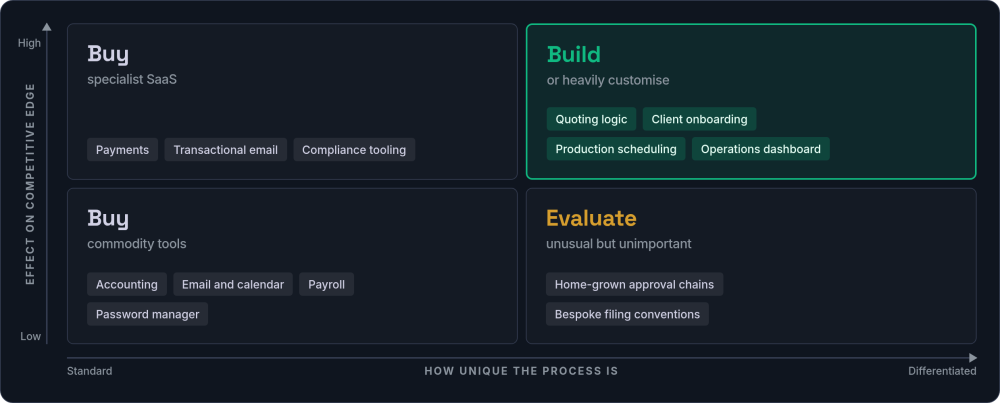
The build vs buy decision framework starts here. If the system is commodity, buy it. If the system is core, building deserves serious consideration.
Build vs Buy Software at a Glance
Before diving into the detail, this comparison captures the key differences between buying off-the-shelf software and building custom.
| Factor | Buy (SaaS / off-the-shelf) | Build (custom software) |
|---|---|---|
| Upfront cost | Low (monthly subscription) | Higher (development investment) |
| Time to deploy | Days to weeks | Weeks to months |
| Fit to your process | Generic, you adapt to it | Exact, it adapts to you |
| Ongoing cost (5 years) | Accumulates (often surprises) | Predictable maintenance |
| Customisation | Limited by vendor roadmap | Unlimited |
| Data ownership | Vendor-controlled | Fully yours |
| Switching cost | Can be very high | You own the code |
| Best for | Commodity functions | Core operations |
When Buying Off the Shelf Is the Right Answer
The custom software vs SaaS debate does not always favour custom. Let us be direct. For many business functions, buying is clearly the better choice. Building your own email system or accounting platform would be absurd.
The next two signs are about timing and risk rather than the nature of the work itself.
A recruitment agency does not need a custom applicant tracking system. A small e-commerce business does not need a custom inventory platform. A consultancy does not need custom time tracking. Not unless their workflows are genuinely different from the standard.
Sometimes, the honest answer to the build vs buy software question is: buy it, and spend the money you saved on something that actually differentiates your business. Scaling without chaos means picking the right battles, not building everything from scratch.
When the Build vs Buy Answer Is "Build"
Knowing when to build custom software starts with recognising friction. Custom software earns its place when off-the-shelf products create workarounds that quietly cost you money. These are the patterns that most reliably signal a build decision.
Each of the remaining signs tends to show up as a recurring cost rather than a single dramatic event.
The final two signs are strategic rather than operational.
How to Run a Workaround Audit
The workaround cost is usually the largest hidden expense in a buy decision, and the hardest to quantify because it is spread across the team in small increments. Here is a practical way to measure it.
Pick a two-week window
Choose a representative fortnight (not a quiet period, not your busiest month). Ask every team member who uses the system to participate.
Give them one simple prompt
Every time you catch yourself saying "the system cannot do that, so I...", write it down. Record the task, roughly how long it took, and which system caused the friction. A shared spreadsheet or a Slack channel works fine.
Calculate the annual cost
Total the hours across the team for the fortnight, multiply by 26 (to annualise), then multiply by your average fully loaded hourly cost. For most UK businesses, £30-45 per hour is a reasonable figure including employer costs.
Compare against build cost
If the annual workaround cost exceeds 20-30% of the estimated build cost, custom software will likely pay for itself within three to four years. If it exceeds 50%, the payback period shortens to under two years.
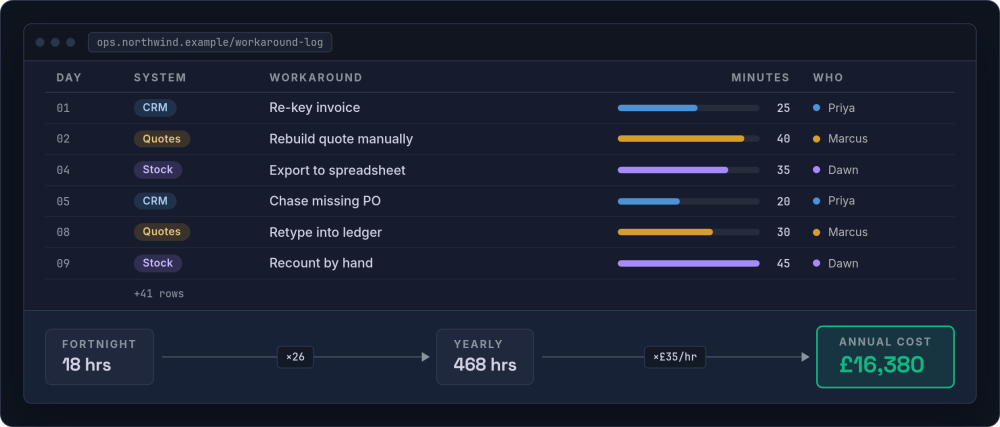
This exercise also produces a requirements document almost as a side effect. The workarounds your team logs are a near-perfect list of what custom software needs to do differently.
When Custom Software Is the Wrong Answer
Building when you should buy is just as expensive as buying when you should build. Any honest assessment of the build vs buy question has to include the cases where custom software is the wrong answer, a theme we explore further in when not to build custom software.
The last two cases are less about the software and more about whether your business is ready to own it.
A good development partner will tell you not to build. Experienced teams in this space report that a significant proportion of initial discovery conversations end with "do not build this, buy X instead." That honesty is a sign you are working with the right people.
The Real Cost of Build vs Buy Software
Most build vs buy software analyses compare the wrong numbers. They look at the subscription fee against the development quote and declare SaaS cheaper. That comparison misses most of the actual cost.
The Hidden Costs of Buying
A SaaS tool that costs £200 per month looks cheap. Over five years, that is £12,000 in subscription fees alone. But the real costs include:
-
Per-seat pricing as you grow That £200 becomes £800 when your team doubles.
-
Premium tier upgrades The feature you need is always on the next plan up.
-
Workaround labour Staff time spent on manual processes the tool does not support. Teams commonly lose 5-15 hours per week to this.
-
Integration costs Connecting tools together, maintaining those connections when APIs change.
-
Training costs Every new hire needs training on a workflow that includes manual steps.
-
Data export limitations When you need to leave, getting your data out can be expensive or impossible.
SaaS prices rarely stay where they start. Annual price increases of 5-15% are common across business software. Major vendors like Atlassian, Salesforce, and HubSpot have all pushed through notable price rises in recent years. These are not exceptional events; they are the business model working as designed. The vendor needs growth, and your renewal is where they find it.
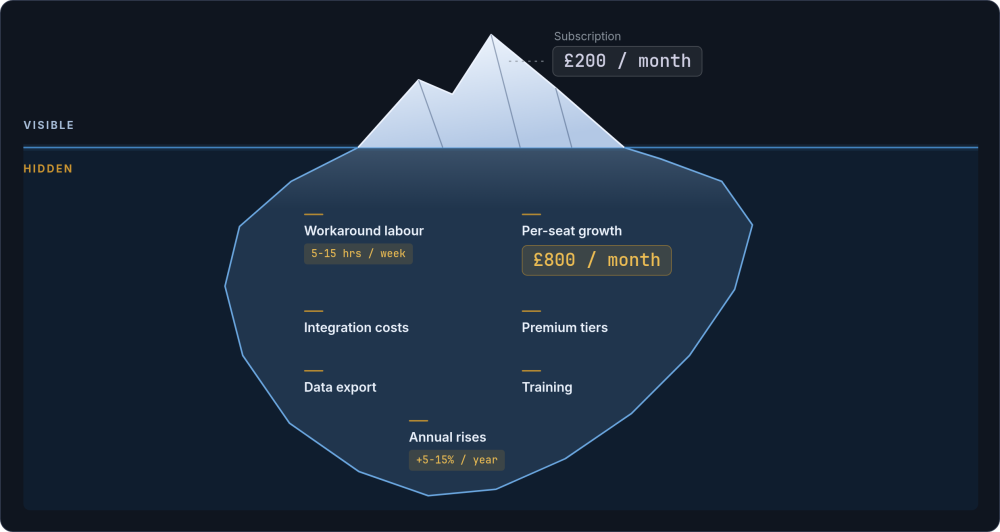
For a mid-market business, a realistic five-year cost for a SaaS stack often lands between £40,000 and £120,000 when you account for everything.
The Real Cost of Building
Custom software development for a well-scoped UK business application typically falls between £15,000 and £80,000, with ongoing maintenance of roughly 10-20% of the build cost per year. According to the Standish Group's CHAOS reports, smaller, well-scoped projects have significantly higher success rates than large-scale builds.
A £40,000 build with £6,000 annual maintenance costs £70,000 over five years. That is often comparable to the true cost of the SaaS alternative, except you own the result, the system fits your process exactly, and your customer records belong to you.
A Worked Example: SaaS vs Custom Development
Consider a professional services firm with 30 staff, using a typical SaaS stack for client management, project tracking, reporting, and integrations.
| Cost category | SaaS stack (5-year total) | Custom application |
|---|---|---|
| Base cost | £36,000 (CRM £30/seat + PM tool £15/seat + reporting £400/mo) | £45,000 development |
| Per-seat growth | £10,800 (team grows to 40 by year 3) | £0 |
| Annual price increases | £6,400 (8% average) | £0 |
| Workaround labour | £27,300 (3 staff, 3 hrs/wk, £35/hr) | £0 |
| Integration/maintenance | £7,500 (Zapier + API fixes) | £31,500 (15% of build cost/year) |
| Hosting | Included | £3,600 (£60/mo) |
| Training | £4,000 (new hires learn workarounds) | £1,500 (system matches process) |
| Five-year total | £92,000 | £81,600 |
The numbers shift depending on team size, tool choices, and scope. For smaller teams or simpler needs, SaaS often wins outright. But for businesses at this scale with core operational systems, the pattern tends to hold: once you include the hidden costs, the true cost of custom software is often comparable to or lower than the SaaS alternative. The difference is that at the end of those five years, you own something built exactly for how your business operates.
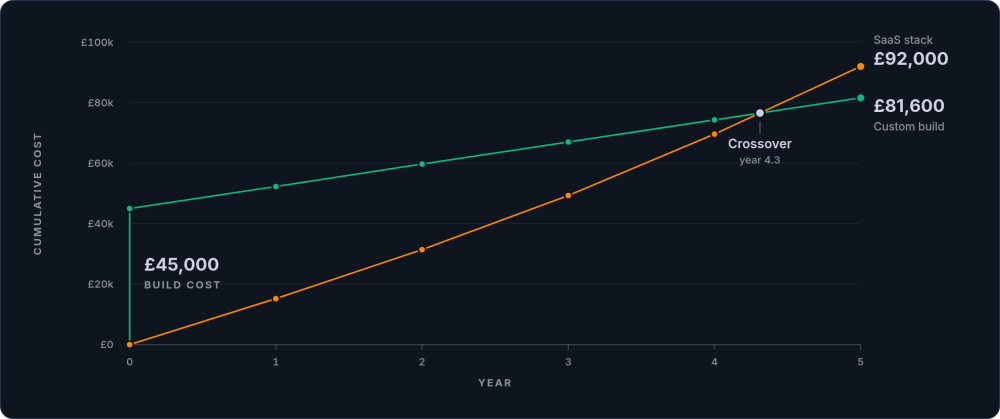
The build vs buy decision framework should always compare software total cost of ownership over five years, not sticker price against development quote.
A Six-Question Decision Framework
Before you decide whether to build or buy, work through these questions honestly. This build or buy decision framework aligns with the UK Government Technology Code of Practice, which recommends evaluating choices based on total cost, data ownership, and integration capability.
Is this a commodity function?
If the answer is yes, buy. Do not build your own email system, payroll platform, or accounting software. These are solved problems with excellent products available.
How much time do workarounds cost each week?
Track it for a fortnight. Ask your team to note every time they say "the system cannot do that, so I..." If the answer is more than 10 hours per week across the team, the cost of buying is higher than you think.
What would it cost to leave your current vendor?
Check your data export options. Look at API access. Read the contract termination clauses. If leaving would take months and cost tens of thousands in migration, you are already more dependent than you may realise.
Where will you be in five years?
If your team will be three times the size, per-seat pricing that feels reasonable now may not. If your processes will be more complex, today's off-the-shelf tool may no longer fit. Project forward, not just sideways.
Can you clearly specify what you need?
Custom software requires clear requirements. If you cannot describe your ideal workflow in concrete terms, you are not ready to build yet. Use off-the-shelf tools to learn what you actually need, then build once you know.
Is this system a competitive advantage?
If the system encodes business knowledge that differentiates you from competitors, owning it protects that advantage. If it handles a function any business does the same way, ownership adds no strategic value.
Take the framework with you: we have published this thinking as a free, open-source decision kit. Build vs Buy on GitHub includes a scoring worksheet that works offline, a five-year cost template, and decision record templates you can run with your team in an afternoon.
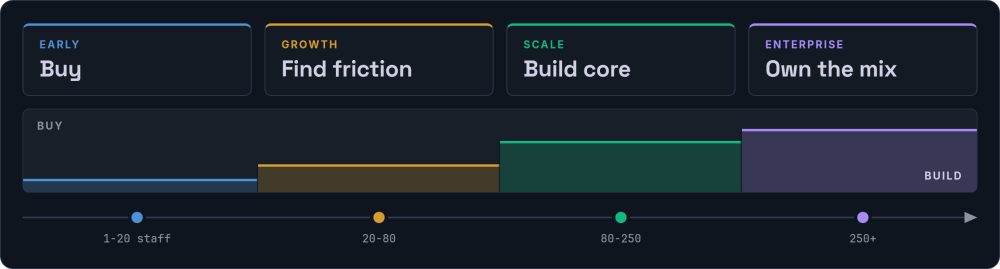
Build vs Buy by Company Stage
The right answer changes as your business grows. Here is what that looks like in practice at each stage.
Early Stage (1-20 staff): Default to Buying
Your processes are still evolving. You do not yet know what your core operations will look like at scale. Use SaaS tools generously. Pay attention to where friction appears.
Growth Stage (20-80 staff): Identify Your Friction Points
By now you know which processes define your business and which are commodity. Start quantifying the cost of workarounds. Begin scoping custom builds for your one or two core systems.
Scale Stage (80-250 staff): Build Your Core Systems
The cost of workarounds at this scale is substantial. Per-seat SaaS pricing becomes painful. Custom software that encodes your operational knowledge pays for itself within two to three years.
Enterprise (250+ staff): Optimise Ownership
You likely need a mix: custom core systems, best-of-breed SaaS for commodity functions, and a custom integration layer connecting everything.
The Third Option: Buy Commodity, Build Core
The best approach to the build vs buy software question is rarely pure build or pure buy. Most businesses that get this right follow a pattern.
This hybrid approach gives you the speed of SaaS for commodity functions and the control of custom software where it matters most.
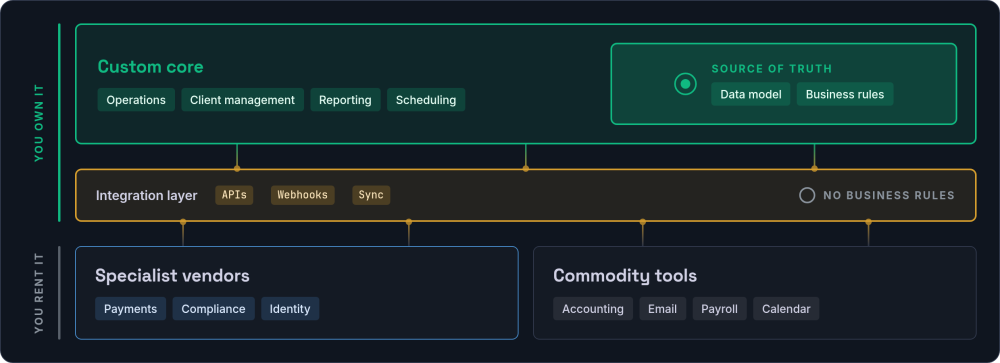
The integration layer is often the most overlooked piece: the glue that lets your custom customer records system talk to your accounting software without manual data entry, and lets your operations dashboard pull from every source automatically. Without it, you end up with the same manual data transfers you were trying to eliminate, just between different systems.
The Sunk Cost Trap
"We have already invested so much in this system" is not a reason to keep using it. The money already spent is irrelevant to the forward-looking decision. What matters is whether the system serves your needs going forward, and what it costs to keep it versus replace it. Watch for these patterns.
The clearest tell is emotional rather than financial.
The honest test is simple. Imagine you are starting from scratch today, with no existing systems, and ask yourself whether you would choose the same tool again. If the answer is no, the sunk cost is the only thing keeping you there.
Vendor Lock-in: The Risk Nobody Talks About Until It Is Too Late
Vendor lock-in is a compounding risk. It starts small (your data is in their format, your team knows their interface) and grows quietly until leaving becomes genuinely expensive. Before signing up with any SaaS vendor, or before your next renewal, work through this checklist.
The remaining points are the ones businesses tend to skip past at signup and regret at renewal.
One last point is the one most outside your control, which is exactly why it belongs on the list.
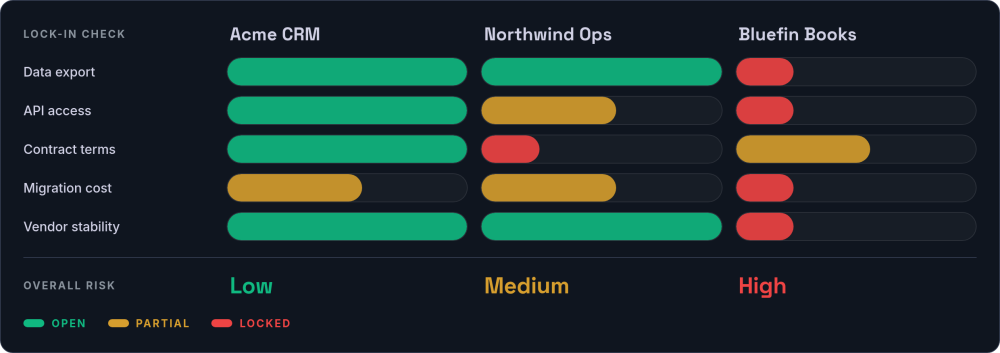
This is closely related to the broader question of digital sovereignty: ultimately, the issue is who controls the data and logic that your business depends on. The more central a system is to your operations, the more that control matters.
What Good Looks Like in a Build vs Buy Process
Whether you handle the decision internally or bring in outside help, a good build vs buy process follows a predictable shape.
Discovery before proposals
Map your current systems. Classify each as commodity or core. Quantify the cost of workarounds. Any conversation that jumps straight to a quote without this step is skipping the most important part.
Honest recommendations
The right partner (or the right internal team) will tell you not to build when buying is the better answer. If the recommendation is always "build", the incentives are misaligned.
Ownership of everything
If you do build, you should own the code, the data, and the infrastructure. No lock-in to the development partner. No proprietary frameworks that only they can maintain. If you could walk away tomorrow and hand the codebase to another team, the relationship is structured correctly.
Iterative delivery
Build the most valuable piece first, deploy it, learn from real usage, then build the next piece. A twelve-month project with nothing to show until month twelve is a high-risk approach. Iterative delivery reduces risk and lets you course-correct early.
These principles hold regardless of whether you build with an agency, a freelancer, or an internal team. The technology stack matters less than the process around it.
Red Flags When Choosing a Development Partner
If you decide to build, your choice of development partner is the single biggest risk factor. Here are the warning signs that a partnership is likely to go wrong.
The remaining flags are about what happens to the relationship once the code exists.
The final flag is subtle, and it tends to predict how the whole project will feel.
Frequently Asked Questions
What is the build vs buy decision in software?
The build vs buy decision is the choice between developing custom (or bespoke) software for your business processes or purchasing an existing product (typically a SaaS subscription or off-the-shelf licence). The right answer almost always depends on whether the function is a commodity process or a core competitive advantage. Commodity functions (payroll, email, accounting) are nearly always better served by existing products. Core functions (the workflows that differentiate your business) are where bespoke software earns its place.
How do you calculate the total cost of ownership for build vs buy?
Compare five-year costs for both options. For buying, include subscription fees, per-seat scaling costs, integration expenses, workaround labour, and training. For building, include development cost, annual maintenance (budget roughly 10-20% of build cost), hosting, and any future enhancements. Most businesses significantly underestimate the true cost of SaaS once these hidden factors are included. The worked example earlier in this guide shows how the numbers typically play out.
When should a small business build custom software?
Buy off-the-shelf tools until you clearly understand your core processes and can specify exactly what you need. Use SaaS deliberately as a prototyping phase. Document friction points and workaround costs as they emerge, then build once your processes have stabilised and the cost of workarounds justifies the investment. An MVP build is a sensible first step at that point: the smallest version that proves the idea before you commit to the full system. The exception is when an off-the-shelf product creates significant friction in a process central to how the business operates and competes. The same applies in regulated industries where data residency and compliance requirements make SaaS unsuitable.
Is custom software more expensive than SaaS?
Not necessarily. Custom software has higher upfront costs, but the total five-year cost is often comparable to or lower than a SaaS stack once you include per-seat pricing growth, workaround labour, integration costs, and premium tier upgrades. The trade-off is front-loaded cost in exchange for better data ownership, exact process fit, and no per-seat scaling. For commodity functions, SaaS is almost always cheaper. For core operational systems, custom software frequently wins on total cost of ownership.
What are the risks of building custom software?
The main risks are unclear requirements (leading to scope creep), choosing the wrong development partner, and underestimating ongoing maintenance needs. These risks are mitigated by thorough discovery before any code is written, iterative delivery with regular check-ins, and working with a team who will tell you honestly when buying is the better option. The Standish Group's research consistently shows that smaller, well-scoped projects succeed at much higher rates than large monolithic builds.
What to Do in the Next 30 Days
Regardless of where you land on the build or buy decision, these four steps will give you better data to work from.
Catalogue your current tools
List every SaaS tool your business uses, what it costs per year (including per-seat fees), and whether it handles a commodity or core function. This alone often reveals surprising totals.
Track workaround hours for a fortnight
Ask your team to note every time they say "the system cannot do that, so I..." Record the task, the time, and which system caused the friction. Multiply the total hours by your average hourly cost.
Check your exit options
For your three most critical SaaS tools, test the data export and confirm you can get your data out in a usable format. Check API access at your current pricing tier. Read the contract termination clauses.
Calculate your five-year costs
Project your SaaS spending forward five years, including team growth, annual price increases, and workaround labour. Compare that number against a realistic custom development estimate for your core systems.
Need a Second Opinion?
If you have worked through the framework and want to sense-check your thinking, we are happy to talk it through. Our consulting sessions are designed for exactly this kind of decision, and if you are ready to move forward, a structured discovery engagement will give you a specification and realistic budget to work from.
Get in touch →