
One Place for the Right Answer
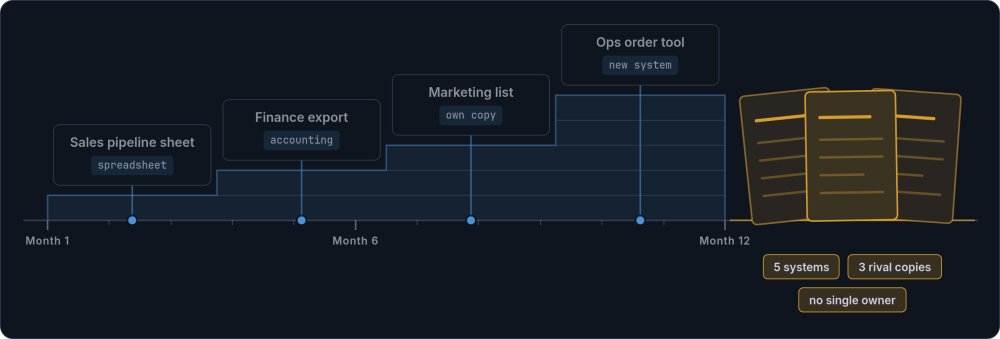
Every business accumulates data across multiple systems. Sales tracks pipeline in a spreadsheet. Finance pulls numbers from the accounting package. Operations manages orders in a tool that made sense three years ago. Marketing maintains its own customer list. Each system works in isolation. The problems live in the gaps between them.
A single source of truth isn't one giant system that does everything. It is clarity about where the definitive version of each type of information lives, and the discipline to treat that source as authoritative. For a growing business with 10 to 50 people, this distinction matters. You don't need an enterprise data warehouse. You need to know that when someone asks "how many active customers do we have?", the answer comes from one place, and that place is trusted.
A quick diagnostic: Ask five people in your business where the customer master record lives. If you get three different answers, you have a data trust problem. This page covers why that happens and how to fix it without replacing every tool you already use.
How Data Silos Develop (and Why They Feel Normal)
Nobody decides to create data silos. They accumulate through reasonable decisions made in isolation, each one solving an immediate problem.
It starts innocently. Sales needs to track pipeline, so they create a spreadsheet. Finance needs revenue figures, so they export from the accounting system. Marketing wants customer information for campaigns, so they maintain their own list. Each tool works for the team that uses it.
The difficulty is that these systems do not talk to each other. A year later, the business has five systems with overlapping data and three spreadsheets that different people consider "the real one". Nobody can give a clear answer to simple factual questions. This is one of the patterns that emerges when spreadsheets stop being fit for purpose.
The Moments That Expose the Gaps
The data silos stay invisible until someone needs information that crosses system boundaries. Then the friction becomes obvious.
The customer calls
You check the CRM. It shows the order shipped last week. The customer says it never arrived. You check the operations system. It shows the order as "processing." Someone updated one system but not the other. Now you are apologising and investigating instead of helping.
The board meeting approaches
You need revenue figures. Finance has one number. Sales has another. Imagine discovering the difference is tens of thousands of pounds. Two hours of reconciliation before you can even start preparing the presentation. When a board member asks a follow-up question, you do not trust your own figures enough to answer confidently.
A new hire starts
They ask where to find customer information. The answer: it depends. Contact details are in the CRM (but it is often outdated). Order history is in the operations system. Payment status is in the accounting package. The new hire spends their first month learning archaeology instead of doing their job.
Someone leaves
Their personal spreadsheet, the one with the "real" project timeline that everyone actually used, leaves with them. Or worse, it stays undiscovered on their desktop until three months later when someone desperately needs it. The knowledge that held things together walks out the door.
These moments are not edge cases. In a business running on scattered data, they happen weekly. Each one costs time, erodes confidence, and makes the team slower.
They also tend to create a secondary problem: people start maintaining their own shadow copies. Personal spreadsheets, local files, email folders that serve as informal databases. Not because people are disobedient, but because the official systems cannot be trusted to give them what they need. This is shadow IT in its most common form: not a security breach, just people solving problems the official tools fail to address. Shadow spreadsheets are a symptom of data friction, not a character flaw.
The Real Cost of Scattered Data
Most businesses underestimate how much poor data consistency costs because the expense is distributed across dozens of small moments rather than appearing on any invoice. But the numbers add up.
Time lost to data archaeology
Every week, someone on your team is comparing spreadsheets, checking which version is current, copying updates between systems, or fixing discrepancies.
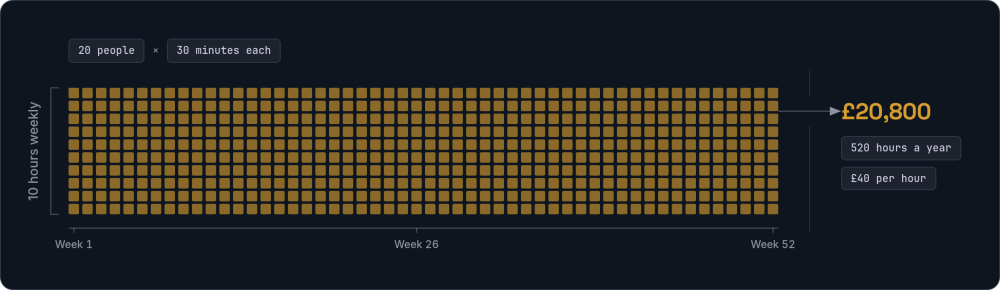
Across a team of 20, if each person spends just 30 minutes a week on this, that is 520 hours a year. At £40 per hour fully loaded, the business spends £20,800 annually on activity that should not exist.
Decisions made on wrong information
When you cannot trust your data, you either make decisions on information that might be outdated, or you delay decisions while you verify. Both are expensive.
A common pattern: the leadership team believes a client account is profitable at 15% margin. When someone finally reconciles the numbers, the real figure is negative. Different systems held different views, and nobody had the complete picture.
Errors from manual data entry
Every time someone copies data from one system to another, there is a chance of error. Transposed digits, missed rows, outdated formulas, copy-paste mistakes.
Research from bodies like the European Spreadsheet Risks Interest Group suggests manual data entry error rates typically fall between 1% and 4%. If your team enters 500 records per month across various systems, that could mean 5 to 20 errors monthly. Some are caught quickly. Some cause real damage.
Knowledge trapped in people
When critical information exists only in someone's head, or in a spreadsheet only they understand, you have created a single point of failure.
Holidays become risky. Sick days become emergencies. Departures become crises. The business depends on specific people being available to answer "where is the real version of this?"
What Centralised Data Actually Looks Like
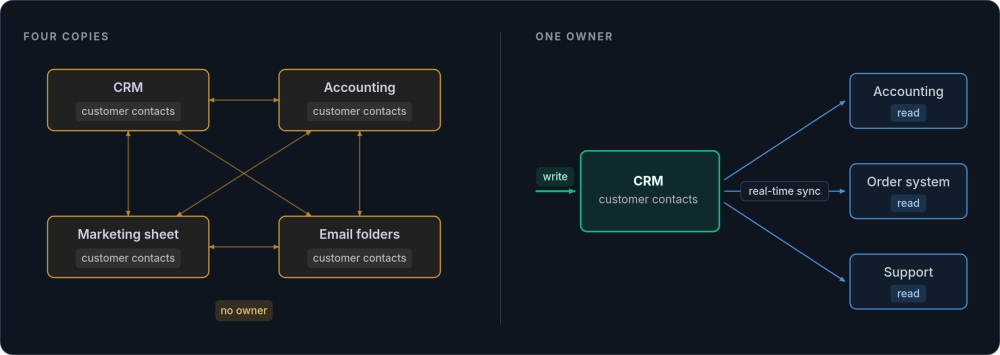
In practice, a single source of truth shows up as centralised data with a clear ownership map. For each type of information, one system is the master and accepts updates. Other systems can display that data, cache it, or use it for reporting, but they do not maintain independent copies. The question is not whether to own or rent your tools, but whether you have documented which tool owns which data.
How to Build a Data Ownership Map
The data ownership map is the single most useful artefact in the entire process. It turns implicit knowledge ("ask Sarah, she knows where the customer list is") into an explicit reference anyone can consult. Here is how to build one from scratch.
Step 1: List every data type your business relies on. Walk through your core operations and write down each category of information. Start broad: customer contacts, financial transactions, order status, product catalogue, inventory levels, project tracking, employee records, supplier information, pricing, contracts. Most businesses with 10 to 50 people will identify between 8 and 20 distinct data types.
Step 2: For each data type, list every system where it currently lives. This is the uncomfortable part. Customer contacts might live in your CRM, your accounting system, a marketing spreadsheet, and three people's email address books. Be thorough. Ask each team to contribute, because they will know about systems and spreadsheets that other teams have never heard of.
Step 3: Decide which system is the owner. For each data type, choose one system as the authoritative source. The owner is the system that accepts updates directly. Everything else either reads from it or receives synced copies. Three criteria decide it: the system most naturally suited to that data type, the system the relevant people already use daily, and the system with the best data quality right now.
Step 4: Identify the consumers. For each data type, list which other systems need access to that information and how often they need it refreshed. A warehouse system might need inventory updates every 15 minutes. A reporting dashboard might be fine with hourly syncs. Monthly reporting can tolerate daily updates.
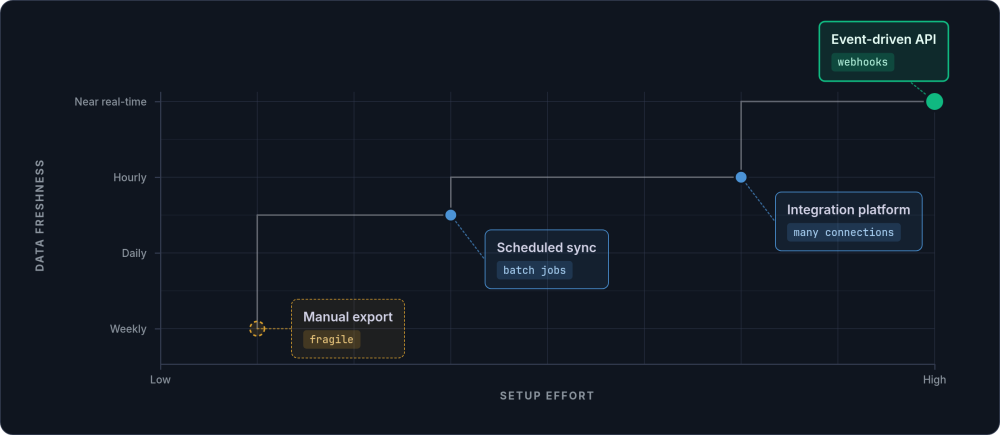
Step 5: Define the sync approach. For each owner-to-consumer relationship, decide how data will flow. The options run from simplest to most involved. A manual export on a schedule is the simplest and the most fragile. An automated scheduled sync runs daily or hourly batch jobs. Event-driven sync via webhooks or APIs pushes updates in near real-time. A dedicated integration platform orchestrates multiple connections at once.
Here is an example of a completed ownership map for a typical growing business.
| Data type | Owner system | Consumers | Sync approach |
|---|---|---|---|
| Customer contacts | CRM (e.g. HubSpot) | Accounting, order system, support | Real-time sync |
| Financial transactions | Accounting (e.g. Xero) | Reporting, dashboards | Hourly |
| Order status | Order management | CRM, customer portal, warehouse | Real-time |
| Product catalogue | PIM or ERP | Website, sales tools, order system | On change |
| Inventory levels | Warehouse system | Website, order system, purchasing | Every 15 minutes |
| Project tracking | Project tool (e.g. Airtable) | CRM, reporting, resource planning | On change |
| Employee records | HR system | Payroll, project system, access control | Daily |
Your map will look different. The specific systems matter less than the principle: every row has exactly one owner. If you find a data type with two owners, that is where your conflicts live. Resolve the ownership before worrying about sync mechanisms.
Store the completed map somewhere the whole team can find it: a shared document, an internal wiki, a pinned page in your knowledge management system. This is not a document that lives in someone's email. Every new team member should see it on their first day. Review and update it quarterly, or whenever you add or retire a system.
The data ownership map makes implicit knowledge explicit. It answers the question every team member asks: "where is the definitive version of this?" When there is a conflict between two systems, the owner wins. No debates. No reconciliation meetings. This clarity is foundational to maintaining well-structured data across your systems.
A note on terminology: a system of record is the designation for a single data type ("HubSpot is our system of record for customer contacts"). The single source of truth is the organisational principle that every data type has such a designation. Master data management (MDM) is the enterprise discipline that sits on top, with dedicated teams and specialist tooling. Most businesses with 10 to 50 people do not need MDM. They need the SSOT principle applied practically: a clear ownership map and someone accountable for data quality.
Connecting the Systems
With ownership defined, the integration rule is simple: write to the master, read from everywhere else. If data needs to exist in multiple systems, synchronise it automatically. The "sync approach" column in your data ownership map defines what each connection needs.
The mechanism matters less than removing the human from the loop. A daily automated export is better than a manual one that depends on someone remembering. A real-time API sync is better still, but only worth the complexity if the data changes frequently and other systems need it immediately. This is one of the highest-value areas for business process automation, and connecting systems through APIs is often the most reliable path. Whether you build custom integrations or use off-the-shelf tools, the principle is the same: no one should have to remember to update three systems manually.
Start with the connection that causes the most pain. If the gap between your CRM and your order system means customers get wrong information weekly, that is your first integration. Prove the value with one reliable connection. The next one will be easier to justify.
How to Consolidate Your Data (Without Replacing Everything)
You do not have to fix everything at once. The following steps work whether you are untangling two systems or twelve. The key is to start with one data type, prove the value, then expand.
Map your current reality
Document where each type of information actually lives today. Not the official version. The real one. Use the data ownership map process described above: list every data type, then list every system (and spreadsheet, and email folder, and shared drive) where it currently resides.
A practical approach: set aside 90 minutes with one representative from each team. Give each person a simple template with two columns: "data type" and "where I actually go to find or update it." Collect the responses and combine them. The overlaps and contradictions are where your problems live.
This exercise is often uncomfortable. It reveals how much critical information exists only in informal systems and institutional memory. That discomfort is the point. You cannot fix what you have not mapped.
Identify the pain points
Look for the same data sitting in multiple places, and for the copies that drift out of sync. Score each conflict on two dimensions: frequency (how often it causes problems) and severity (how much damage it does when it strikes).
Customer data that causes weekly fire drills with clients is more urgent than product data that is slightly stale in a marketing brochure. Rank your conflicts. Pick the top three. Ignore the rest until the top three are resolved. Trying to fix everything simultaneously is the most common reason consolidation projects stall.
Decide on masters
For each data type in your top three, pick one authoritative system. Three tests narrow the choice. First, the natural home for the data: financial transactions belong in the accounting system, not a spreadsheet. Second, the system the people who create and update that data already use daily, because choosing a tool nobody opens is a recipe for stale records. Third, the system with the best existing data quality.
Sometimes the answer means retiring a spreadsheet that everyone uses but that creates constant problems. This decision is partly technical, mostly organisational. If two teams both claim ownership, escalate it. Unresolved ownership disputes are the single biggest blocker to establishing a single source of truth.
Build the connections
Connect your systems so data flows from masters to consumers. Start with the highest-pain integration first. For your first integration, choose the simplest reliable approach:
- Automated scheduled export (simplest): a script or tool that exports data from the master and imports it into the consumer system on a schedule. Good for data that does not change hourly.
- Integration platform (moderate): tools like Zapier, Make, or n8n can connect common business systems without custom code. Good for standard CRM-to-accounting or form-to-database flows.
- API-based sync (most reliable): direct system-to-system connections that update in near real-time when records change. Best for data where delays cause visible problems, such as order status or inventory. This is where connecting systems through APIs pays for itself.
Do not over-engineer early integrations. Prove the value with one connection. Once the team sees that customer data is reliably in sync between the CRM and the order system, the appetite for further integrations grows naturally.
Enforce the discipline
Assign a data steward for each major data type. This is not a full-time role. It is the person who already cares most about that data, spending an hour or two a week on three specific tasks. They check that required fields are populated. They investigate any discrepancies that automated checks flag. And they field questions from the team about where to find or update information.
The cultural shift matters more than the technical one. When managers consistently ask "what does the system say?" instead of "can you pull together a spreadsheet?", behaviour follows. When a board meeting runs from the dashboard instead of a manually assembled slide deck, the message is clear: the source of truth is the system, not the spreadsheet.
Measuring Data Quality
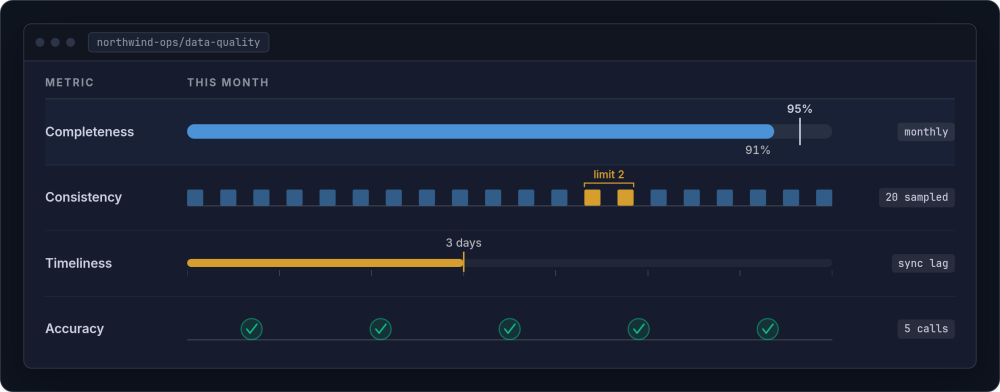
Track data quality to catch drift early. Four metrics matter most:
-
Completeness This tracks whether required fields are populated. Run a monthly count of records missing critical fields (email addresses, order values, project status). Set a target: 95% completeness for core fields within three months.
-
Consistency This checks whether the same records match across systems. Pick 20 random records each month and compare them between the master and each consumer system. If more than two records show discrepancies, the sync mechanism needs attention.
-
Timeliness This measures how stale the data has become. Check the "last updated" timestamp on records in consumer systems. If a customer changed their address in the CRM three days ago and the order system still shows the old one, the sync frequency is too low.
-
Accuracy This confirms that spot-checked records are correct. Call five customers per month and verify their details against the system. This catches errors that automated checks miss, such as a correct-format phone number that belongs to the wrong person.
Review these four dimensions monthly, even informally. A simple spreadsheet tracking each metric over time is enough. The trend matters more than any single measurement. Improving quality builds trust, and trust is what makes people stop maintaining shadow copies.
The DAMA Data Management Body of Knowledge provides a formal framework for data governance if you want to go deeper. Most growing businesses need only the core principles: clear ownership, regular quality checks, and someone accountable.
Common Obstacles to Data Consolidation
Every single source of truth initiative encounters resistance. Anticipating the objections helps you address them before they stall progress. But before you tackle objections, run an amnesty.
The Shadow Spreadsheet Amnesty
Before any consolidation work begins, invite the team to declare every piece of shadow IT they maintain alongside official systems: personal spreadsheets, local files, and workarounds. Frame it explicitly as discovery, not blame. The goal is to surface every shadow copy so you understand what the official systems are failing to provide.
Here is how to run an effective amnesty:
Announce it clearly
Send a brief message to the whole team explaining the exercise. Use language like: "We are mapping where all our data actually lives. If you maintain any personal spreadsheets, local files, saved email searches, or workarounds alongside the official systems, we want to know about them. No judgement. These files exist because our systems were missing something you needed, and we want to fix that." Set a deadline of one week.
Provide a simple submission form
Ask for four pieces of information per shadow file: what data it contains, why they created it (what gap it fills), how often they update it, and who else uses it. A shared spreadsheet or a simple online form works. Keep the barrier to submission low.
Categorise the results
Group the shadow files by the gap they fill. Common categories: "the official system does not capture this field," "the official system is too slow to update," "I need this data in a different format for my work," and "I do not trust the data in the official system." Each category points to a different fix.
Turn findings into requirements
Each shadow spreadsheet is a requirements document written by someone who gave up on the official system. Treat them accordingly. If six people maintain personal customer lists because the CRM lacks a "preferred contact method" field, adding that field is the fix. If the operations team exports order data to Excel every morning because the reporting view is too slow, the reporting view needs attention.
The amnesty only works if it is genuinely safe. If anyone is criticised for declaring a shadow spreadsheet, the next amnesty will surface nothing. Make it clear, publicly and repeatedly, that every shadow file discovered is a system improvement opportunity, not evidence of bad behaviour.
Common Objections and How to Address Them
Once the amnesty surfaces the shadow copies, the same handful of objections come up in almost every business. None of them are unreasonable. Each one points at a real failing in the official system, and each has a practical answer.
"My spreadsheet has information the system does not capture"
Resolution: The master system needs to accommodate that context. Add a notes field, a custom data section, or room for annotations. If people maintain shadow copies because the official system is missing something they need, the system needs to change, not the people.
"The official system is too hard to update"
Resolution: Invest in the user experience of data entry. If updating an address takes eight clicks, nobody will do it consistently. If it takes two clicks, they will. Every friction point in the master system is an invitation for someone to create a shadow copy. Low-friction interface design is not a luxury here; it is what makes the single source of truth stick.
The first two objections are about the system itself. The next two are about the data inside it. Both are valid, and both have practical answers.
"I do not trust the data in the system"
Resolution: Trust is earned, not declared. Pick one data set. Clean it thoroughly. Make it demonstrably accurate. When people see that customer records are reliably up to date, checked daily and visibly improving, they start trusting the system. Early wins build momentum.
"We have years of historical data to migrate"
Resolution: Separate current-state from historical. Get new data flowing correctly first. Clean historical data incrementally. You do not need perfect historical records on day one. According to Martin Fowler's data mesh principles, treating data as a product means focusing on current quality and usability.
What Changes When Your Data Lives in One Place
The immediate difference is time. Meetings that used to start with "let me pull the numbers" start with the numbers already available. Everyone is looking at the same system, the same dashboard, the same truth. The deeper change is confidence. When someone asks "how many active customers do we have?", the answer is the answer. Not "I think it is about X, let me check." A number. Trusted. Immediate. For customer data specifically, this is what the industry calls a single customer view: one complete, accurate record per customer, accessible to every team that needs it. A purpose-built dashboard over that single source is usually what makes the change visible day to day.
| Scenario | Before (scattered data) | After (single source of truth) |
|---|---|---|
| New hire onboarding | Weeks learning which spreadsheet has what, who to ask, where the "real" numbers live | One system to learn. Clear documentation. Productive in days, not weeks. |
| Customer enquiry | Check three systems, make two phone calls, still uncertain | Look in one place. Answer with confidence. Move on. |
| Monthly reporting | Two days pulling data from multiple sources, reconciling discrepancies | Reports generate from the source of truth. Review and send. (The first few months still need spot-checks while data quality beds in.) |
| Strategic decision | Delay while someone assembles data. Debate about which numbers are correct. | Data is available and trusted. Focus on the decision, not the data gathering. |
| Staff departure | Knowledge walks out the door. Critical spreadsheets lost or orphaned. | Systems persist. Knowledge is documented. Transition is managed. |
The compounding effect is what makes this worth the effort. Trusted data enables better decisions. Better decisions improve outcomes. Improved outcomes justify further investment in data quality. The cycle builds on itself. This is how you build the foundation for scaling without adding proportional complexity, and it is a prerequisite for genuine vertical integration across your operations.
Signs You Are Ready to Start
If you recognise several of these, the cost of inaction is already significant. Each one on its own looks like ordinary friction. Together they are the signature of scattered data.
-
Different people give different answers to the same factual question.
-
You spend meaningful time in "data reconciliation" meetings.
-
Reports take hours to assemble from multiple sources.
-
You have discovered errors caused by out-of-sync data.
-
New team members take weeks to learn "where things live".
-
Important information exists only in someone's email or personal files.
-
Someone's holiday or absence creates operational risk because only they know where things are.
One or two of these is normal friction in any growing business. If you are nodding at most of the list, you are paying a significant invisible tax every week.
Start With the Map
The data ownership map is the first step. Maybe you have worked through this guide and want a second pair of eyes on your map. Maybe you need help planning the integration work. Either way, our integration service is built for exactly this: connecting your systems so data flows reliably from masters to consumers.
Get in touch →