
When Custom Software is not the Answer
Custom software (or bespoke software, as it is more commonly called in the UK) is expensive, slow to deliver, and commits you to years of ongoing maintenance. For the right problem at the right time, that investment pays for itself many times over. For the wrong problem, it is one of the most expensive mistakes a growing business can make. Knowing when not to build custom software is as valuable as knowing when to commission it.
This page is a practical guide to recognising when building is the wrong call, what to do instead, and how to know when the conditions have changed enough to revisit the decision. It is written for business owners who are weighing up the investment and want to think it through clearly before committing.
Who this page is for: Business owners considering custom software who want an honest framework for the decision. Not every problem needs a custom build. Sometimes the better answer is a SaaS product, a process change, or simply waiting until the business is ready.
Warning Signs You Should Not Build Custom Software
Certain patterns reliably predict that a custom build will not deliver value. Some relate to timing, some to budget, some to the nature of the problem itself. If you recognise several of these in your own situation, that is useful information.
Those first two signs are about readiness. The next two are about money and whether the problem needs new code at all.
The last two signs are the ones people most often talk themselves out of: the work is already done by someone else.
None of these warning signs are permanent. They describe situations where the timing or the conditions are wrong, not where custom software is inherently a bad idea. The distinction matters.
The problem beneath the problem
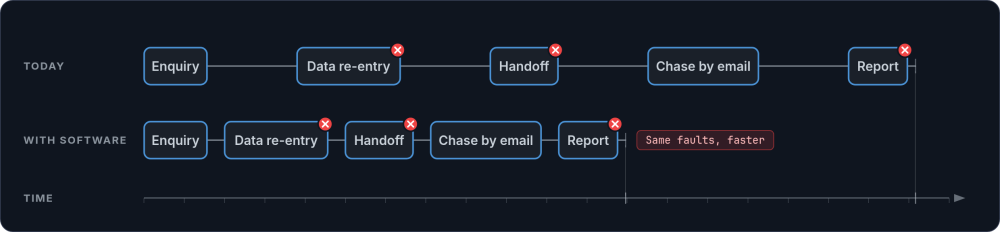
If you put software on top of a broken process, you get a faster broken process. The errors happen more quickly. The confusion becomes harder to unpick because now it is encoded in code rather than in habits.
| Signal | Technology problem | Organisational problem |
|---|---|---|
| Data lives in too many places | Tools do not connect, forcing manual re-entry | Nobody has decided which tool is the source of truth |
| Things fall through the cracks | No system tracks tasks or triggers reminders | Handoff responsibilities are unclear between team members |
| Reporting is painful | Data must be manually extracted and assembled | Nobody has agreed on what "good" looks like or which metrics matter |
| The owner cannot step away | Critical approvals and information are locked in manual channels | Decisions are centralised by habit, not by necessity |
If most of your problems sit in the right column, process mapping and some honest internal conversations will do more good than a custom build. Once the process is clear, the technology decision becomes straightforward.
What to Do Instead
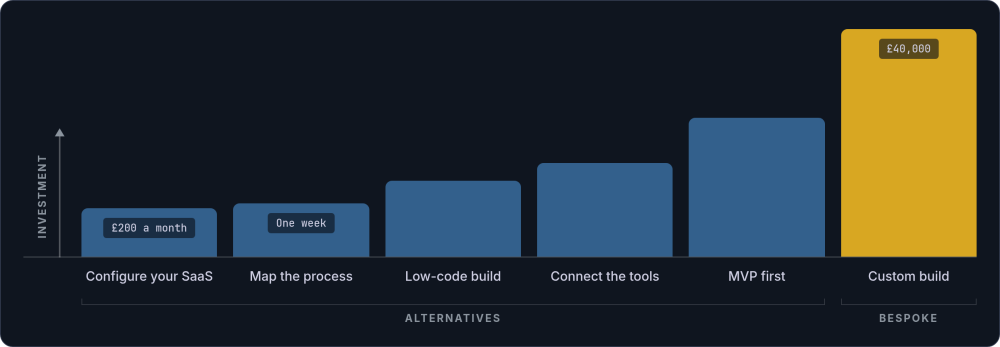
Deciding not to build does not mean doing nothing. There are usually better options for where the business is right now. Off-the-shelf software (pre-built products sold to many businesses, configured rather than coded from scratch) covers a surprisingly wide range of needs. Each of the following alternatives has a place, and none of them prevents you from commissioning bespoke software later when the conditions are right.
Use your existing SaaS properly
Most businesses use only a fraction of what their SaaS tools can do. Before concluding that your CRM or project management tool does not work, check whether you have actually configured it properly. Set up the automations, build the dashboards, connect the integrations. The answer might already be in the tool you are paying for.
Try low-code and no-code tools
Airtable, Retool, Make, Bubble, and Notion can handle many internal workflow needs at a fraction of the cost and timeline of custom development. They are not toys. Some businesses run significant operations on them. If your needs are primarily data capture, workflow automation, and basic reporting, start here. You can validate your requirements with these tools and move to custom development later if you outgrow them.
Invest in process improvement first
Map your workflows. Define who owns each step. Agree on naming conventions and data standards. This work costs a fraction of a custom build and often resolves the majority of day-to-day friction. It also produces the clear requirements specification you will need if you do build later. Process maturity is a precondition for successful custom software, not an afterthought.
Connect what you already have
Sometimes the problem is not the tools themselves but the gaps between them. Zapier, Make, or a small piece of custom integration code can connect your existing systems into something more coherent. An integration layer costs far less than replacing everything. Be aware of dependency, though: if your entire operation runs through a chain of third-party automations, you are building a different kind of fragility.
The common thread is proportionality. Match the size of the intervention to the size of the problem. A £40,000 custom build for a problem that a £200 per month SaaS subscription or a week of process mapping would solve is not a good use of money, however well the software is built.
Choosing the right SaaS by use case
The generic advice to "use SaaS" is not particularly helpful unless you know what to look for. Here is a more specific breakdown of where existing products handle things well, and what to prioritise when evaluating them.
| Use case | Strong SaaS options | What to look for |
|---|---|---|
| CRM and sales pipeline | HubSpot (free tier is generous), Pipedrive (simpler, sales-focused), Capsule (lightweight, UK-based) | Pipeline customisation, email integration, reporting on deal stages. Avoid tools that force you into their sales methodology if it does not match yours. |
| Project and task management | Monday.com (flexible, visual), Asana (strong for cross-team work), ClickUp (feature-dense, steep learning curve), Basecamp (opinionated, simple) | Match the tool to how your team thinks. If you need Gantt charts, Monday.com or Asana. If you want fewer features and less noise, Basecamp. Trial with your actual team, not just the person evaluating it. |
| Internal workflows and data capture | Airtable (spreadsheet that behaves like a database), Google Forms plus Sheets (free, simple), Jotform (form-heavy workflows) | Airtable suits teams that need relational data without a developer. It handles linked records, views, and basic automations well. Its limits show when you need complex permissions, heavy reporting, or more than 50,000 records per base. |
| Workflow automation | Make (powerful, visual builder), Zapier (simpler, wider integrations), n8n (self-hosted, technical) | Make offers better value and more complex logic than Zapier for most use cases. Zapier is easier to learn. If you have a developer on the team and want full control, n8n is worth considering. |
| Client portals and document sharing | Notion (flexible, client-facing workspaces), Google Workspace (shared drives, familiar), Clinked (purpose-built client portal) | If clients just need to view documents and leave comments, a shared Google Drive folder with clear naming conventions may be all you need. Custom client portals are one of the most over-built features in the industry. |
| Booking and scheduling | Calendly (simple, effective), Cal.com (open-source alternative), Acuity (part of Squarespace, good for service businesses) | Unless your booking logic involves complex resource allocation, conditional availability, or multi-party scheduling, off-the-shelf tools handle this well. Custom booking systems are expensive to build and maintain for marginal benefit. |
The point is not to endorse any particular product. Products change, pricing shifts, and what suits one business may not suit another. The point is that for each of these use cases, there are off-the-shelf products with years of development behind them, active support teams, and thousands of existing users. Those users surface the bugs you would otherwise discover the hard way.
Off-the-shelf software has real advantages: lower upfront cost, faster deployment, and vendor-managed updates and security. You also inherit a community of users who have already found and reported the problems you would otherwise hit yourself. It has real limitations too. You are constrained by the vendor's roadmap, per-seat pricing compounds as your team grows, and you may hit a ceiling where the product cannot bend to match your actual workflow. Build custom only when these options genuinely fall short for your specific needs.
Consider an MVP before a full build
If you are genuinely unsure whether custom software will solve the problem, there is a middle ground. A minimum viable product (MVP) lets you test the core idea with real users at a fraction of the full cost. Build the small set of functionality that addresses the biggest pain point. Use it for three months. If it proves its value, expand. If it does not, you have spent a modest amount learning something important rather than committing the full budget to discover the same thing too late.
The MVP approach works best when you can define one specific workflow or bottleneck to address. It works poorly when the scope is vague or the problem is not well understood, which brings us back to process maturity.
The Real Cost of Owning Custom Software
One of the most common mistakes in this decision is treating a custom build as a one-off cost. The development fee is the largest single payment, but it is not the total cost of ownership.
| Cost category | Typical range | What it covers |
|---|---|---|
| Initial build | £15,000 to £80,000+ | Discovery, design, development, testing, deployment |
| Annual maintenance | 10 to 20% of build cost per year | Security patches, framework updates, bug fixes, minor improvements |
| Hosting and infrastructure | £50 to £500+ per month | Servers, SSL certificates, backups, monitoring |
| Budget contingency | 15 to 25% of build cost | Scope changes, unforeseen complexity, integration difficulties |
A £40,000 bespoke software build, then, is realistically a £50,000 to £55,000 first-year commitment, followed by £6,000 to £10,000 per year in ongoing costs. That investment pays for itself when the software addresses a genuine, quantifiable problem. It does not pay for itself when the problem is vague, the processes are unstable, or a £50 per month SaaS subscription would do the job.
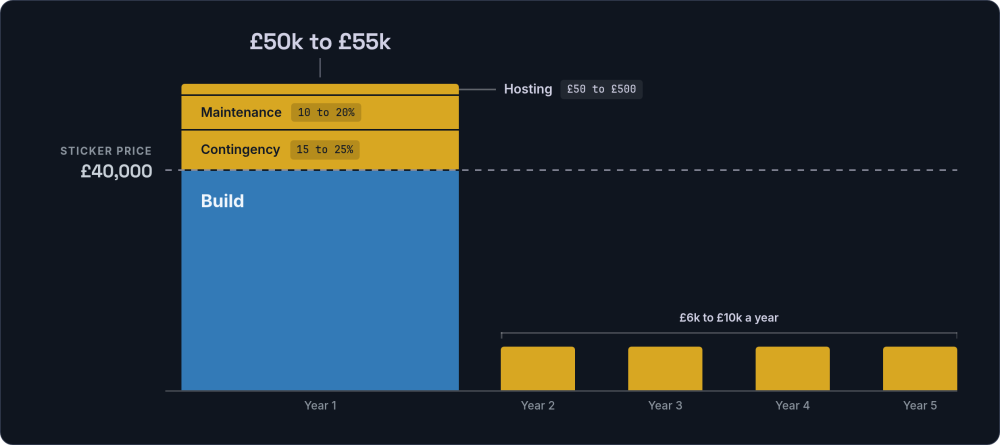
The maintenance commitment is not optional. Unpatched software becomes a security risk. Unsupported frameworks become harder and more expensive to update the longer you leave them. If you cannot commit to ongoing maintenance, you should not start the build.
The Traps That Lead to Bad Builds
Even when the conditions are broadly right for custom software, there are patterns of thinking that lead businesses into builds they later regret. Recognising them early saves significant money.
The sunk cost trap
"We have already spent £15,000 on this direction, so we need to keep going." No, you don't. The money already spent is gone regardless. The only question that matters is whether spending more will produce something worth having. If the answer is no, stopping is the right decision, even though it feels like admitting failure. It isn't failure. It is good judgement.
The "just one more feature" trap
The initial scope is sensible. Then someone suggests adding a client portal. Then automated reporting. Then a mobile app. Each addition seems small and reasonable on its own. Collectively, they double the budget and triple the timeline. This is scope creep disguised as reasonable requests, and it is the single most common reason projects exceed their budget. A proper discovery phase helps prevent this by forcing hard decisions about scope before the build begins.
The "our process is unique" trap
Every business thinks its processes are unique. Most are largely the same as their competitors. The genuinely distinctive parts are where custom software earns its place. The rest should use off-the-shelf tools. Overestimating your uniqueness leads to building what could be bought, which is expensive and slow. Before commissioning a custom build, write down the specific parts of your process that no existing product handles. If the list is short, you probably don't need custom software. If it is long and specific, you might.
The technology enthusiasm trap
Sometimes the push to build comes from someone in the team who is excited about technology rather than from a genuine business need. The brief sounds like "it would be cool if we had a system that..." rather than "we are losing money because..." Cool is not a business case. The pressure to build should come from a quantifiable problem, not from enthusiasm for the idea of having bespoke software.
The vendor pressure trap
Be cautious of any agency or consultancy that recommends building in every conversation. A company that profits from development has a structural incentive to recommend development. This is not necessarily dishonest. It is just how incentives work. The same dynamic exists in any profession where the adviser also sells the service: accountants recommending complex structures, architects recommending extensions, mechanics recommending repairs.
Protect yourself by separating the advice from the sale where possible. Get an independent assessment of whether you need custom software before engaging the company that would build it. Ask the consultancy what percentage of their discovery conversations end with a recommendation not to build. If the answer is close to zero, their discovery process may not be as impartial as it appears. A good consultancy will sometimes tell you not to build, because the alternative is building something that fails and damaging the relationship.
When to Revisit the Decision
The decision not to build is not permanent. Businesses change. Processes stabilise. Budgets grow. What was wrong last year might be exactly right this year.
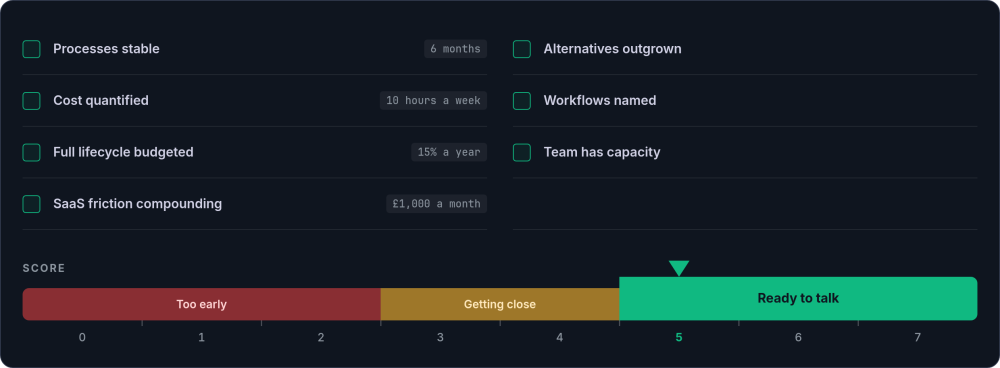
The following checklist works as a reusable decision framework. Come back to it every six to twelve months, or whenever your situation changes significantly. When the majority of these statements are true, the conditions for a successful custom build are likely in place.
-
Your processes have been stable for six months or more You can describe your core workflows clearly and specifically. The team agrees on how things should work. You could write a requirements document without needing to resolve internal disagreements about how the process should run, because those disagreements have already been settled through practice.
-
You can quantify the cost of the current setup Track the hours. If your team is spending more than 10 hours a week on manual workarounds across your tools, the cost of the current setup is becoming significant. Multiply those hours by average hourly cost, then add the cost of errors the manual processes cause. When the annual workaround cost approaches the cost of building, the maths starts to favour custom development.
-
You can budget for the full lifecycle Not just the build, but the ongoing maintenance, hosting, and support. As a rough test: can you commit to 15% of the build cost per year for at least three years after launch, plus a 20% contingency on the initial budget? If yes, the investment is sustainable. If that figure makes you uncomfortable, it is worth waiting until it does not.
-
SaaS friction is compounding Per-seat pricing is growing with your team. You are paying for multiple tools that do not talk to each other, and the gap between what you need and what they provide is widening. You may also feel the effects of vendor lock-in, where switching costs make it harder to leave each year. If you are spending more than £1,000 per month on SaaS that still requires heavy manual workarounds, the economics of custom development start to look different.
-
You have outgrown the alternatives The Airtable base that worked for a small team is buckling under complex relationships, layered automations, and views that take seconds to load. The Zapier automations are hitting limits. The low-code tool cannot handle the complexity your operations now require. This is a good problem to have, because it means you validated your needs before investing in a full build.
-
You can identify the specific workflows that need to be custom Not "we need a system," but "we need automated job allocation based on engineer certifications and geographic proximity" or "we need a quoting tool that pulls live supplier pricing and calculates margins." The more specific you can be about what no existing product handles, the stronger the case for building.
-
Your team is ready to engage with the build Custom software requires input from the people who will use it. If your team has the capacity to participate in discovery, review prototypes, and test iterations, the project has a much higher chance of delivering something that actually works. If the team is already stretched thin and cannot dedicate time to the process, even a well-built system will struggle to land properly.
A simple scoring method: Give yourself one point for each statement above that is clearly true. Five or more points suggests the conditions are right for a serious conversation about building. Three or four suggests you are getting close but may benefit from addressing the gaps first. Two or fewer suggests it is too early, and your money is better spent on process improvement or better use of existing tools.
When the score is high enough, the next step is a proper discovery phase. This is a structured process, typically two to four weeks, where you define the scope, validate the requirements, and get a realistic cost estimate before committing to a full build. If you want something you can click as well as read, the Build Roadmap produces a working prototype and a firm price in two weeks. The build vs buy framework provides a structured way to work through the decision itself.
Making the Decision Well
The fear of wasting a significant sum on something you cannot see or touch yet is real. So is the anxiety about being pushed into a project by someone who profits from building it. Both fears are reasonable, and both can be managed with the right preparation.
Custom software is a significant investment. For the right business at the right time, it pays for itself and keeps paying. For the wrong business at the wrong time, it is an expensive lesson. It is well documented across the industry that a significant proportion of software projects fail to deliver their intended value. Most of those failures trace back to the same causes: unclear requirements, unstable processes, and unrealistic budgets.
The difference is rarely about the software itself. It is about readiness. Three things predict success more reliably than anything else:
The third predictor is the one businesses most often skip, because it forces you to be honest about the problem rather than the wish.
Businesses that get these three things right tend to have successful projects. Businesses that skip them tend to have expensive regrets. If you are considering scaling your operations and wondering whether custom software is part of the answer, use the framework on this page to test your readiness before you engage any consultancy.
Want to talk through the decision?
If you have worked through this page and think the conditions might be right, a short conversation can help clarify the next step.
Get in touch →