
Tart Documentation
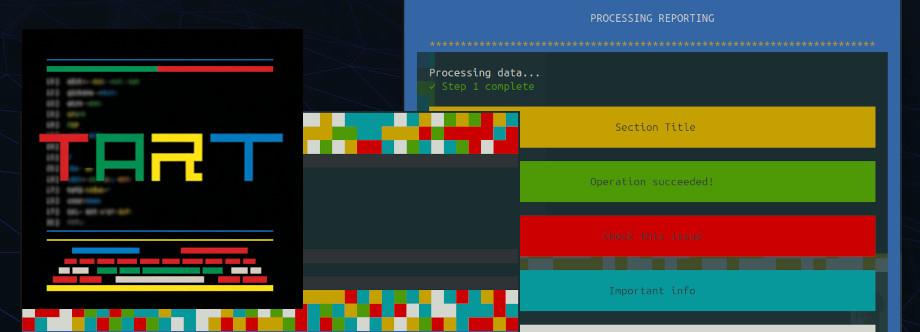
Beautiful terminal output for PHP. One line at a time.
TART (Terminal Art for Artisan) is a terminal UI toolkit that turns plain PHP console output into branded, styled, professional-looking interfaces. Extend a single base class and you get colourful logos, themed borders, progress bars, interactive menus, and rich formatting, all without pulling in a frontend framework or learning a new DSL. It works with Laravel Artisan and Symfony Console.
Quick Start
Install
composer require igclabs/tart
No migrations, no config files, no build step. Laravel auto-discovers the service provider.
Create your first styled command
php artisan make:command DeployStatus
Change the parent class to StyledCommand:
<?php

namespace App\Console\Commands;

use IGC\Tart\Laravel\StyledCommand;

class DeployStatus extends StyledCommand
{
    protected $signature = 'deploy:status';
    protected $description = 'Show deployment status';

    public function handle(): int
    {
        $this->header('Deployment Status');
        $this->good('All services running');
        $this->success('Last deploy: 3 minutes ago');
        $this->footer('Status', 'Checked at 14:32');

        return self::SUCCESS;
    }
}
Run it
php artisan deploy:status
You get a framed, colour-coded, branded terminal display. Every line sits inside a themed border (blue by default) with consistent padding and width.
Examples
Example 1: A database migration command with status output
You're building a command that runs migrations and reports what happened. You want the output to be scannable at a glance: green for success, red for failure, yellow for skipped.
Your command:
<?php

namespace App\Console\Commands;

use IGC\Tart\Laravel\StyledCommand;

class MigrateWithReport extends StyledCommand
{
    protected $signature = 'db:migrate-report';
    protected $description = 'Run migrations with a styled report';

    public function handle(): int
    {
        $this->header('Database Migrations');

        $migrations = [
            '2024_01_15_create_users_table' => 'success',
            '2024_02_03_create_posts_table' => 'success',
            '2024_02_10_add_avatar_to_users' => 'success',
            '2024_03_01_create_comments_table' => 'skipped',
            '2024_03_15_create_tags_table' => 'success',
        ];

        foreach ($migrations as $migration => $status) {
            $this->openLine($migration);

            if ($status === 'success') {
                $this->appendLine(' migrated', 'green');
            } elseif ($status === 'skipped') {
                $this->appendLine(' skipped', 'yellow');
            } else {
                $this->appendLine(' failed', 'red');
            }

            $this->closeLine();
        }

        $this->br();
        $this->success('4 migrations ran, 1 skipped');
        $this->footer('Migrations', 'Completed in 0.8s');

        return self::SUCCESS;
    }
}
The terminal output:
  ╔══════════════════════════════════════════════════════════════════════════╗
  ║  ★★★ DATABASE MIGRATIONS ★★★                                          ║
  ╚══════════════════════════════════════════════════════════════════════════╝
  ║  2024_01_15_create_users_table     migrated                            ║
  ║  2024_02_03_create_posts_table     migrated                            ║
  ║  2024_02_10_add_avatar_to_users    migrated                            ║
  ║  2024_03_01_create_comments_table  skipped                             ║
  ║  2024_03_15_create_tags_table      migrated                            ║
  ║                                                                        ║
  ║  ██████████████████ 4 migrations ran, 1 skipped ██████████████████████  ║
  ╚══════════════════════════════════════════════════════════════════════════╝
Each line is framed inside the theme border. The openLine / appendLine / closeLine pattern lets you build a single line progressively: label on the left, status on the right, coloured appropriately. No string concatenation.
Example 2: Branded logo with a deployment script
You want your deploy command to open with a big branded logo, run through a checklist, and close with a summary. You're using the fluent logo builder.
Your command:
<?php

namespace App\Console\Commands;

use IGC\Tart\Laravel\StyledCommand;
use IGC\Tart\Themes\Theme;

class DeployCommand extends StyledCommand
{
    protected $signature = 'app:deploy {environment=staging}';
    protected $description = 'Deploy the application';

    public function handle(): int
    {
        $env = $this->argument('environment');

        $this->logo()
            ->text(strtoupper("Deploy: {$env}"))
            ->banner()
            ->color('cyan')
            ->render();

        $steps = [
            'Pulling latest code'    => true,
            'Installing dependencies'=> true,
            'Running migrations'     => true,
            'Building assets'        => true,
            'Clearing cache'         => true,
            'Restarting workers'     => false,
        ];

        $this->title('Deployment Steps');

        foreach ($steps as $step => $passed) {
            $this->openLine($step);
            if ($passed) {
                $this->appendLine(' done', 'green');
            } else {
                $this->appendLine(' failed', 'red');
            }
            $this->closeLine();
        }

        $this->br();
        $this->warning('1 step failed: Restarting workers');
        $this->stat("Environment: {$env}");
        $this->footer('Deploy', 'Total time: 42s');

        return self::FAILURE;
    }
}
The logo() builder lets you chain ->text(), ->banner(), ->color(), and ->render() in a single expression. Three logo styles are available: standard (centred text with colourful decoration blocks), boxed (text inside a Unicode box), and banner (text between separator lines). You can also pass raw ASCII art with ->ascii().
Example 3: Interactive menus for a setup wizard
You're building a project scaffolding command. The user needs to pick a framework, select features, and confirm. TART provides menus, checkboxes, and radio selects, all keyboard-navigable.
Your command:
<?php

namespace App\Console\Commands;

use IGC\Tart\Laravel\StyledCommand;

class ProjectSetup extends StyledCommand
{
    protected $signature = 'project:setup';
    protected $description = 'Interactive project setup';

    public function handle(): int
    {
        $this->header('Project Setup');

        // Single-select menu (arrow keys + Enter)
        $framework = $this->menu('Choose a framework:', [
            'Laravel',
            'Symfony',
            'Slim',
        ]);

        $this->good("Selected: {$framework}");
        $this->br();

        // Multi-select checkboxes (Space to toggle, Enter to confirm)
        $features = $this->checkboxMenu('Select features to install:', [
            'Authentication',
            'API scaffolding',
            'Admin panel',
            'Queue workers',
            'WebSocket support',
        ]);

        $this->br();
        $this->title('Selected Features');
        $this->bulletList($features);

        $this->br();

        // Confirmation
        if ($this->confirm('Proceed with setup?', true)) {
            $this->progressBar(count($features), 'Installing', function ($bar) use ($features) {
                foreach ($features as $feature) {
                    usleep(500000);
                    $bar->advance();
                }
            });

            $this->br();
            $this->success('Project scaffolded successfully!');
        }

        $this->footer('Setup', 'Done');
        return self::SUCCESS;
    }
}
The menu() method returns the selected value. The checkboxMenu() returns an array of selected items. Both use raw terminal input: arrow keys to navigate, Space to toggle checkboxes, Enter to confirm. The cursor is hidden during selection and restored automatically.
Example 4: Tables and lists in a system health check
You're building a health check command that queries your services and displays the results in a table, with a task list showing what passed and what failed.
Your command:
<?php

namespace App\Console\Commands;

use IGC\Tart\Laravel\StyledCommand;

class HealthCheck extends StyledCommand
{
    protected $signature = 'system:health';
    protected $description = 'Check system health';

    public function handle(): int
    {
        $this->header('System Health Check');

        // Render a table with auto-calculated column widths
        $this->renderTable(
            ['Service', 'Status', 'Response Time'],
            [
                ['PostgreSQL',  'Connected',    '2ms'],
                ['Redis',       'Connected',    '1ms'],
                ['S3 Storage',  'Available',    '45ms'],
                ['Mail (SMTP)', 'Unavailable',  'timeout'],
                ['Elasticsearch','Connected',   '12ms'],
            ]
        );

        $this->br();

        // Task list with color-coded status indicators
        $this->taskList([
            '✓ Database connection',
            '✓ Cache store',
            '✓ File storage',
            '✗ Mail server',
            '~ DNS resolution (slow)',
        ]);

        $this->br();
        $this->warning('1 service unavailable: Mail (SMTP)');
        $this->footer('Health', 'Checked 5 services');

        return self::SUCCESS;
    }
}
renderTable() automatically calculates column widths from your data and draws Unicode box-drawing borders. Headers render in cyan. The taskList() method colour-codes each item by its prefix: checkmark items go green, cross items go red, tilde items go yellow. No manual colour assignments needed.
Example 5: Progress bar and spinner for a batch import
You're importing 500 products from a CSV. You want a progress bar for the known total, and a spinner for the indexing step where you don't know how long it will take.
Your command:
<?php

namespace App\Console\Commands;

use IGC\Tart\Laravel\StyledCommand;

class ImportProducts extends StyledCommand
{
    protected $signature = 'import:products {file}';
    protected $description = 'Import products from CSV';

    public function handle(): int
    {
        $file = $this->argument('file');
        $this->header('Product Import');
        $this->say("Reading {$file}...");
        $this->br();

        $total = 500;

        // Progress bar with callback
        $this->progressBar($total, 'Importing', function ($bar) use ($total) {
            for ($i = 0; $i < $total; $i++) {
                usleep(5000); // Simulate row processing
                $bar->advance();
            }
        });

        $this->br();
        $this->good("Imported {$total} products");
        $this->br();

        // Spinner for an unknown-duration task
        $this->spinner('Rebuilding search index', function () {
            usleep(2000000); // Simulate indexing
        });

        $this->br();
        $this->success('Import complete!');
        $this->stat("Processed {$total} rows from {$file}");
        $this->footer('Import', 'Finished in 8.3s');

        return self::SUCCESS;
    }
}
The progress bar renders as [Importing] [████████████████████████░░░░░░░░░░░░░░░░] 62% (310/500). It auto-calculates the filled/empty ratio. The spinner cycles through animation frames (⠋ ⠙ ⠹ ⠸ ⠼ ⠴ ⠦ ⠧ ⠇ ⠏) until the callback completes. Seven animation styles are available: dots, dots2, dots3, line, arrow, pulse, and bounce.
Example 6: Switching themes mid-command
You're building a report command that starts with the default blue theme, switches to green for the success section, and switches to red for the error section. Themes change the border color, text color, and highlight color globally.
Your command:
<?php

namespace App\Console\Commands;

use IGC\Tart\Laravel\StyledCommand;
use IGC\Tart\Themes\Theme;
use IGC\Tart\Themes\SuccessTheme;
use IGC\Tart\Themes\ErrorTheme;

class DailyReport extends StyledCommand
{
    protected $signature = 'report:daily';
    protected $description = 'Generate daily report';

    public function handle(): int
    {
        // Default blue theme
        $this->header('Daily Report');
        $this->say('Report for February 26, 2026');
        $this->br();

        // Switch to green for the wins
        $this->setTheme(new SuccessTheme());
        $this->title('Successes');
        $this->orderedList([
            'Revenue hit $42,300 (+12% over target)',
            'New signups: 184 users',
            'Zero downtime for 30 consecutive days',
        ]);

        $this->br();

        // Switch to red for the issues
        $this->setTheme(new ErrorTheme());
        $this->title('Issues');
        $this->orderedList([
            'Cart abandonment rate up 3%',
            'Email delivery delays on Sendgrid',
        ]);

        $this->br();

        // Custom theme via fluent builder
        $this->setTheme(
            Theme::make('magenta')
                ->withTextColor('white')
                ->withHighlightColor('cyan')
                ->withMaxWidth(80)
        );

        $this->title('Action Items');
        $this->bulletList([
            'Investigate Sendgrid throttling',
            'A/B test checkout flow',
            'Review signup funnel analytics',
        ]);

        $this->footer('Report', 'Generated at 09:00');
        return self::SUCCESS;
    }
}
Three built-in themes are included: DefaultTheme (blue), SuccessTheme (green), and ErrorTheme (red). The fluent Theme::make() builder lets you create custom themes on the fly: set the border colour, text colour, highlight colour, max width, and decoration palette. The entire frame and all output methods respect the active theme instantly.
Where Things Live
your-laravel-app/
├── config/
│   └── tart.php                ← Published config (theme, logo, auto-answer)
├── app/Console/Commands/
│   └── YourCommand.php         ← Extends IGC\Tart\Laravel\StyledCommand
└── vendor/igclabs/tart/
    ├── src/
    │   ├── Concerns/           ← Traits: HasBlocks, HasTables, HasSpinners, etc.
    │   ├── Support/            ← Helpers: LogoBuilder, Table, ProgressBar, etc.
    │   ├── Themes/             ← DefaultTheme, SuccessTheme, ErrorTheme
    │   ├── Contracts/          ← ThemeInterface, StyledCommandInterface
    │   ├── Laravel/            ← StyledCommand + ServiceProvider
    │   └── Symfony/            ← StyledCommand for Symfony Console
    └── config/
        └── tart.php            ← Default config
No database tables. No storage directories. No build artifacts. Just a Composer package and one optional config file.
CLI / API Reference
Output
# Regular white text
$this->say('Processing records...');

# Green text: positive feedback
$this->good('All tests passed');

# Red text: errors, auto-wrapped to fit line width
$this->bad('Connection refused: timeout after 30s');

# Yellow text: status updates, truncated to max width
$this->state('Waiting for queue worker...');

# Cyan text on blue background: informational callouts
$this->cool('Tip: use --verbose for detailed output');
Block Messages
# Large decorated header
$this->header('Deployment Report');

# Section title in highlight color
$this->title('Database Changes');

# Full-width colored blocks
$this->success('All migrations applied');
$this->notice('Cache will be cleared');
$this->warning('Disk usage above 80%');
$this->failure('Deploy aborted');
$this->stat('Processed 1,247 records in 3.2s');

# Footer with optional timing
$this->footer('Deploy', 'Total: 42s');
Layout
# Blank lines
$this->br();       # One blank line
$this->br(3);      # Three blank lines

# Horizontal rule (dashes across the frame)
$this->hr();
Line Building
# Build a single line progressively
$this->openLine('Migrating users');
$this->appendLine('...', 'yellow');
$this->appendLine(' 1,247 rows', 'cyan');
$this->appendLine(' done', 'green');
$this->closeLine();

# Fixed-width columns
$this->openLine('Orders');
$this->addColumn('$42,300', 12, 'green');
$this->addColumn('+12%', 8, 'cyan');
$this->closeLine();
Logos
# Fluent builder (recommended)
$this->logo()->text('MY APP')->render();
$this->logo()->text('MY APP')->boxed()->color('green')->render();
$this->logo()->text('MY APP')->banner()->color('cyan')->render();

# ASCII art logo
$this->logo()
    ->ascii($multiLineAsciiArt)
    ->colors(['cyan', 'blue', 'green'])
    ->width(50)
    ->withoutHeader()
    ->render();

# Traditional API
$this->displayTextLogo('MY APP', 'standard');
$this->displayTextLogo('MY APP', 'box', ['color' => 'green']);
$this->displayAsciiLogo($asciiArt);

# Built-in TART logo
$this->tartLogo();
Lists
# Bullet list
$this->bulletList(['First item', 'Second item', 'Third item']);

# Nested bullet list
$this->bulletList(['Deploy', ['Build assets', 'Run migrations'], 'Clear cache']);

# Ordered list
$this->orderedList(['Connect to server', 'Pull latest code', 'Restart services']);

# Task list (auto-colored by prefix)
$this->taskList([
    '✓ Database backup',     # Green
    '✓ File sync',           # Green
    '✗ Mail delivery',       # Red
    '~ DNS propagation',     # Yellow
]);
Tables
# Auto-width table with Unicode borders
$this->renderTable(
    ['Name', 'Role', 'Status'],
    [
        ['Alice Chen',   'Admin',     'Active'],
        ['Bob Kumar',    'Editor',    'Active'],
        ['Carol Santos', 'Viewer',    'Suspended'],
    ]
);
Progress Bars
# With callback (auto-start, auto-finish)
$this->progressBar(100, 'Processing', function ($bar) {
    for ($i = 0; $i < 100; $i++) {
        doWork();
        $bar->advance();
    }
});

# Manual control
$bar = $this->progressBar(500, 'Importing');
$bar->start();
foreach ($rows as $row) {
    importRow($row);
    $bar->advance();
}
$bar->finish();
Spinners
# With callback (auto-start, auto-stop)
$this->spinner('Rebuilding index', function () {
    rebuildSearchIndex();
});

# Manual control with custom style
$spinner = $this->spinner('Connecting');
$spinner->setStyle('line');  # dots, dots2, dots3, line, arrow, pulse, bounce
$spinner->start();
connectToServer();
$spinner->stop('Connected!');
Interactive Input
# Text prompt with default and validation
$name = $this->prompt('Project name', 'my-app', function ($value) {
    return strlen($value) >= 3;
});

# Password input (hidden characters)
$token = $this->password('API token');

# Single-select menu (arrow keys + Enter)
$choice = $this->menu('Pick a database:', ['PostgreSQL', 'MySQL', 'SQLite']);

# Multi-select checkboxes (Space to toggle, Enter to confirm)
$features = $this->checkboxMenu('Enable features:', [
    'Auth', 'API', 'Admin', 'Queues', 'WebSockets'
]);

# Radio select (Space or Enter to select)
$tier = $this->radioMenu('Pricing tier:', ['Free', 'Pro', 'Enterprise']);

# Select component (alternative to menu)
$env = $this->select('Environment:', ['local', 'staging', 'production'], 'staging');

# Multi-select component
$regions = $this->multiSelect('Deploy regions:', [
    'us-east-1', 'eu-west-1', 'ap-southeast-1'
], ['us-east-1'], minRequired: 1);
Themes
# Built-in themes
use IGC\Tart\Themes\DefaultTheme;   # Blue borders, white text, yellow highlight
use IGC\Tart\Themes\SuccessTheme;   # Green borders, white text, cyan highlight
use IGC\Tart\Themes\ErrorTheme;     # Red borders, white text, yellow highlight

# Set at runtime
$this->setTheme(new SuccessTheme());

# Fluent builder for custom themes
$this->setTheme(
    Theme::make('magenta')
        ->withTextColor('white')
        ->withHighlightColor('cyan')
        ->withMaxWidth(100)
        ->withColors(['magenta', 'cyan', 'white', 'yellow'])
);

# Available colors: black, red, green, yellow, blue, magenta, cyan, white
Configuration
Publish the config file:
php artisan vendor:publish --tag=tart-config
config/tart.php
<?php

use IGC\Tart\Themes\DefaultTheme;

return [
    // Auto-answer interactive prompts with their default value.
    // Turn on for CI pipelines, scheduled tasks, or cron jobs
    // so commands never block waiting for input.
    'auto_answer' => false,

    // Register the built-in demo commands (tart:demo, tart:demo-full, etc.).
    // Disable in production to keep your Artisan namespace clean.
    'register_demo_commands' => false,

    // Theme controls the visual frame around all output:
    // border color, text color, accent color, and content width.
    'theme' => [
        // Any class implementing IGC\Tart\Contracts\ThemeInterface.
        // Use the base Theme class to customize via the keys below,
        // or point to your own class for full control.
        'class' => DefaultTheme::class,

        // Primary border/background color. This is the colored stripe
        // on the left and right edges of every output line.
        'color' => 'blue',

        // Default foreground color for say() and general text.
        'text_color' => 'white',

        // Accent color used by title() blocks and emphasis.
        'highlight_color' => 'yellow',

        // Maximum character width of the content area (inside the border).
        // Lines are padded or truncated to this width.
        'max_line_width' => 72,

        // Palette used for decorative color blocks in logos and headers.
        'colors' => ['red', 'green', 'yellow', 'cyan', 'white'],
    ],

    // Logo decoration defaults, used by the logo builder and
    // displayTextLogo/displayAsciiLogo methods.
    'logo' => [
        // Colors for the decorative blocks above and below logos.
        'colors' => ['red', 'green', 'yellow', 'cyan', 'white'],

        // Text color for the logo content itself.
        'text_color' => 'white',

        // Number of colorful decoration lines above the logo.
        'header_lines' => 3,

        // Number of colorful decoration lines below the logo.
        'footer_lines' => 3,

        // Blank lines between decoration and logo content.
        'padding_top' => 1,
        'padding_bottom' => 1,

        // Number of colored blocks per decoration line.
        // Higher = denser color pattern.
        'blocks_per_line' => 40,
    ],
];
Configuration Recipes
Run commands non-interactively in CI
'auto_answer' => true,
Use a green theme globally
'theme' => [
    'class' => \IGC\Tart\Themes\SuccessTheme::class,
],
Widen the output for large terminals
'theme' => [
    'max_line_width' => 100,
],
Use a custom brand color
'theme' => [
    'color' => 'magenta',
    'highlight_color' => 'cyan',
    'colors' => ['magenta', 'cyan', 'white', 'yellow', 'green'],
],
Disable demo commands in production
'register_demo_commands' => false,
Minimal logo decoration
'logo' => [
    'header_lines' => 1,
    'footer_lines' => 1,
    'padding_top' => 0,
    'padding_bottom' => 0,
],
Extensibility
Custom Themes
Create a theme by implementing ThemeInterface:
<?php
// app/Console/Themes/BrandTheme.php

namespace App\Console\Themes;

use IGC\Tart\Contracts\ThemeInterface;

class BrandTheme implements ThemeInterface
{
    public function getColor(): string
    {
        return 'magenta';
    }

    public function getTextColor(): string
    {
        return 'white';
    }

    public function getHighlightColor(): string
    {
        return 'cyan';
    }

    public function getMaxLineWidth(): int
    {
        return 80;
    }

    public function getColors(): array
    {
        return ['magenta', 'cyan', 'white'];
    }
}
Register it globally in config/tart.php:
'theme' => [
    'class' => \App\Console\Themes\BrandTheme::class,
],
Or set it per-command:
public function handle(): int
{
    $this->setTheme(new BrandTheme());
    // All output now uses your brand theme
}
Trait-Based Composition
TART's features are delivered as independent traits. If you only need coloured output and tables, skip menus, spinners, and everything else:
<?php
// app/Console/Commands/LightCommand.php

namespace App\Console\Commands;

use IGC\Tart\Concerns\HasColoredOutput;
use IGC\Tart\Concerns\HasTables;
use IGC\Tart\Concerns\InteractsWithStyling;
use IGC\Tart\Concerns\ConfiguresFormatter;
use Illuminate\Console\Command;

abstract class LightCommand extends Command
{
    use HasColoredOutput;
    use HasTables;
    use InteractsWithStyling;
    use ConfiguresFormatter;

    public function __construct()
    {
        parent::__construct();
        $this->bootStyling();
    }
}
Using with Symfony Console (without Laravel)
<?php

namespace App\Command;

use IGC\Tart\Symfony\StyledCommand;
use Symfony\Component\Console\Input\InputInterface;
use Symfony\Component\Console\Output\OutputInterface;

class StatusCommand extends StyledCommand
{
    public function __construct()
    {
        parent::__construct('app:status', [
            'theme' => [
                'color' => 'green',
                'max_line_width' => 90,
            ],
            'auto_answer' => true,
        ]);
    }

    protected function execute(InputInterface $input, OutputInterface $output): int
    {
        $this->header('Application Status');
        $this->good('All systems operational');
        $this->footer('Status');

        return self::SUCCESS;
    }
}
Pass config as the second constructor argument. No service provider, no config file, no Laravel required.
Keyboard Shortcuts
These apply during interactive menus, selects, and multi-selects:
| Shortcut | Action |
|---|---|
Up Arrow |
Move selection up |
Down Arrow |
Move selection down |
Enter |
Confirm selection |
Space |
Toggle checkbox / select radio item |
Escape |
Confirm selection (same as Enter) |
What Gets Rendered
Every method in the API maps to a specific visual element. This table lists each rendered component and what it looks like in the terminal, so you can match the right call to the output you want.
| Element | Description |
|---|---|
| Frame border | Colored stripe on left and right edges of every line, using the theme's primary color |
| Content area | Padded text region, auto-sized to max_line_width characters |
| Header block | Uppercased text with star decoration, spanning the full frame width |
| Title block | Section heading with the theme's highlight color background |
| Success/Notice/Warning/Failure | Full-width blocks with green/cyan/red backgrounds respectively |
| Stat block | Blue foreground on black background, used for metrics and timings |
| Footer block | Closing block with optional timing stat |
| Bullet list | Items prefixed with -- markers, supporting nested arrays |
| Ordered list | Numbered items with automatic incrementing, supporting nesting |
| Task list | Color-coded by prefix: checkmarks green, crosses red, tildes yellow |
| Table | Unicode box-drawing borders, auto-calculated column widths, cyan headers |
| Progress bar | [label] [████████░░░░░░░░] 62% (310/500): filled and empty Unicode blocks |
| Spinner | Animated character cycling through frames until a task completes |
| Logo | Centered text or ASCII art with configurable color block decoration |
| Path highlight | File paths with directories in cyan, separators in yellow, filename in white |
How It Works Under the Hood
-
Boot: when your command is constructed,
bootStyling()loads the config, resolves the theme (fromconfig/tart.phpor constructor overrides), and sets theautoAnswerflag. -
Formatter setup: on
run(),configureOutputFormatter()registers custom Symfony OutputFormatter styles for each colour (red,green,yellow,blue,magenta,cyan,white) with black backgrounds. These styles power all<fg=X>and<bg=X>tags. -
Framed rendering: every visible line passes through
prepLine(), which wraps content in the frame structure:[coloured border] [padding] [content padded to max width] [padding] [coloured border]. This is why all TART output has consistent visual edges. -
Line building:
openLine()writes the left border and starting text.appendLine()writes coloured text inline.closeLine()pads remaining width and writes the right border. If you callbline()while a line is open, it auto-closes first. -
Interactive input: menus and selects save terminal state with
stty -g, switch to raw mode withstty -icanon -echo, hide the cursor, read keystrokes byte-by-byte, parse them throughKeyPress, re-render the selection in place using cursor movement escape codes, then restore everything in afinallyblock. Non-TTY environments get a graceful fallback to default values. -
Theme cascade: the active
ThemeInterfaceinstance provides colours to every rendering method.setTheme()swaps it at runtime. The fluentTheme::make()builder creates a new instance without defining a class. Config values are the defaults; runtime calls override them.
No database. No external services. No JavaScript. Just PHP, ANSI escape codes, and your terminal.
Frequently Asked Questions
Does TART need Laravel?
No. TART works with Symfony Console directly via IGC\Tart\Symfony\StyledCommand. Laravel integration is optional: the package only requires symfony/console.
Will it break my existing commands?
No. TART is opt-in. Only commands that extend StyledCommand get the styled output. Your existing Illuminate\Console\Command classes are unaffected.
Does it work in CI/CD pipelines?
Yes. Set auto_answer to true in your config (or pass it as a constructor override) and all interactive prompts return their default values without waiting for input. Non-TTY environments automatically skip interactive menus.
Can I use it with Laravel Zero or standalone PHP scripts?
Yes. Use the Symfony integration: extend IGC\Tart\Symfony\StyledCommand and pass config in the constructor. No service provider or config file needed.
How do I change the output width?
Set theme.max_line_width in config/tart.php or use the fluent builder: Theme::make('blue')->withMaxWidth(100). The default is 72 characters.
Can I use only some features without pulling in everything?
Yes. TART's features are individual traits (HasTables, HasSpinners, HasProgressBars, etc.). Create your own base command class and use only the traits you need.
Does the interactive menu work on Windows?
The menu uses stty for raw terminal input, which works on Unix-like systems. On Windows, password input falls back to fgetc() for character-by-character reading. Interactive menus are best supported on macOS, Linux, and WSL.
What PHP versions are supported?
PHP 8.2 and above. TART uses modern PHP features including named arguments, enums in match expressions, and typed properties.
Requirements
- PHP 8.2+
- Symfony Console 5.x, 6.x, or 7.x
- Laravel 9.x, 10.x, or 11.x (optional, for Laravel integration)
License
MIT License, IGC Enterprises Ltd
Built by IGC
TART came out of our own work: we write a lot of Laravel internal tools and deploy scripts, and we wanted console output that was actually readable at a glance. We build the same way for clients, from Laravel business applications to the background jobs that keep operations running. If you want to see how we approach custom software, the development section is a good place to start.
Need a CLI tool or Laravel app built properly?
We build custom software for businesses that have outgrown their tools. No obligation, just a conversation about what you are trying to do.
Start a conversation →